
 Audible warnings and indicators
Key In Ignition Warning Chime
Sounds when the key is left in the ignition in the off or accessory
position and the driver’s door is opened.
Keyless Warning Alert (If Equipped)
Sounds the horn tw ...
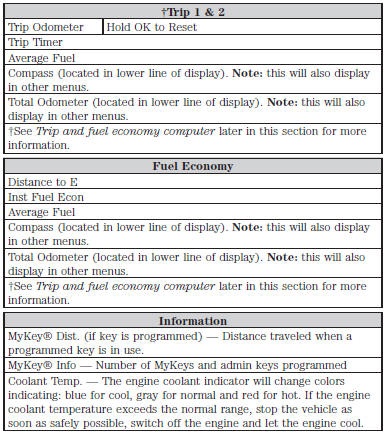
 Trip computer
Resetting the Trip Computer
Press and hold OK on the current screen to reset the respective trip,
distance, time and fuel information.
Odometer
Registers the total accumulated distance for the lif ...
Other materials:
General Procedures
Safety Belt Cleaning
WARNING:
Do not bleach or re-dye the safety belt webbing, as the webbing may weaken.
Failure to follow this instruction may increase the risk of serious personal
injury or death in a crash.Clean the safety belt webbing only with a
mild soap solution recommended f ...
Roadside Emergencies
Vehicles Sold in the United States: Getting Roadside Assistance
To fully assist you should you have a vehicle concern, Ford Motor
Company offers a complimentary Roadside Assistance program.
This program is separate from the New Vehicle Limited Warranty.
• 24 hours a day, seven days a week
...
Stability Control
PRINCIPLES OF OPERATION
WARNING: Vehicle modifications involving braking system,
aftermarket roof racks, suspension, steering system, tire
construction and wheel or tire size may change the handling
characteristics of your vehicle and may adversely affect the
performance of the AdvanceTrac® sy ...
