
WARNING:
Driving while distracted can result in loss of vehicle control, crash and injury. We strongly recommend that you use extreme caution when using any device that may take your focus off the road. Your primary responsibility is the safe operation of your vehicle. We recommend against the use of any hand-held device while driving and encourage the use of voice-operated systems when possible.
Make sure you are aware of all applicable local laws that may affect the use of electronic devices while driving.
The USB port is located in the center console. It allows you to plug in media playing devices, memory sticks and charge devices (if supported).
See the SYNC chapter for more information.
MEDIA HUB (IF EQUIPPED)
The media hub is located in the center console and has the following features:
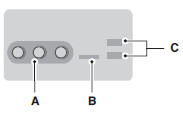
A. A/V inputs
B. SD card slot
C. USB ports
For more information, see the MyFord Touch chapter.
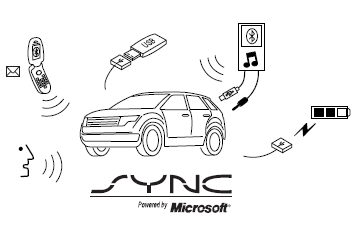
SYNC is an in-vehicle communications system that works with your Bluetooth-enabled cellular phone and portable media player. This allows you to: • Make and receive calls.
• Access and play music from your portable music player.
• Use 911 Assist, Vehicle Health Report and SYNC Services (Traffic, Directions & Information) (if equipped).
• Use applications, such as Pandora and Stitcher, via SYNC AppLink™ (if applicable).
• Access phonebook contacts and music via voice commands.
• Stream music from your connected phone.
• Text message.
• Use the advanced voice recognition system.
• USB device charging (if your device supports this).
 Auxiliary input jack
WARNING: Driving while distracted can result in loss of vehicle
control, crash and injury. We strongly recommend that you use
extreme caution when using any device that may take your focus off
the ...
 SYNC®
SYNC®
GENERAL INFORMATION
Make sure you review your device’s manual before using it with SYNC.
Support
The SYNC support team is available to help you with any questions you
cannot answer on your own.
...
Other materials:
Removal and Installation
Main Control Cover
Material
Removal
With the vehicle in NEUTRAL, position it on a hoist. Refer to Section
100-02.
Remove the ACL assembly. Refer to Section 303-12.
Drain the fluid.
Tighten to 12 Nm (106 lb-in).
NOTE: Note ...
Anti-Theft - Perimeter
DESCRIPTION AND OPERATION
Anti-Theft - Without Intelligent Access (IA)
Overview
The perimeter alarm system deters unauthorized entry to the vehicle by
sounding the horn and flashing all the turn signals and interior courtesy lamps
when an unauthorized entry occurs. The horn and lamps activate for ...
Tire care
Information About Uniform Tire Quality Grading
Tire Quality Grades apply to new
pneumatic passenger car tires. The Tire
Quality Grades can be found where
applicable on the tire sidewall between
tread shoulder and maximum section
width. For example:
• Treadwear 200 Traction AA Temperature ...
