
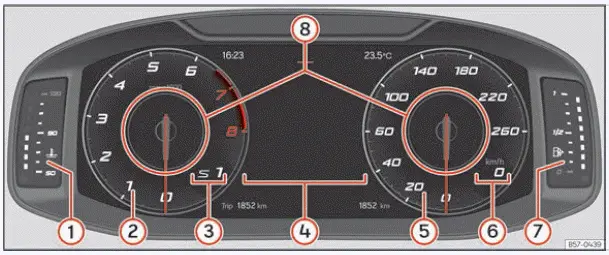
Fig. 2 SEAT Digital Cockpit on the instrument
panel (classic view).
- Engine coolant temperature display. Indicates the temperature of the engine coolant, allowing the driver to monitor the engine's thermal operating condition.
- Revolution counter. Displays the engine's rotational speed in revolutions per minute (rpm), helping the driver select an appropriate engine speed for the current driving conditions.
- Gear engaged or position of the selector lever. Identifies the selected gear or, on vehicles with an automatic transmission, the current selector lever position.
- Screen display. The central display area presents vehicle information, system messages and other indications according to the selected instrument cluster view.
- Speedometer. Shows the vehicle's current road speed through the speedometer display, allowing the driver to monitor speed while travelling.
- Digital speed display. Provides a numerical indication of the current vehicle speed for quick and precise reading.
- Fuel gauge. Indicates the approximate amount of fuel remaining in the tank and helps the driver determine when refuelling is necessary.
- Information Profile. A configurable display area that presents selected driving data, navigation information, multimedia details or other available vehicle information.
The SEAT Digital Cockpit is a fully digital instrument cluster featuring a high-resolution colour TFT display. In the Seat Ateca, it replaces conventional fixed instrument dials with an electronic display that can present driving information in several different layouts. The arrangement combines essential vehicle indications with configurable information areas, allowing the driver to choose how the available data is presented.
The system offers three principal display views, which can be selected using the
 button on the multifunction steering wheel. By choosing different information profiles, the driver can display content beyond the traditional circular speedometer and rev counter. Depending on the selected configuration, the instrument cluster can present navigation instructions, multimedia information, journey statistics and other vehicle data directly within the driver's field of view.
The three available views are:
- Classic – presents the main driving instruments in a traditional layout, with prominent circular speedometer and rev counter displays accompanied by additional vehicle information.
- Dynamic – provides an alternative arrangement of the digital instruments and information areas, allowing the driver to view the available driving data in a different presentation.
- Navigation – gives greater prominence to navigation-related information while retaining the essential driving indications required during a journey.
Each display view can provide information relating to audio playback, telephone functions, journey statistics, vehicle status, navigation and driver assistance systems. The content available depends on the Seat Ateca's equipment and the functions currently in use. Changing the view alters the presentation of the information without changing the underlying operation of the vehicle systems.
The information shown within the configurable Information Profiles can be personalised in every display view, as illustrated in Fig. 2, item 8. This allows the driver to select which supplementary details appear alongside the principal driving instruments.
Information profiles
To configure the information displayed in the SEAT Digital Cockpit, open the infotainment system menu  >
Selection
> Digital Cockpit. This menu provides the available options for selecting and arranging the information profiles shown in the instrument cluster. Choose the preferred configuration according to the information you want to monitor while driving.
Classic View
In Classic View, the speedometer and rev counter are displayed as full-length circular instruments, with their needles extending across the corresponding scales, as shown in Fig. 2. This presentation resembles a conventional instrument panel while retaining the flexibility of a digital display. Additional information can appear in the designated information areas without replacing the primary speed and engine revolution indications.
View 1, 2, 3 or AUTOMATIC
The View 1, View 2, View 3 and AUTOMATIC settings allow the driver to personalise the information presented in the SEAT Digital Cockpit. Two selected information items can be displayed simultaneously. The driver determines which items appear and their order by moving a finger vertically over the dials in the relevant configuration interface. This arrangement makes it possible to prioritise frequently used information while keeping the display organised and easy to read.
Depending on the vehicle version and installed equipment, selected views can be stored by leaving the configuration menu or by pressing and holding the View button. Once the preferred arrangement has been saved, the corresponding information profile can be used without having to repeat the entire selection process.
- Consumption. Displays a graphical representation of current fuel consumption together with a numerical indication of average consumption. This information allows the driver to compare immediate fuel use with the average recorded during the relevant journey or measurement period.
- Audio. Shows information about the audio source currently playing, allowing the driver to identify the active media content through the instrument cluster display.
- Altitude. Provides a digital indication of the vehicle's current altitude above sea level, where the corresponding information is available.
- Compass. Displays the compass direction digitally, providing an indication of the vehicle's orientation during travel.
- Destination arrival information. Presents navigation-related journey estimates, including the remaining travel time, distance to the selected destination and estimated time of arrival. These values relate to the active navigation route.
- Range. Shows the estimated remaining driving distance based on the available fuel and the vehicle's calculated range information.
- Travelling time. Displays the elapsed driving or journey time recorded by the corresponding trip information function.
- Route guidance. Presents guidance information associated with the active navigation route, helping the driver follow the planned journey.
- Journey. Provides a digital indication of the distance travelled, allowing the driver to monitor the distance covered during the relevant trip.
- Assist systems. Displays graphical information relating to the available driver assistance functions, providing a visual representation of the corresponding system indications.
- Road signs. Shows traffic signs detected by the vehicle's road sign recognition system, where this function is fitted and available.
- Navigation. Presents navigation instructions graphically using directional arrows, allowing the driver to follow route guidance directly from the instrument cluster.
The number of selectable Information Profiles, their contents and the available display combinations may vary according to the vehicle's equipment and software configuration. Consequently, some options described here may not be present in every Seat Ateca, and the information shown can differ between individual versions.
 Basic version digital instrument cluster
Fig. 1 Basic version digital instrument cluster: Main
view.
The upper section of the digital instrument cluster displays information such as the current time, selected driving profile, engine ...
 Rev counter. Fuel gauge
Rev counter
The rev counter, also known as the tachometer, indicates the number of revolutions completed by the engine each minute. The reading is expressed in revolutions per minute (rpm) and provide ...
Other materials:
Warranty
Warranty for fault-free operation
Authorised SEAT service centres help ensure that new vehicles are delivered in proper working condition and meet the manufacturer's quality requirements. The warranty covering your Seat Ateca is subject to the terms and conditions established at the time of purch ...
Removal and Installation
Main Control Cover
Material
Removal
With the vehicle in NEUTRAL, position it on a hoist. Refer to Section
100-02.
Remove the ACL assembly. Refer to Section 303-12.
Drain the fluid.
Tighten to 12 Nm (106 lb-in).
NOTE: Note ...
Anti-Theft - Passive Anti-Theft System (PATS), With Intelligent Access (IA)
DESCRIPTION AND OPERATION
Anti-Theft
Component Location
RFA Module
Backup Transceiver
TPM Module
Passive Start Antenna (3 required)
Overview
PATS deters the vehicle from theft by preventing the ignition from turning on
and the engine from starting unless a programmed IA&n ...
