
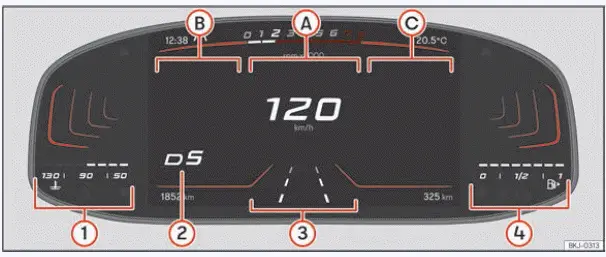
Fig. 1 Basic version digital instrument cluster: Main
view.
The upper section of the digital instrument cluster displays information such as the current time, selected driving profile, engine speed and outside temperature. The lower section provides additional driving information, including the vehicle's total distance travelled in kilometres or miles, the speed selected for the cruise control or Adaptive Cruise Control (ACC), and the estimated remaining driving range. The information presented depends on the active functions and the vehicle's equipment.
- Main display: The central display area presents the vehicle's current speed in digital form and can show recognised road signs. This arrangement allows the driver to check essential driving information without relying solely on conventional circular instruments.
- Secondary indications: This area provides driving statistics and journey-related information, including average speed, average fuel consumption, distance travelled and other available trip data. The displayed values help the driver monitor vehicle use and driving conditions.
- Secondary indications: This section can display information from the radio, media playback, telephone and navigation systems. Depending on the selected function and installed equipment, the driver can view relevant information without switching to the main infotainment screen.
- Engine coolant temperature indicator – displays information about the temperature of the engine coolant, allowing the driver to monitor the engine's operating condition.
- Gear engaged and gear or selector lever position recommendation – shows the currently selected gear or transmission position and, where applicable, a recommended gear selection.
- Selected driving assistant – identifies the driver assistance function currently selected or displayed in the instrument cluster.
- Fuel gauge – indicates the approximate quantity of fuel remaining in the tank, helping the driver determine when refuelling may be necessary.
The basic digital instrument cluster fitted to the Seat Ateca uses a high-resolution colour TFT display to present essential vehicle information. Unlike a conventional instrument panel with fixed analogue gauges, this digital arrangement can display different combinations of instruments, driving data and system information according to the selected view.
The content shown on the screen can be changed by selecting an alternative display layout, such as the rev counter view, or by modifying the information presented in the main and secondary display areas. This flexibility allows the driver to prioritise the information most relevant to the current journey, while retaining access to important vehicle status indications.
Instrument cluster operation
The basic digital instrument cluster is operated exclusively through the controls on the multifunction steering wheel. These buttons allow the driver to navigate between available views, select displayed information and confirm certain messages without using separate controls on the instrument panel. The exact functions assigned to the steering wheel buttons depend on the equipment installed in the vehicle.
While a priority 1 warning remains active, access to the instrument cluster menus is restricted. The warning takes precedence over other display functions because it indicates a condition that requires immediate attention. Normal menu navigation becomes available again when the relevant warning condition has been resolved.
Certain warning messages can be acknowledged and temporarily removed from the display by pressing the  button on the multifunction steering wheel. Acknowledging a message does not correct the underlying fault, and any necessary inspection or corrective action must still be carried out.
Instrument cluster views
To change between the available instrument cluster layouts, press the
 button on the multifunction steering wheel. Each press allows you to move through the supported display views, making it possible to choose the presentation that best suits your preferences.
The basic digital instrument cluster offers the following display configurations:
- Main: Displays the vehicle's speed as a prominent digital value, accompanied by secondary indications containing additional driving information. This view places the current speed at the centre of the display while keeping selected supplementary data visible.
- Speed: Presents the speedometer in a traditional circular instrument layout. Secondary information appears within the centre of the dial, combining a familiar speedometer presentation with the additional information available from the digital display.
- Rev counter: Shows engine speed using a conventional circular rev counter representation. The central area of the dial can display secondary information, allowing the driver to monitor engine revolutions alongside selected vehicle or journey data.
The quantity, arrangement and type of information available in each view depend on the Seat Ateca's equipment and the functions supported by its instrument cluster. Some indications may therefore be unavailable in certain vehicle versions, even though the corresponding display layout is present.
Note When the ignition is switched off, the instrument cluster may briefly display vehicle status information, including the distance travelled. This provides a final overview of selected journey or vehicle data before the display switches off.
Select secondary indications in the "Main" view
The secondary display areas identified as B and C can be configured independently, allowing different information to appear on the right and left sides of the main display. Individual indications can also be hidden when they are not required. To choose the information shown in either secondary area, use the multifunction steering wheel controls and follow the procedure below:
1. Press the  and
 buttons to select the secondary indication area you want to configure. Choose B for the right-hand display area or C for the left-hand display area.
2. Rotate the thumbwheel on the multifunction steering wheel to browse through the available secondary indications. Continue turning it until the information you want to display is highlighted. The available choices depend on the vehicle's equipment and the functions supported by the selected display area.
3. Press the
 button to confirm your selection. The chosen information will then be shown in the corresponding secondary display area, provided the function is available.
Selecting secondary indications in the "Speed" or "Rev counter" views
1. Use the thumbwheel on the multifunction steering wheel to move through the secondary indications available for the selected circular instrument view. Rotate the control until the desired information is highlighted in the centre of the speedometer or rev counter display.
2. Confirm the selected indication by pressing  . The instrument cluster will display the chosen information within the circular instrument layout, subject to the functions supported by the vehicle.
Note If warning messages concerning existing vehicle faults appear when the ignition is switched on, certain instrument cluster settings or information displays may be temporarily unavailable. Under these circumstances, it may not be possible to change the display configuration or access the information using the procedures described above. If the fault persists, have the vehicle inspected by a suitably qualified specialist workshop. SEAT recommends contacting an Official SEAT Service or an authorised SEAT dealership for diagnosis and any necessary repairs.
 Introduction
When the Seat Ateca is started with a severely discharged 12-volt battery or after the battery has been replaced, certain stored system settings may have changed or been erased. These can include the ...
 SEAT Digital Cockpit
Fig. 2 SEAT Digital Cockpit on the instrument
panel (classic view).
Engine coolant temperature display. Indicates the temperature of the engine coolant, allowing the driver to monitor the ...
Other materials:
General notes
Fig. 212 In the engine compartment: engine oil label
Fig. 213 In the engine compartment: area where the engine oil label is located
Information identifying the engine oil standard prescribed for the vehicle. This specification indicates the quality and performance requirements t ...
Noise, Vibration and Harshness (NVH) - Diagnosis and Testing
Special Tool(s)
Diagnostic Theory
The shortest route to an accurate diagnosis results from:
system knowledge, including comparison with a known good system.
system history, including repair history and usage patterns.
condition history, especially any relationship to repairs or sudden
change ...
Automatic high beam control
The system will automatically turn on your high beams if it is dark
enough and no other traffic is present. When it detects an approaching
vehicle’s headlights, a preceding vehicle’s tail lamps or street lighting, the
system will turn off the high beams (low beams remain on) before they
dist ...
