
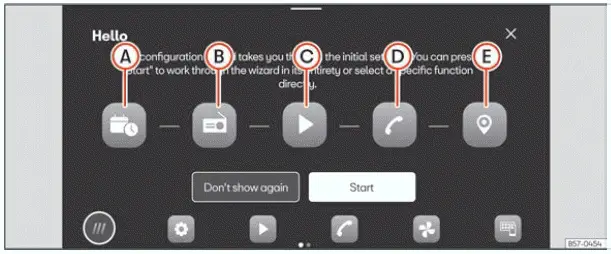
Fig. 11 Schematic representation: Initial
configuration wizard
The initial configuration wizard guides you through the basic setup of the Seat Ateca infotainment system when it is switched on for the first time. It brings together several important settings, allowing you to configure the system according to your preferences before using its main functions. The wizard provides direct access to settings such as the date and time, radio stations, mobile phone connection and frequently used navigation destinations.
Each time the infotainment system is switched on, the initial setup screen may appear again, as illustrated in Fig. 11. This happens if one or more configuration parameters remain incomplete, indicated by the symbol " ", or if the Don't show again button has not been selected. The wizard therefore remains available until the required settings have been completed or the driver chooses to stop displaying the initial configuration screen.
The configuration wizard includes the following function buttons, each providing access to a specific part of the infotainment setup:
- Press this button to configure the date and time displayed by the infotainment system. Check the current values and adjust them as necessary so that the vehicle's clock and calendar information are correct.
- Press this button to search for radio stations with the strongest reception at the vehicle's current location. The system scans for available stations and stores the stations offering the best reception in its memory, making them easier to access during subsequent use.
- Press this button to open the Online Media settings. This section provides access to the configuration options associated with the infotainment system's supported online media functions.
- Press this button to connect your mobile phone to the infotainment system. Follow the instructions displayed on the screen to establish the connection and make the supported telephone functions available through the vehicle's interface.
- Press this button to specify your home and work addresses for navigation purposes. You can select an address using the vehicle's current position or enter the required location manually. Once configured, these destinations can be accessed more conveniently when planning future journeys.
Don't show again Selecting this option prevents the initial configuration wizard from appearing automatically when the infotainment system is switched on. It does not prevent you from changing the system settings later. If you need to modify any of the initial configuration options, open the corresponding functions through the Settings menu.
Start Press this button to launch the Configuration Wizard and begin the guided setup process. The system will present the available configuration options so that you can review and adjust the settings required for your Seat Ateca.
End After completing one or more configuration steps, press this button in the wizard's main menu to finish the setup procedure. You can end the process without configuring every available option and return to the remaining settings later if necessary.
 Press this button to close the Configuration Wizard and return to the infotainment interface. Any settings already applied during the configuration process remain available according to the system's normal operation.
 Explanation of the function buttons
Fig. 10 Schematic representation: Overview of the
possible function buttons on the screen.
Top part of the screen
Current time. The upper area of the infotainment display shows the curr ...
 Assistance systems and vehicle settings
Fig. 12 Schematic representation: Assistance
systems and vehicle settings
Selecting Driver assistance from the infotainment system's main menu opens the section containing the available driv ...
Other materials:
Electrically unlocking trailer hook
Fig. 182 Right side of the luggage
compartment: button to unlock the tow hitch.
The Seat Ateca electrically operated tow hook is integrated into the rear bumper area when it is not in use. Unlike a detachable towing ball, this tow hook remains permanently connected to the towing mechanis ...
Changing a road wheel
WARNING: The use of tire sealants may damage your tire
pressure monitoring system and should not be used. However,
if you must use a sealant, have an authorized dealer install a new tire
pressure monitoring system sensor and valve stem.
WARNING: See Tire Pressure Monitoring System in this
chapt ...
Introduction
When towing a trailer with the Seat Ateca, always observe the regulations that apply in the country where you are driving. Legal requirements concerning trailer operation, towing equipment, permitted weights and the use of a towing bracket may vary between countries. Before setting off, make sure th ...
