
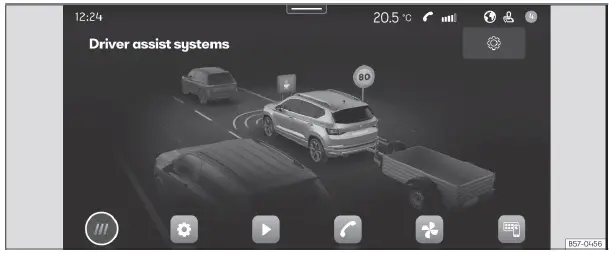
Fig. 12 Schematic representation: Assistance
systems and vehicle settings
Selecting  Driver assistance from the infotainment system's main menu opens the section containing the available driver assistance functions and related vehicle settings. This menu allows the driver to review the configuration of supported systems and, where permitted, activate, deactivate or adjust individual functions.
The number of assistance systems displayed and the settings available depend on the Seat Ateca model version, installed equipment and country-specific requirements. Consequently, some functions listed below may not be present in every vehicle, and certain settings may differ according to the vehicle's configuration.
- Automatic parking brake activation. Provides access to the available settings associated with automatic parking brake operation, where this function is supported by the vehicle.
- Park assist. Allows the driver to access the settings and functions associated with the parking assistance system, depending on the equipment installed.
- Trailer Assist. Provides access to the available trailer manoeuvring assistance functions on vehicles equipped with the corresponding system.
- Activate/deactivate ESC, stabilisation systems and brake assist. Allows the driver to adjust the available settings for the vehicle's electronic stability and braking assistance functions, subject to the operating restrictions of each system.
- Activate/deactivate the Start-Stop system. Provides the option to switch the automatic engine Start-Stop function on or off where this control is available.
- Adaptive cruise control (ACC). Provides access to the available settings for the adaptive cruise control system, which assists with maintaining the selected driving speed and following distance according to its operating conditions.
- Lane Assist (lane departure warning system). Allows the driver to access settings associated with the lane keeping assistance function, which helps identify unintended departures from a recognised traffic lane.
- Emergency brake assistance system (Front Assist). Provides access to the settings for the Front Assist function, which monitors relevant traffic situations and can provide warnings or braking assistance within its system limits.
- Fatigue detection. Allows the driver to review or adjust the available settings for the drowsiness monitoring function, which evaluates driving behaviour for indications of possible fatigue.
- Speed warning system. Provides access to settings associated with warnings when the vehicle exceeds a detected or configured speed threshold.
- Side assist. Allows the driver to access the available settings for the Side Assist function, which provides assistance when monitoring relevant traffic situations alongside the vehicle.
- Lights. Opens the available vehicle lighting settings, allowing supported lighting functions to be configured through the infotainment system.
Vehicle information
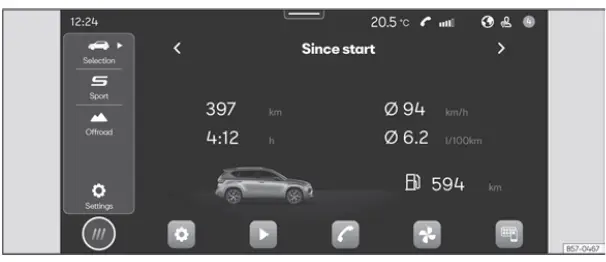
Fig. 13 Schematic representation: Vehicle
information and status
Pressing  Vehicle > Selection in the infotainment system's main menu opens the vehicle information section. This menu brings together information from several vehicle systems and provides access to the following submenus, depending on the installed equipment:
- Digital Cockpit: Displays the available configuration options for the digital instrument cluster. These settings allow the driver to select how supported information is presented in the Digital Cockpit, making it possible to adapt the instrument display to the desired information layout.
- Driving data: Provides an overview of the vehicle's recorded journey statistics, including average fuel consumption, average speed, distance travelled, journey duration and estimated remaining range. The information is organised into three separate memories: "Since start", "Long-term" and "Since refuelling". Each memory records driving information over a different period, allowing the driver to review individual journeys, longer-term statistics and data collected between refuelling stops.
The "From departure" and "Total calculation" memories can be reset through the infotainment system. To clear the corresponding recorded values, open Vehicle > Settings > Instrument cluster > Reset data and select the required reset function. Resetting a memory clears its stored journey statistics so that subsequent driving information can be recorded from a new starting point.
- Vehicle status: Displays notifications and information relating to the current condition of the Seat Ateca. This includes warnings about detected faults or operating incidents, information associated with storing tyre pressure reference values, and details concerning the next scheduled inspection service. The menu allows the driver to review relevant vehicle notifications and identify matters that may require attention or maintenance.
 Initial configuration wizard
Fig. 11 Schematic representation: Initial
configuration wizard
The initial configuration wizard guides you through the basic setup of the Seat Ateca infotainment system when it is switched on ...
 Safety
...
Other materials:
Transporting the vehicle
If you need to have your vehicle towed, contact a professional towing
service or, if you are a member of a roadside assistance program, your
roadside assistance service provider.
We recommend the use of a wheel lift and dollies or flatbed equipment
to tow your vehicle. Do not tow with a slin ...
Coolant temperature indicator.
Fig. 5 Basic digital instrument cluster: engine
coolant temperature indicator.
Fig. 6 SEAT Digital Cockpit digital instrument
cluster: engine coolant temperature indicator.
Cold zone. The engine has not yet reached its normal operating temperature. While the coolant temperature ...
Specifications, Description and Operation
SPECIFICATIONS
General Specifications
Torque Specifications
DESCRIPTION AND OPERATION
Charging System
Overview
The generator is driven by the accessory drive belt. When the engine is started,
the generator begins to generate AC voltage which is internally converted to DC
voltage. The DC vo ...
