
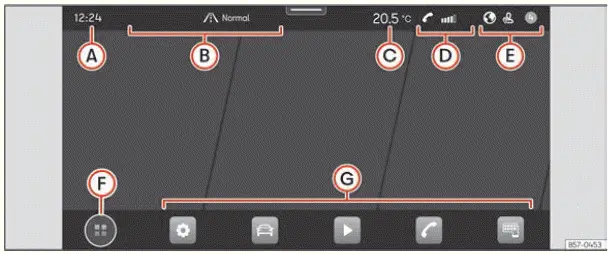
Fig. 10 Schematic representation: Overview of the
possible function buttons on the screen.
Top part of the screen
- Current time. The upper area of the infotainment display shows the current time, allowing the driver and passengers to check the vehicle's clock without opening a separate settings menu. The displayed value corresponds to the time configured in the vehicle system.
- Drive profile and navigation information.
If route guidance is active, this area displays navigation information including the remaining time and distance to the selected destination. These details provide an overview of the current journey without requiring the full navigation screen to be opened.
When no navigation route is active, the selected drive profile is shown instead. In vehicles where drive profile information is not available, the system displays the current address whenever route guidance is inactive. The information presented therefore changes according to the vehicle's equipment and whether a destination has been selected.
- Air conditioning information. In Seat Ateca vehicles equipped with a heated steering wheel or windscreen heating, the corresponding symbol appears in this area when the relevant heating function is activated. This provides a visible indication that the selected heating feature is operating.
If neither of these active heating functions is being indicated, the current outside temperature is displayed instead. The information shown depends on the equipment fitted to the vehicle and the functions currently in use.
- Telephone information. This section displays available information about a connected mobile device and its communication status. Depending on the device and connection, the information may include mobile network signal strength, the status of the Bluetooth connection, missed or unanswered calls, newly received messages and the mobile device's battery charge level. The exact indications depend on the functions supported by the connected telephone and the infotainment system.
- System customisation based on user and notifications. The infotainment system can associate certain personalised settings with individual user accounts through the personalisation function. Where this feature is available, supported preferences can be stored separately for different users. When another user account is selected, the system can automatically apply the settings saved for that account. This area also provides access to the corresponding user-related information and notifications supported by the system.
Bottom part of the screen
The following functions apply to the Connect System infotainment system. The lower section of the display provides controls for selecting the main menu layout and accessing frequently used functions. The arrangement can be customised within the limits supported by the system, allowing users to organise the available functions according to their preferences.
- Main menu display mode:
 : Selects the main menu layout containing six principal functions distributed across two screens, with three functions shown on each screen. The arrangement can be customised by the user by pressing the relevant function, allowing the positions of the main functions to be adapted to individual preferences.
 : Selects the tile-style main menu, which provides an overview of all functions available in the infotainment system. This display mode allows the user to browse the available features through a collection of function tiles rather than the six-function arrangement.
- Direct access to infotainment functions. The system can provide shortcuts to as many as ten functions, arranged in two groups of five. These shortcuts can be customised by the user, making it possible to keep frequently used functions readily accessible from the lower area of the screen. By pressing the relevant icon, the user can select or deselect the function to be included in the direct access arrangement. This allows the shortcut area to be adapted to the functions used most often without changing the underlying infotainment menu structure.
 Introduction
The Seat Ateca infotainment system combines a range of important vehicle functions within a central control interface. Depending on the equipment installed, it provides access to air conditioning cont ...
 Initial configuration wizard
Fig. 11 Schematic representation: Initial
configuration wizard
The initial configuration wizard guides you through the basic setup of the Seat Ateca infotainment system when it is switched on ...
Other materials:
Hydraulic Brake Actuation
SPECIFICATIONS
Material
Torque Specifications
DESCRIPTION AND OPERATION
Adjustable Pedals
Overview
The adjustable pedal feature uses an electrical motor to adjust the brake and
accelerator pedal positions forward and rearward to increase driver comfort. Two
adjustable pedal systems are available ...
Removal and Installation
Antenna - Satellite Radio
Removal and Installation
NOTE: This procedure applies to both the stand-alone satellite radio
antenna and the combination satellite radio/Global Positioning System (GPS)
antenna.
Lower the headliner. For additional information, refer to Section
501-05.
...
Driving on slopes
Hill Hold Control (HHC)
Hill Hold Control (HHC) helps the driver move off more easily when the Seat Ateca is stopped on an uphill gradient. The system activates when the vehicle comes to a standstill while travelling uphill or when driving in Offroad mode with the automatic transmission selector ...
