
SPECIFICATIONS
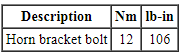
Torque Specifications
DESCRIPTION AND OPERATION
Horn
Component Location
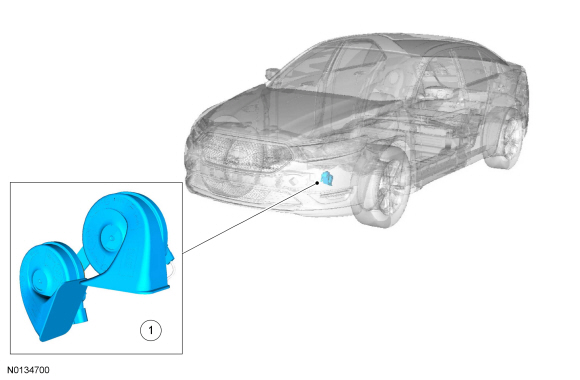

Overview
The horn emits an audible tone when the driver air bag module is pressed. The horn output is controlled by a relay, which is integral to the BCM.
System Operation
System Diagram
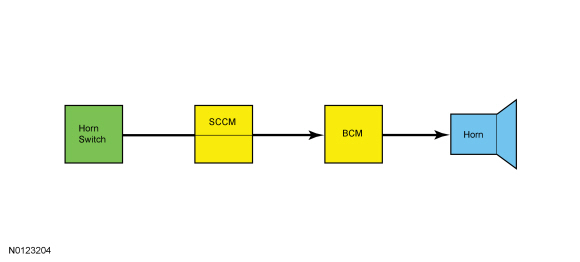
Horn Operation
The horn switch consists of 2 sets of contacts separated by springs. The lower set is connected to ground and the upper set is connected to the horn signal circuit.
When the driver air bag module is pressed, it pushes down on the upper set of contacts, collapsing the springs and allowing the contacts to touch. When the contacts touch, it completes the circuit and provides the ground signal which is routed through the clockspring, the SCCM and then to the horn relay, which is integral to the BCM.
The BCM supplies the control and switched (load) voltage to the horn relay. When energized, the horn relay provides voltage to the horn, enabling the horn to sound.
DIAGNOSIS AND TESTING
Horn
Symptom Chart
Diagnostics in this manual assume a certain skill level and knowledge of Ford-specific diagnostic practices. Refer to Diagnostic Methods in Section 100-00 for information about these practices.

Pinpoint Tests
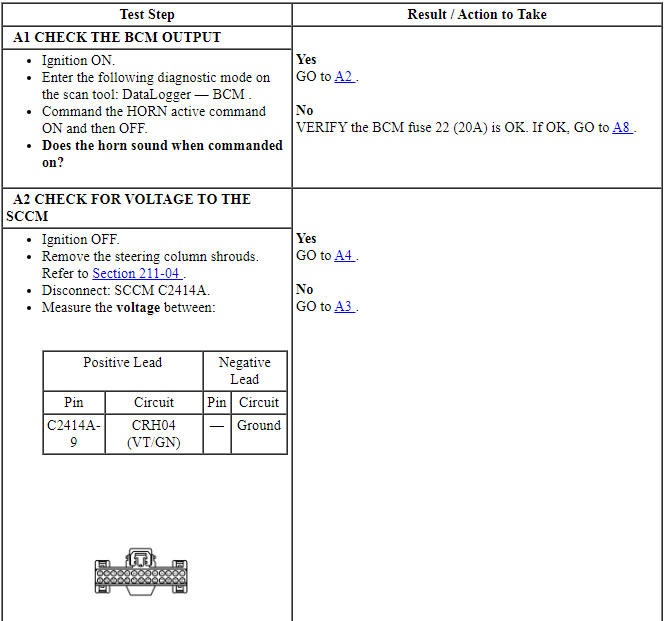
Pinpoint Test A: The Horn Is Inoperative
Diagnostic Overview
Diagnostics in this manual assume a certain skill level and knowledge of Ford-specific diagnostic practices. Refer to Diagnostic Methods in Section 100-00 for information about these practices.
Normal Operation and Fault Conditions
REFER to Horn.
-
Possible Sources
- Fuse
- Wiring, terminals or connectors
- Steering wheel harness
- Horn
- Clockspring
- Horn switch (part of the steering wheel)
- BCM
- SCCM
Visual Inspection and Diagnostic Pre-checks
Inspect the BCM fuse 22 (20A).
PINPOINT TEST A: THE HORN IS INOPERATIVE
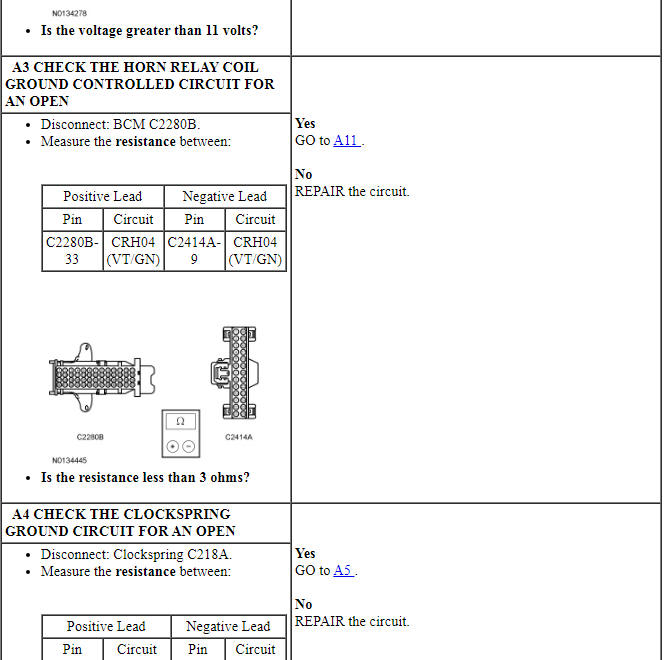
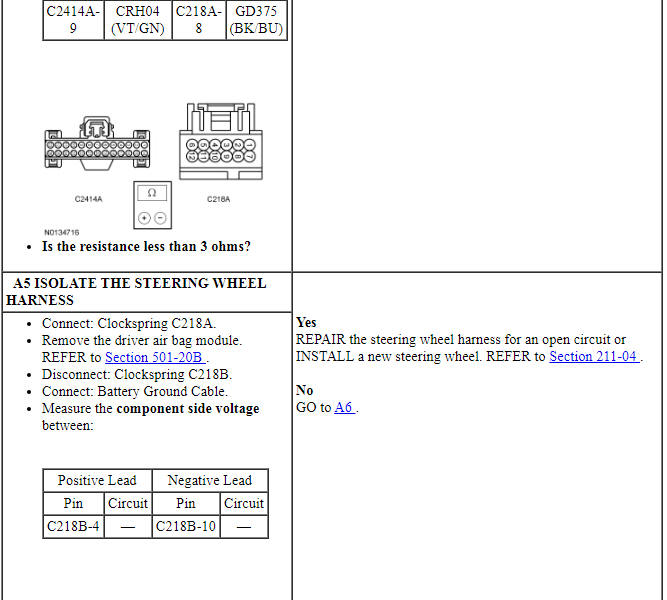
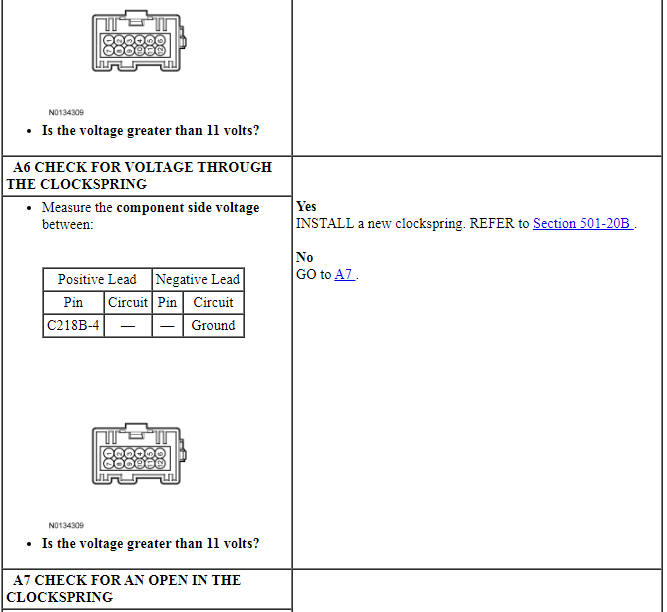
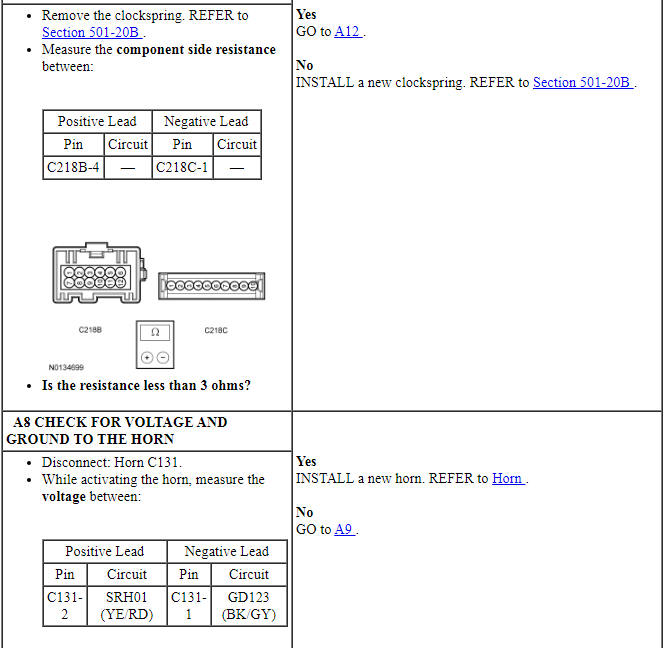
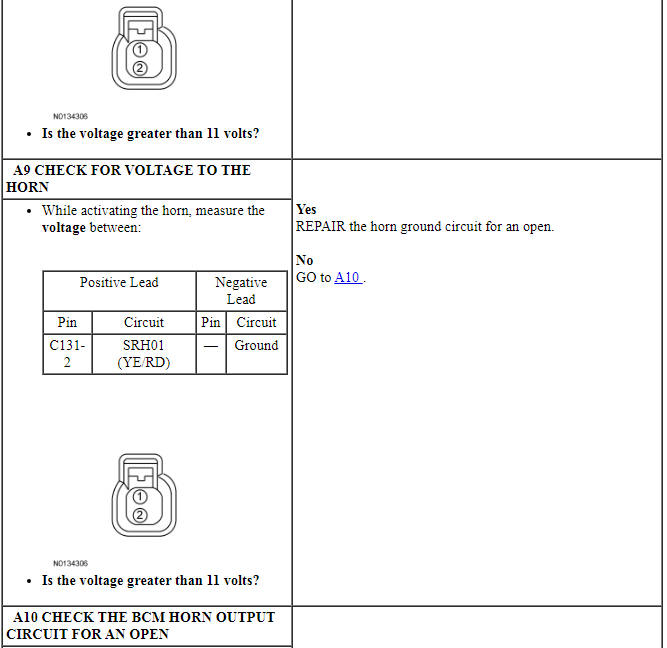
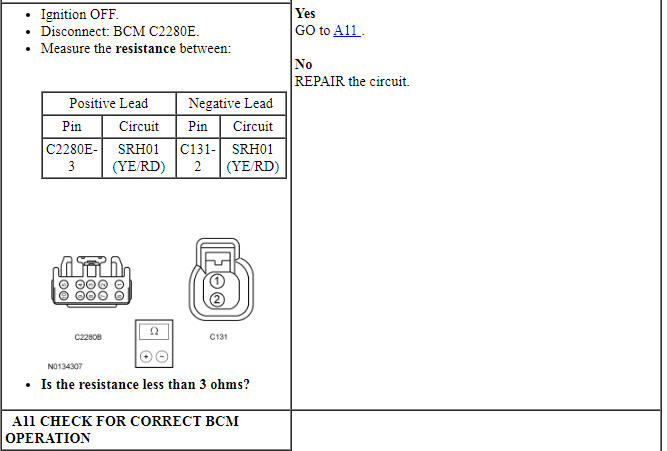
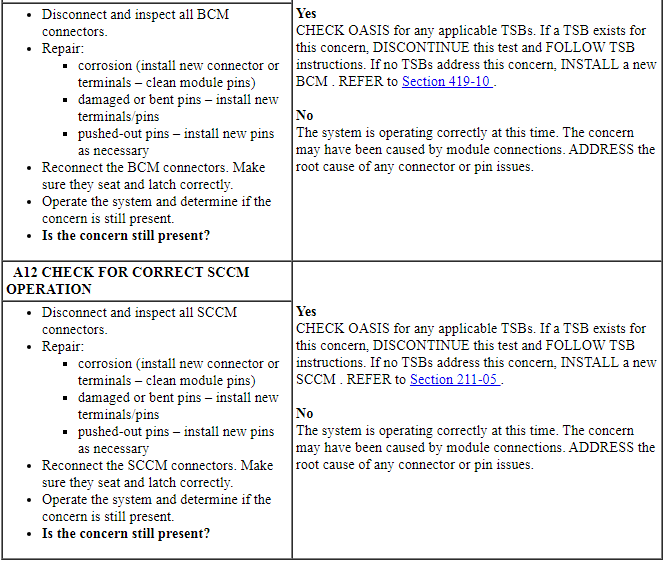
Pinpoint Test B: The Horn Is Always On
Diagnostic Overview
Diagnostics in this manual assume a certain skill level and knowledge of Ford-specific diagnostic practices. Refer to Diagnostic Methods in Section 100-00 for information about these practices.
Normal Operation and Fault Conditions
REFER to Horn.
-
Possible Sources
- Wiring, terminals or connectors
- Steering wheel harness
- Clockspring
- Horn switch (part of the steering wheel)
- BCM
- SCCM
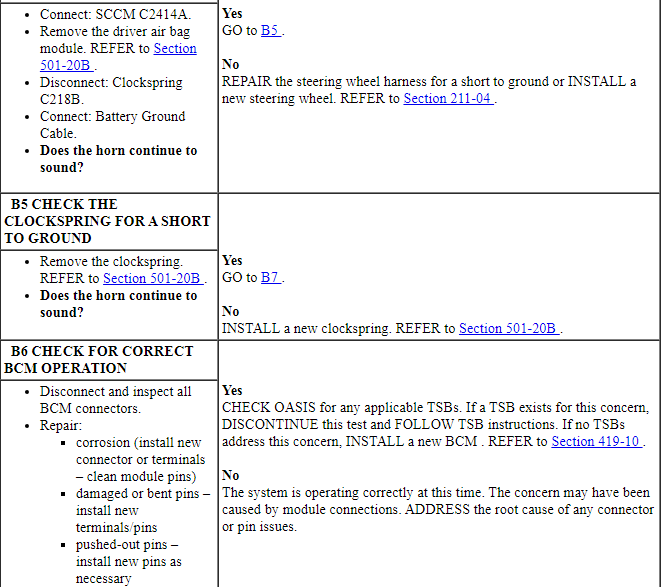
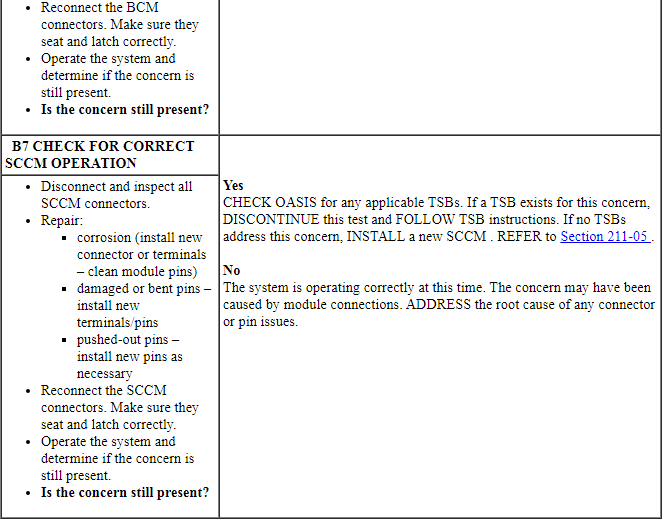
PINPOINT TEST B: THE HORN IS ALWAYS ON
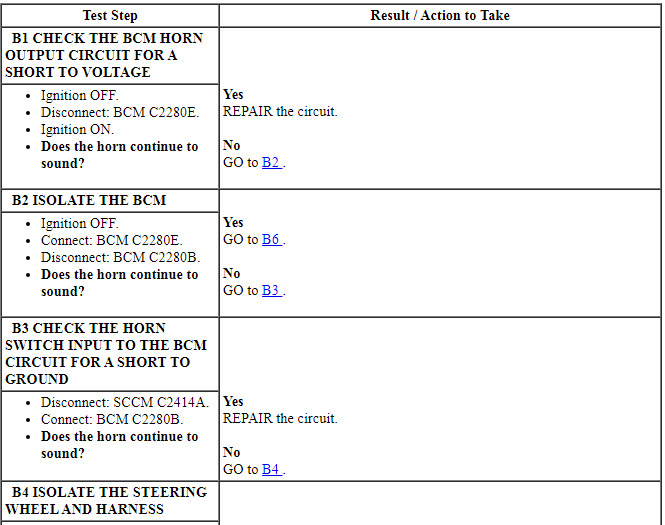
REMOVAL AND INSTALLATION
Horn
Removal and Installation
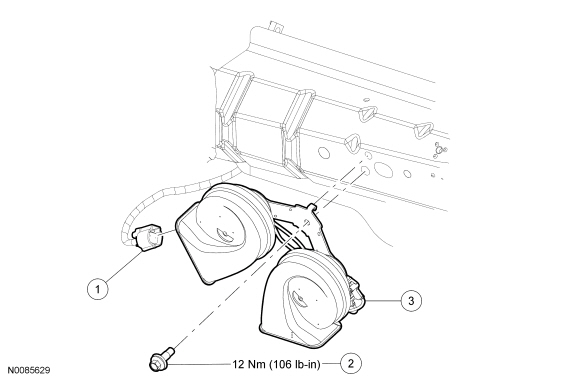
- With the vehicle in NEUTRAL, position it on a hoist. For additional information, refer to Section 100-02.
- NOTE: The horn and bracket are installed as an assembly.
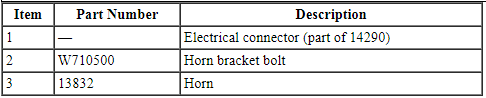
Remove the bolt and the horn.
- Disconnect the electrical connector.
- To install, tighten to 12 Nm (106 lb-in).
- To install, reverse the removal procedure.
 General Procedures, Removal and Installation
GENERAL PROCEDURES
Belt-Minder Deactivating/Activating
NOTE: If you are using MyKey, the Belt-Minder cannot be disabled. If
the Belt-Minder has been previously disabled, it is re-enabled during ...
 Parking Aid - Audible
SPECIFICATIONS
General Specifications
DESCRIPTION AND OPERATION
Parking Aid
Component Location
Parking aid speaker
PAM
Parking aid sensors
Overview
The parking aid system sounds a warning to al ...
Other materials:
Sunshade
The power rear sunshade covers the rear window of the vehicle.
The control is located in the center
console access bin.
Press the control to move the sunshade up or down.
Note: Do not try to manually move the sunshade.
The sunshade has a one-touch down feature. Press and release the
cont ...
Trip computer
Resetting the Trip Computer
Press and hold OK on the current screen to reset the respective trip,
distance, time and fuel information.
Odometer
Registers the total accumulated distance for the lifetime of the vehicle.
This value cannot be reset.
Trip Odometer
Registers the distance of indiv ...
MyFordâ„¢ system
WARNING: Driving while distracted can result in loss of vehicle
control, crash and injury. We strongly recommend that you use
extreme caution when using any device that may take your focus off
the road. Your primary responsibility is the safe operation of your
vehicle. We recommend against the ...
