
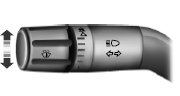
• Push down to activate the left turn signal.
• Push up to activate the right turn signal.
Note: Tap the lever up or down to make the direction indicators flash only three times to indicate a lane change.
 Automatic high beam control
The system will automatically turn on your high beams if it is dark
enough and no other traffic is present. When it detects an approaching
vehicle’s headlights, a preceding vehicle’s tail lamps ...
 Interior lamps
Front row map lamps
The map lamps are located on the
overhead console. Press the outer
edge of the clear lens to turn on the
lamps. The map lamps also light
when:
• any door is opened.
†...
Other materials:
Police Package Equipment
SPECIFICATIONS
Torque Specifications
DESCRIPTION AND OPERATION
Lighting, Siren and Speaker System
Spotlamps
Overview
The spotlamps provide an exterior illumination source that can be directed by an
interior control handle to illuminate the desired object.
System Operation
The LH and RH spotl ...
Safety belt-minder
This feature supplements the safety belt warning function by providing
additional reminders by intermittently sounding a chime and illuminating
the safety belt warning light when the driver’s or front passenger’s seat is
occupied and the safety belt is unbuckled.
The system uses informatio ...
General Procedures
Remote Keyless Entry (RKE) Transmitter Programming
NOTE: The Remote Keyless Entry (RKE) transmitter of the Integrated
Keyhead Transmitter (IKT) is programmed automatically during the Passive
Anti-Theft System (PATS) programming. For information on programming
the IKT keys, refer to ...
