
Front row map lamps
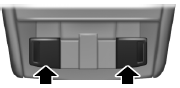
The map lamps are located on the overhead console. Press the outer edge of the clear lens to turn on the lamps. The map lamps also light when: • any door is opened.
• the instrument panel dimmer button is pressed until the courtesy lamp comes on.
• the remote entry controls are pressed and the ignition is off.
Rear dome/reading lamps
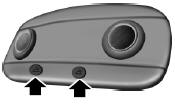
Your vehicle may have reading lamps within the rear dome lamp(s).
Press the switches on either side of the dome lamp to turn on the reading lamps. The direction of the reading lamps can be adjusted by pressing on the sides of the reading lamps.
The dome/reading lamps will light when: • any door is opened.
• the remote entry controls are pressed and the ignition is off.
 Direction indicators
• Push down to activate the left
turn signal.
• Push up to activate the right turn
signal.
Note: Tap the lever up or down to make the direction indicators flash
only three times to indica ...

Other materials:
Removal and Installation
Roof Opening Panel - Exploded View
NOTE: The roof opening panel motor must be initialized when repairs
are carried out on any part of the roof opening panel system, including:
whenever the roof opening panel motor has been removed from the roof opening
panel system, the roof opening panel gl ...
Sun visors
Slide-On-Rod
Rotate the visor toward the side
window and extend it rearward for
extra sunlight coverage.
Retract the visor before moving it
back toward the windshield and
storing it.
Illuminated Visor Vanity Mirror
Lift the cover to switch on the
lamp. ...
Head restraints
WARNING: To minimize the risk of neck injury in the event of a
crash, the driver and passenger occupants should not sit in or
operate the vehicle, until the head restraint is placed in its proper
position. The driver should never adjust the head restraint while the
vehicle is in motion.
WARNING ...
