
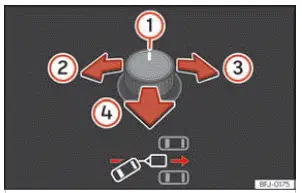
Fig. 149 Outside rearview mirror rotary
control: adjust the trailer angle.
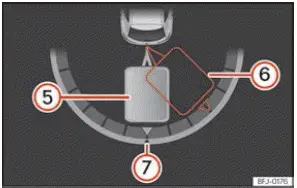
Fig. 150 Instrument cluster display: engage
reverse.
- Rotary exterior mirror controls. The rotary control normally used to adjust the exterior mirrors also serves as the directional input for Trailer Assist. When the assistance system is active, the driver uses this control to specify the desired direction of the trailer during reversing.
- Trailer orientation to the left. This indication represents a trailer direction towards the left. The driver can select or adjust this direction using the rotary control while observing the corresponding representation in the instrument cluster.
- Trailer orientation to the right. This indication represents a trailer direction towards the right. It helps the driver identify the selected direction and make the necessary corrections during the manoeuvre.
- Move the vehicle in the direction of the towing device. This control position allows the towing vehicle to follow the direction of the trailer, helping the driver adjust the movement of the complete vehicle-trailer combination.
- Actual trailer position. The instrument cluster shows the current orientation of the trailer relative to the Seat Ateca. This representation allows the driver to compare the trailer's actual position with the intended direction.
- Target trailer position. The target indication represents the trailer orientation selected by the driver using the rotary control. Trailer Assist uses this setting to guide the steering movements required during the reversing manoeuvre.
- Angle indicator zero position. The zero marking provides a reference for the trailer angle indicator. It helps the driver interpret the displayed trailer orientation and the direction selected through the rotary control.
Manoeuvre with the tow vehicle and trailer set
- Engage reverse gear while the Seat Ateca and the attached trailer are stationary. Before starting the manoeuvre, make sure that all Trailer Assist operating requirements are satisfied and that the intended reversing path is clear of obstacles, pedestrians and other vehicles.
- Press the Trailer Assist activation button to enable the manoeuvring function. The system prepares to provide steering assistance for the attached trailer, and the relevant operating information appears in the instrument cluster.
- Release the steering wheel so that Trailer Assist can perform the necessary steering movements. Keep your hands clear of the wheel while the system is operating, as it may rotate rapidly when adjusting the direction of the towing vehicle.
- Move the exterior mirror rotary control towards the desired trailer direction, as illustrated in Fig. 149. Adjust the control until the intended orientation is selected. The instrument cluster displays a graphical representation of the Seat Ateca and its trailer, as shown in Fig. 150, allowing the driver to compare the actual trailer position with the selected target position. Use this information to establish the intended reversing direction before moving.
- Begin reversing slowly by carefully operating the accelerator. Continuously observe the movement of the trailer, the towing vehicle and the surrounding area. Trailer Assist controls the steering, but the driver remains responsible for vehicle speed, gear selection and braking. Stop immediately if the trailer approaches an obstacle or its movement differs unexpectedly from the intended path.
- If the trailer does not follow the desired direction, correct the selected angle using the exterior mirror rotary control. Press the control towards the left to direct the vehicle-trailer combination towards the left, or towards the right to guide it towards the right. Pressing the control backwards instructs the towing vehicle to follow the trailer's direction. Make these adjustments gradually while monitoring the actual trailer position and the available clearance.
- Continue manoeuvring with the necessary backward and forward movements until the Seat Ateca and trailer reach the intended position. Use the displayed guidance to adjust the trailer's direction, but judge the available space by observing the actual surroundings. The driver must operate the transmission, accelerator and brakes throughout the procedure and remain prepared to interrupt the manoeuvre whenever necessary.
- The assisted manoeuvre is considered complete when the corresponding message appears in the instrument cluster. In some situations, an audible signal also confirms completion. Check the final position of both the towing vehicle and trailer before securing the combination or beginning another driving manoeuvre.
Automatic brake operation
Trailer Assist includes an automatic braking function that can support the driver in certain situations during an assisted reversing manoeuvre. The system may apply the vehicle's brakes when specific operating conditions occur, helping to bring the Seat Ateca to a stop if the manoeuvre cannot continue as intended. This intervention is a supplementary function and does not provide continuous automatic control of the vehicle's speed.
The driver remains responsible for braking at the appropriate time. Always control the vehicle's speed according to the available space, the movement of the trailer and the surrounding conditions. Do not wait for an automatic intervention when approaching an obstacle or whenever the manoeuvre becomes unsafe.
Automatic braking may be triggered and Trailer Assist may be deactivated in the following circumstances:
- The permitted speed is exceeded. If the Seat Ateca travels faster than the speed allowed for the assisted trailer manoeuvre, the system may intervene by applying the brakes and switching off the assistance function. Maintain a low, controlled speed throughout the procedure.
- The driver takes hold of the steering wheel. If the steering wheel is grasped while Trailer Assist is controlling the steering, the system automatically brakes the vehicle until it comes to a stop. This allows the assisted steering operation to be interrupted when the driver intervenes.
- The activation button is pressed or the driver's door is opened. Pressing the Trailer Assist button during an active manoeuvre, or opening the driver's door, may cause automatic braking and deactivation of the assistance function. The driver must then ensure that the vehicle remains safely stationary.
WARNING The steering wheel can rotate quickly and unexpectedly while Trailer Assist is carrying out steering corrections. Contact with the moving wheel may cause serious injuries, particularly if the driver attempts to restrain it or places their hands in its path.
- Do not hold or interfere with the steering wheel during an assisted manoeuvre unless the system specifically instructs you to take control. Allow Trailer Assist to complete the necessary steering movements while keeping your hands clear of the rotating wheel.
- If a dangerous situation develops, intervene immediately and take over steering control. The driver's responsibility to prevent a collision or other hazardous situation always takes priority over the operation of the assistance system.
WARNING Automatic braking must never encourage the driver to take risks or rely on the system to prevent a collision. Trailer Assist cannot replace attentive driving, careful observation or timely operation of the brakes. The driver is responsible for maintaining control of the Seat Ateca and its trailer throughout the manoeuvre.
- The trailer manoeuvring assistant operates within defined technical limits and cannot respond reliably to every possible situation.
Depending on the circumstances, automatic braking may be restricted or may not take place at all. The absence of a braking intervention does not mean that the vehicle-trailer combination can continue moving safely. Always assess the actual situation and apply the brakes whenever necessary.
- Remain ready to press the brake pedal yourself at any moment. Monitor the trailer's movement, nearby obstacles and the distance available for manoeuvring, and do not depend on Trailer Assist to stop the vehicle automatically.
- When the vehicle has been brought to a stop by automatic braking, the braking intervention ends after approximately 1.5 seconds. The driver must then apply the brake pedal to keep the Seat Ateca stationary. Failure to take over braking may allow the vehicle to move when the automatic intervention is released.
Note The exterior mirrors cannot be adjusted manually while Trailer Assist is active because the rotary mirror control is being used to specify the trailer's direction. However, the stored adjustment for the passenger-side exterior mirror can still be activated. Normal mirror adjustment becomes available again when the assistance function is no longer active.
Troubleshooting
Camera with no visibility, fault message, the system disconnects
- Inspect the camera lens and clean it if necessary. Remove dirt, snow, ice, detergent residue or other contamination that may obstruct the camera's view. Also remove any stickers or accessories covering the lens or interfering with its field of vision. Trailer Assist depends on a sufficiently clear camera image to operate correctly.
- Check the camera and the surrounding bodywork for visible damage. An impact during parking or manoeuvring may affect the camera housing, mounting position or viewing angle. Even if an image is still displayed, damage or misalignment can interfere with the assistance system's operation.
The system behaves differently than expected There can be several causes:
- Camera contamination. The camera may be dirty or partially obscured. In addition to mud, dust and snow, visibility can be reduced by detergent deposits, cleaning residues or coatings on the lens. These substances may distort the image or prevent the system from obtaining the view needed for trailer manoeuvring.
- Operating conditions not satisfied. Trailer Assist requires specific conditions relating to the towing vehicle, trailer and assistance system. If one or more requirements are not met, the function may be unavailable, deactivate unexpectedly or behave differently from the driver's expectations. Check that all specified operating conditions are satisfied before attempting another manoeuvre.
- Water on the camera lens. Rainwater, droplets or a film of water covering the camera can reduce visibility and distort the image. This may affect the system after driving in wet conditions or washing the Seat Ateca.
- Damage in the camera area. Damage to the vehicle near the camera, such as that caused by a parking collision, can change the camera's position or affect its operation. A camera that is no longer correctly aligned may provide an unsuitable image even if the lens itself is clean.
- Obstructed field of view. Accessories fitted to the vehicle, such as a rear-mounted bicycle carrier, may block part of the camera image. Any equipment positioned in front of the camera can prevent Trailer Assist from obtaining the visual information required for reliable operation.
- Changes to bodywork or vehicle components. Alterations to the paintwork around the camera, or structural modifications to components such as the front section of the vehicle or the running gear, may affect the conditions under which the system is designed to operate. Such changes should be considered when investigating unusual Trailer Assist behaviour.
Solution for all cases
- Temporarily switch off Trailer Assist if it displays a fault, disconnects unexpectedly or provides assistance that does not correspond to the intended manoeuvre. Do not continue relying on the system while its operation is uncertain. Bring the Seat Ateca and trailer to a safe stop before checking the possible cause.
- Examine the conditions described above to determine whether camera contamination, water, an obstruction, visible damage or an unmet operating requirement could explain the problem. Check the camera area and the vehicle-trailer combination before attempting to reactivate the function.
- Once the identified cause has been corrected, Trailer Assist may be switched on again. Confirm that the required operating conditions are satisfied and that the system provides the expected indications before resuming the manoeuvre. Continue to observe the actual movement of the trailer rather than relying exclusively on the instrument cluster display.
- If Trailer Assist continues to behave unpredictably, repeatedly displays fault messages or does not operate correctly after the obvious causes have been eliminated, have the system inspected by a qualified specialist workshop. A professional inspection can establish whether the camera, its alignment or another component requires attention before the assistance function is used again.
 Introduction
Trailer Assist is designed to help the driver reverse and manoeuvre the Seat Ateca while towing a compatible trailer. Reversing with a trailer requires coordinated steering movements because the trail ...
 Rear Cross Traffic Alert
How it works
Fig. 151 Park assist diagram: detected area
around the vehicle that is driving off.
Rear Cross Traffic Alert uses radar sensors installed in the rear bumper of the Seat A ...
Other materials:
Cruise Control - Non-Adaptive
DESCRIPTION AND OPERATION
Cruise Control
Overview
The cruise control system is controlled by the PCM. The cruise control mode
is selected from the steering wheel mounted switches (ON/OFF, SET, CNCL and RES)
which are integrated into the LH steering wheel switch. The cruise control
system maintain ...
Manually connecting and disconnecting
the Start-Stop system
Fig. 96 Centre console: Start-Stop system
button.
The Start-Stop system is designed to reduce fuel consumption and exhaust emissions by automatically switching off the engine when the vehicle stops under suitable conditions. However, there may be situations in which the driver prefers the ...
Preparing the vehicle for work in the
engine compartment
Before carrying out any inspection, maintenance or repair work in the engine compartment of the Seat Ateca, the vehicle must be prepared correctly. Follow the steps below in the specified order to prevent unexpected movement, accidental engine starting and other potentially dangerous situations. Do ...
