
The system will automatically turn on your high beams if it is dark enough and no other traffic is present. When it detects an approaching vehicle’s headlights, a preceding vehicle’s tail lamps or street lighting, the system will turn off the high beams (low beams remain on) before they distract other drivers.
Note: If it appears that automatic control of the high beams is not functioning properly, check the windshield in front of the camera for blockage. A clear view of the road is required for proper system operation. Any windshield damage in the area of the camera field-of-view should be repaired.
Note: If a blockage is detected (e.g. bird dropping, bug splatter, snow, or ice) and no changes are observed, the system will go into low beam mode until the blockage is cleared. A message may also appear in the instrument cluster display noting the front camera is blocked.
Note: Typical road dust, dirt and water spots will not affect the automatic high beam system’s performance. However, in cold or inclement weather conditions, the automatic high beam system’s availability may be decreased. If the driver wants to change the beam state independently of the system, the driver may turn the high beams on or off using the multifunction switch stalk. Automatic control will resume when conditions are correct.
Note: Modification of the vehicle ride height (e.g. using much larger tires) may degrade feature performance.
A camera sensor is centrally mounted behind the windshield of the vehicle, and monitors the conditions to decide when to switch the high beams off and on.
Once the system is active the high beams will switch on if: • The ambient light level is low enough that high beams are needed.
• There is no traffic in front of the vehicle.
• Vehicle speed is greater than 25 mph (40 km/h).
• Severe weather is not detected.
The high beams will switch off if: • An approaching vehicle’s headlights or a preceding vehicle’s tail lamps are detected.
• The vehicle speed falls below 19 mph (30 km/h).
• The ambient light level is high enough that high beams are not needed.
• Severe rain, snow or fog is detected.
• The camera is blocked.
Activating the system
Switch the system on within the information display. See Information displays.
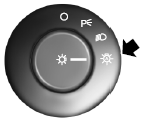
Turn the lighting control to the autolamps position.
Manually overriding the system
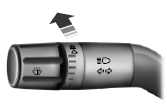
When the automatic control has activated high beams, pushing or pulling the stalk will provide a temporary override to low beam.
To permanently deactivate the system use the information display menu or turn the lighting control switch from autolamps to headlamps.
 Daytime running lamps
WARNING: Always remember to turn on your headlamps at
dusk or during inclement weather. The Daytime Running Lamp
(DRL) system does not activate the tail lamps and generally may not
provide adequate ...
 Direction indicators
• Push down to activate the left
turn signal.
• Push up to activate the right turn
signal.
Note: Tap the lever up or down to make the direction indicators flash
only three times to indica ...
Other materials:
Police Package Equipment
SPECIFICATIONS
Torque Specifications
DESCRIPTION AND OPERATION
Lighting, Siren and Speaker System
Spotlamps
Overview
The spotlamps provide an exterior illumination source that can be directed by an
interior control handle to illuminate the desired object.
System Operation
The LH and RH spotl ...
General Procedures
Headlamp Adjustment
Special Tool(s)
Headlamp Adjustment Screw Location
Headlamp Aiming
The headlamp aiming procedure depends on what type of beam pattern the
headlamp is equipped with. Vehicles may come equipped with visually
optically aligned left (VOL) or visually optically aligned right ( ...
Specifications, Description and Operation
SPECIFICATIONS
Torque Specifications
DESCRIPTION AND OPERATION
Headlamps
Overview
The headlamp system consists of:
Headlamp assemblies
Ballasts ( HID only)
Headlamp switch
Multifunction switch
BCM
SCCM
The headlamp system is a dual-beam pattern system. It consists of a single
rep ...
