
SPECIFICATIONS
Torque Specifications

DESCRIPTION AND OPERATION
Acceleration Control
The acceleration controls consist of the accelerator pedal and sensor assembly.
The engine management system electronically operates the throttle of the engine in response to throttle pedal movements initiated by the driver. In the event of a system failure, the engine management system provides a "limp home" mode which allows the car to be driven with limited performance.
DIAGNOSIS AND TESTING
Acceleration Control
Refer to the Powertrain Control/Emissions Diagnosis (PC/ED) manual.
REMOVAL AND INSTALLATION
Accelerator Pedal
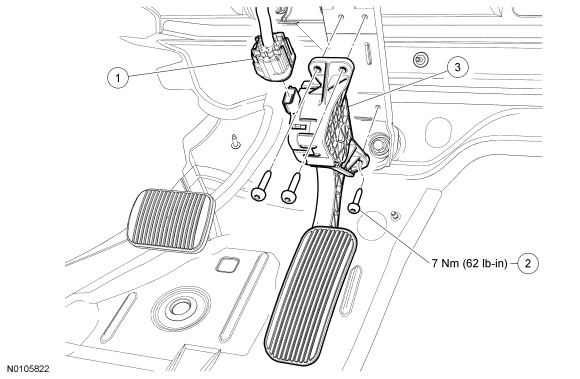
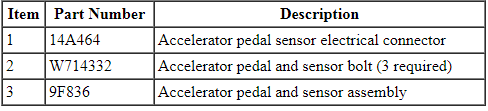
Removal and Installation
- Disconnect the accelerator pedal sensor electrical connector.
- Remove the 3 accelerator pedal and sensor bolts.
- To install, tighten to 7 Nm (62 lb-in).
- Remove the accelerator pedal and sensor assembly.
- To install, reverse the removal procedure.
 Fuel Tank and Lines
SPECIFICATIONS
General Specifications
Torque Specifications
DESCRIPTION AND OPERATION
Fuel Tank and Lines
2.0L Gasoline Turbocharged Direct Injection (GTDI)
Fuel Tank and Lines
The fuel tank and l ...
 Electrical
...
Other materials:
Brakes
GENERAL INFORMATION
Note: Occasional brake noise is normal. If a metal-to-metal, continuous
grinding or continuous squeal sound is present, the brake linings may be
worn out. Have them inspected by an authorized dealer. If your vehicle
has continuous vibration or shudder in the steering wheel wh ...
Climate features
Press the lower right corner on the touchscreen to access your climate
control features. Depending on your vehicle line and option package,
your climate screen may look different from the screen shown here.
A. Power: Touch to switch the system off and on. Outside air cannot
enter your vehicle ...
Sync applications and services (if equipped)
Note: In order for the following features to work, your cellular phone
must be compatible with SYNC. To check your phone’s compatibility, visit
www.SYNCMyRide.com, www.SYNCMyRide.ca or www.syncmaroute.ca.
• SYNC Services (if equipped, United States only): Provides access to
traffic, direct ...
