
USB connection
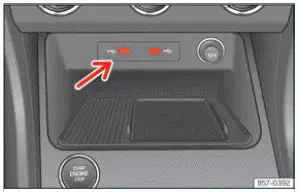
Fig. 158 Centre console: USB input.
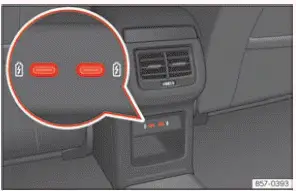
Fig. 159 Rear centre console: USB connectors
with power socket function.
The Seat Ateca is equipped with a USB connection located in the storage compartment area of the front centre console, as illustrated in Fig. 158. This connection provides an accessible interface for compatible external devices and can be used with supported infotainment functions that require a USB connection. When connecting a mobile phone, audio source or other suitable device, make sure that the USB cable and the device itself meet the requirements of the function you intend to use.
Depending on the vehicle's equipment specification and the country in which it is supplied, additional USB connections may be installed. Some of these connections are intended exclusively for charging electronic devices or supplying electrical power through a USB socket. Unlike a USB interface that supports data communication with the infotainment system, a charging-only connection is not designed to transfer media files or establish a data connection for smartphone integration. Check the purpose of the available socket before connecting a device that requires data transmission.
These additional USB ports are positioned at the rear of the centre console, between the two front seats, as shown in Fig. 159. Their location makes them convenient for passengers in the rear seating area who need to connect compatible devices for charging. The number and availability of these connectors depend on the Seat Ateca's installed equipment, so the arrangement may differ between individual vehicles.
Note Disconnect electronic devices and other appliances from the USB ports before switching the ignition on or off. Changes in the vehicle's electrical operating state can cause voltage fluctuations that may affect connected equipment. Unplugging devices before these operations helps protect them against possible damage resulting from such fluctuations. This precaution applies to devices connected to both the front USB interface and any additional USB power sockets.
 Android Auto
Requirements for Android Auto
Android Auto allows a compatible Android smartphone to access supported applications and functions through the Seat Ateca infotainment system. Before using this techno ...

Other materials:
Troubleshooting
The engine does not start
The corresponding indicator lamp illuminates green on the instrument cluster. This indication alerts the driver that the required brake pedal operation has not been carried out and that the requested starting or gear selection procedure cannot be completed under the curre ...
Fuses in the engine compartment
Fig. 202 In the engine compartment: lid of the
fuse box.
The engine compartment contains a separate fuse box protecting electrical circuits associated with equipment installed in this area and other vehicle systems. Its protective lid is secured by locking tabs and must be removed carefu ...
Leaving a parking space with the
parking assist system (only for parallel
parking)
Fig. 143 On the instrument panel display:
driving off from perpendicular parking.
Your vehicle in reverse gear. The vehicle symbol on the instrument cluster represents the Seat Ateca with reverse gear selected. It helps the driver identify the current stage of the assisted parking-s ...
