
From Inside Your Vehicle

Press the button located on the instrument panel.
Vehicles with Intelligent Access
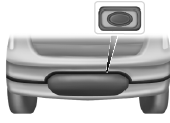
1. Unlock the trunk with the remote control or power door lock control.
The trunk unlocks when you press the release button if the intelligent access transmitter is within 3 feet (1 meter) of the trunk.
2. Press the release button located near the license plate.
 SecuriCodeâ„¢ keyless entry keypad
The keypad, located near the driver window, is invisible until you touch
it. It then lights up so you can see and touch the appropriate buttons.
Note: If you enter your entry code too fast on the ...
 Interior luggage compartment release
WARNING: Keep vehicle doors and luggage compartment locked
and keep keys and remote transmitters out of a child’s reach.
Unsupervised children could lock themselves in the trunk and risk
injury ...
Other materials:
Jacking and Lifting
WARNING: When jacking or lifting the vehicle, block all wheels remaining
on the ground. Set the parking brake if the rear wheels will remain on the
ground. These actions help prevent unintended vehicle movement. Failure to
follow these instructions may result in serious personal injury.
&nb ...
Trailer towing
WARNING: Do not exceed the GVWR or the GAWR specified on
the certification label.
WARNING: Towing trailers beyond the maximum recommended
gross trailer weight exceeds the limit of your vehicle and could
result in engine damage, transmission damage, structural damage, loss
of vehicle control, ve ...
Brake System - General Information
SPECIFICATIONS
Material
General Specifications
Torque Specifications
DIAGNOSIS AND TESTING
Principles of Operation
Brake System
Applying the brake pedal uses lever action to push a rod into the brake
booster, which through the use of vacuum, boosts the force of the rod and then
transmits this f ...
