
Introduction
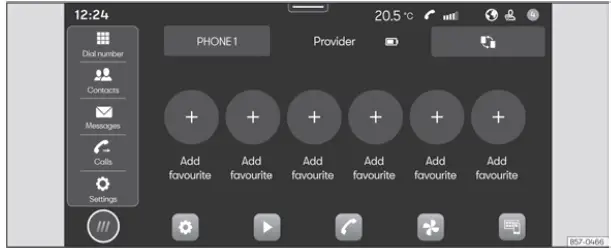
Fig. 165 Schematic representation: Phone view.
The telephone interface allows you to connect a compatible mobile phone to the Seat Ateca infotainment system and access supported telephone functions through the vehicle's controls. Once the connection has been established, telephone calls can be managed using the infotainment interface, while the caller's voice is reproduced through the vehicle's speakers. This integration makes it possible to use compatible phone functions without having to operate the mobile device directly.
The infotainment system supports the simultaneous connection of up to two mobile phones. This allows two compatible devices to remain connected at the same time, although the telephone functions available for each device depend on the system configuration and the capabilities of the connected phones. The connection status and available operating options can be checked through the telephone interface.
The sound quality of telephone conversations inside the vehicle can be affected by several factors. Driving at high speeds may increase road and wind noise, while poor weather conditions, uneven road surfaces and other sources of noise inside or outside the passenger compartment can make conversations more difficult to hear. Mobile network reception also plays an important role: a weak or unstable signal may reduce call quality or interrupt communication. The clarity of a conversation therefore depends on both the acoustic conditions inside the Seat Ateca and the quality of the mobile connection.
Note
- In most cases, a compatible device, such as a mobile phone, needs to be paired with the infotainment system only once. After the initial pairing procedure has been completed, the connection can normally be re-established through Bluetooth or Wi-Fi without repeating the pairing process. The appropriate connection method depends on the device and the infotainment functions being used. If the saved connection information is removed or the device settings are changed, pairing may need to be performed again.
- The availability of individual telephone functions depends on the capabilities of the mobile phone connected to the Seat Ateca infotainment system. Factors such as the phone's operating system, supported connection features, mobile network and telecommunications provider can influence which functions are accessible. Consequently, some telephone features may operate differently or may not be available with certain devices or network services.
Connectivity Box
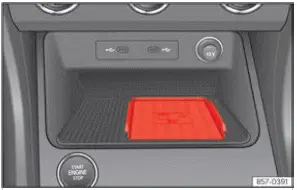
Fig. 166 On the centre console: pad for the
mobile phone connection.
The Connectivity Box in the Seat Ateca includes a Wireless Charger function, allowing compatible mobile phones to be charged without connecting a charging cable directly to the device. The charging area is integrated into the centre console and is designed to accommodate a suitable mobile phone positioned on the designated pad. Wireless charging is available only when the mobile device supports the required charging technology and is placed correctly on the charging surface.
Wireless charger
Mobile phones equipped with Qi inductive charging technology can be charged wirelessly using the Connectivity Box. This technology transfers energy between the charging pad and a compatible mobile device without requiring a physical charging connector. The phone must support the Qi standard and be positioned correctly for the charging process to begin. Devices without the necessary wireless charging capability cannot use this function.
To charge your mobile phone wirelessly:
- Place the compatible mobile device in the centre of the charging pad, with its screen facing upwards, as illustrated in Fig. 166. Position the phone so that it rests properly on the designated charging surface. Correct alignment is important because an incorrectly positioned device may not be detected by the Wireless Charger or may fail to charge as intended.
Before placing the phone on the pad, check that there are no objects between the mobile device and the charging surface. Items placed in this area can interfere with inductive charging and prevent the system from operating correctly. The phone should rest directly on the designated charging area, without anything obstructing the contact between the device and the pad.
When a suitable mobile phone is positioned correctly and the necessary operating conditions are met, wireless charging starts automatically. No separate charging cable needs to be connected to the phone. If charging does not begin, check that the device supports Qi technology and that it is correctly centred on the charging pad.
For further information about the wireless charging capabilities of your mobile device, consult the instructions supplied by its manufacturer. The phone's user manual should indicate whether it supports the Qi inductive charging standard. Additional information about compatibility and the Connectivity Box may also be available on the official SEAT website.
WARNING Notifications appearing on a mobile phone screen can distract the driver from the road and surrounding traffic. Looking at incoming messages, alerts or other information displayed on the device while driving reduces attention to the driving task and increases the risk of a serious accident. Do not allow the mobile phone or its notifications to interfere with safe vehicle operation.
- Place only one suitable mobile device on the Connectivity Box charging pad. If wireless charging is required, the device must be compatible with the Qi standard. For correct operation, position the phone on the base of the Connectivity Box without its protective case and ensure that its dimensions do not exceed 80 x 140 mm (3.15 x 5.512 inches), measured as width x length. The device must fit within the designated charging area and be positioned as indicated in the illustration.
- If the mobile device is not resting correctly on the base of the Connectivity Box, is positioned outside the intended charging area or exceeds the specified dimensions, the system may fail to recognise it or may not charge it properly. In certain circumstances, the infotainment system may display a message indicating that a foreign object has been detected in the storage compartment. This indication can occur when the device is unsuitable or incorrectly positioned. Using a compatible mobile phone and placing it correctly on the charging pad may resolve the problem and allow charging to begin.
WARNING Observe the following precautions when using the Wireless Charger to avoid problems associated with heat and objects placed in the charging area.
- A mobile phone may become warm while it is being charged wirelessly. The temperature of the device can increase during the charging process, so take this into account before picking it up. Exercise care when removing the phone from the Connectivity Box, particularly if it has been charging for an extended period or feels noticeably warm.
- Do not place metallic objects or other items between the mobile phone and the charging surface or housing of the Connectivity Box. Foreign objects in this area can interfere with the wireless charging process and prevent the system from functioning correctly. Keep the charging pad clear and place only the suitable mobile device in the designated position.
NOTICE Do not leave the vehicle key near the Wireless Charger area. The key may interfere with the operation of the charging system when positioned close to the inductive charging pad. Keep it away from the Connectivity Box while charging a mobile phone to reduce the possibility of interference.
NOTICE The base of the Connectivity Box is permanently installed and is not designed to be removed. Do not attempt to detach the charging pad or its base from the centre console, as it forms part of the vehicle's integrated equipment.
Note
- The mobile device must support the Qi inductive charging interface standard to operate correctly with the Seat Ateca Wireless Charger. A phone that does not support Qi charging cannot be charged wirelessly using the Connectivity Box, even if it fits within the specified dimensions and is placed correctly on the pad.
- Charging duration and the temperature reached by the mobile phone depend on the particular device being used. Different phones may require different amounts of time to charge and may become warmer during operation. These variations are influenced by the characteristics of the mobile device and its wireless charging capabilities.
- The maximum wireless charging power provided by the Connectivity Box is 5 W. The actual charging performance depends on the compatible mobile device and the operating conditions. Charging speed should therefore not be expected to be identical for every phone, even when the same charging pad is used.
- Qi wireless charging through the Connectivity Box supports only one mobile device at a time. Two or more phones cannot be charged simultaneously on the same pad. To charge another compatible device, remove the phone currently occupying the charging area before positioning the next one.
- Keeping the engine running is recommended to ensure reliable wireless charging. This helps maintain the electrical power required by the charging system during operation. The availability of charging when the engine is not running may depend on the vehicle's electrical operating conditions.
- If a Qi-compatible mobile phone is connected to the infotainment system through USB, charging takes place according to the method specified by the phone manufacturer. The charging behaviour in this situation depends on the mobile device and its supported charging arrangements, rather than solely on the wireless charging capability of the Connectivity Box.
 Navigation
Introduction
Fig. 164 Schematic representation: Navigation
view.
The Seat Ateca navigation system uses a global satellite positioning system to determine the vehicle's current location. A ...
 Storing objects
...
Other materials:
Interior monitoring and anti-tow system
The interior monitoring system is designed to detect movement inside the Seat Ateca while the vehicle is locked and the anti-theft alarm is active. If movement is detected within the passenger compartment, the monitoring system triggers the alarm, providing an additional level of protection against ...
Reporting safety defects (U.S. only)
Your satisfaction is important to Ford Motor Company and to your dealer.
If a warranty concern has not been resolved using the three-step
procedure outlined earlier in this chapter in the Getting the Services
You Need section, you may be eligible to participate in the BBB AUTO
LINE program.
...
Capacities and Specifications
Engine Drivebelt Routing
3.5L V6 engine
3.5L V6 SHO engine
2.0L EcoBoost engine
...
