
Introduction
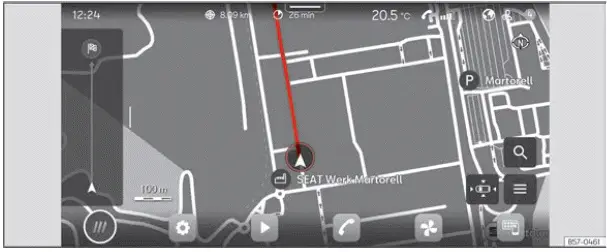
Fig. 164 Schematic representation: Navigation
view.
The Seat Ateca navigation system uses a global satellite positioning system to determine the vehicle's current location. At the same time, sensors installed in the vehicle monitor its movement and provide information about the route being travelled. By combining satellite positioning data with information from the vehicle's sensors, the infotainment system can track the vehicle's position and progress along the selected route.
The navigation system compares the collected positioning and movement data with the digital maps available in its memory. Where relevant information is available, reported traffic events are also taken into account when calculating and updating the route. This combination of map data, vehicle position and traffic information allows the system to determine a suitable route to the selected destination and adapt its guidance when conditions change.
Once route guidance has started, the navigation system provides spoken instructions and visual directions to help you reach your destination. Navigation announcements indicate upcoming driving manoeuvres, while the map and graphical guidance show the route and the vehicle's position. These functions work together to provide information about the journey without requiring the driver to follow the map continuously.
Navigation functions are operated through the infotainment touchscreen. The display allows you to enter destinations, view the calculated route, change the map presentation and access the available navigation settings. The controls and information shown depend on the current navigation function and the equipment installed in the Seat Ateca.
In certain countries, some infotainment functions cannot be selected or operated on the screen once the vehicle exceeds a specified speed. These restrictions are intended to comply with the applicable national regulations and to limit operations that could distract the driver. If a function becomes unavailable while driving, this does not indicate a fault in the infotainment system. The function may become accessible again when the vehicle is stationary or when the relevant operating conditions are met.
Navigation announcements
Navigation announcements are spoken driving instructions provided by the infotainment system during active route guidance. They inform the driver about the route ahead and indicate the manoeuvres required to continue towards the selected destination. These audible instructions complement the directions displayed on the navigation map and help the driver follow the calculated route.
The content and frequency of navigation announcements vary according to the driving situation and the selected navigation settings. For example, the system may provide different instructions when route guidance first begins, when approaching a motorway junction or when navigating a roundabout. The timing of each announcement is determined by the current route and the manoeuvres that need to be performed, so instructions are given when they are relevant to the journey.
If the navigation system cannot calculate a route directly to the exact destination, for example because the destination is located in an area that has not been included in the digital map data, it may be unable to provide complete turn-by-turn guidance to that point. In such circumstances, the infotainment screen displays available information about the destination address and the remaining distance. This allows the driver to use the available location information even when precise route guidance cannot be provided for the final part of the journey.
When dynamic route guidance is active, the Seat Ateca navigation system can provide information about reported traffic congestion affecting the calculated route. If the available traffic information causes the system to recalculate the journey, an additional navigation announcement informs the driver that the route has been changed. The updated directions are then based on the newly calculated route, taking the reported traffic conditions into account.
The volume of navigation announcements can be adjusted while an instruction is being spoken. If an announcement is too loud or too quiet, change the volume during playback to the desired level. The infotainment system retains the adjusted announcement volume for subsequent navigation instructions, so the following spoken directions are reproduced at the newly selected level without requiring the same adjustment each time.
Limitations during navigation
The navigation system normally uses signals from GPS satellites to determine the vehicle's position. However, satellite reception may be interrupted or unavailable in certain locations, such as tunnels, underground garages or other areas where the signals cannot reach the vehicle reliably. When this occurs, the infotainment system continues estimating the vehicle's movement and position using information from the sensors installed in the Seat Ateca. This allows navigation to continue temporarily even without a direct satellite signal.
In areas where the road network has not been fully digitised, or where only part of the relevant map information is stored in the infotainment system, navigation will still attempt to provide route guidance using the data that is available. However, the instructions may be less complete than in areas covered by detailed digital maps. The system can only calculate and display routes based on the roads and geographical information included in its navigation database.
If navigation data is missing, incomplete or insufficiently detailed, the system may be unable to establish the vehicle's exact position. This can affect the accuracy of the displayed location and the directions provided during the journey. The vehicle may appear in a slightly incorrect position on the map, or route guidance may be less precise than usual until reliable positioning and map information become available again.
Road networks and address information change continually. New roads are constructed, existing roads are modified, temporary roadworks are introduced and some streets may be closed to traffic. Street names and building numbers can also change over time. If the navigation database does not reflect these developments, the Seat Ateca infotainment system may calculate a route using outdated information. This can result in inaccurate directions, incorrect destination locations or guidance that does not correspond to the current road layout.
Managing the navigation map
The navigation map can be adjusted directly on the infotainment touchscreen using finger gestures. These controls allow you to move around the displayed map, change the viewing scale, switch between two-dimensional and three-dimensional presentations, and rotate the map to examine the surrounding area from a different perspective. Using these gestures makes it possible to inspect the route and nearby roads without changing the selected destination.
Moving the map
Tip: use your index finger for precise control when moving the map across the infotainment display. This gesture is useful when you want to examine an area outside the section currently shown on the screen.
- Place your finger on the navigation map and slide it in the direction you want to move the view. The map follows your finger, allowing you to explore neighbouring streets, sections of the calculated route or other areas shown in the available map data. Lift your finger when the desired area is visible.
Zooming into or out of the view
Tip: use your index finger to adjust the map scale with a continuous touchscreen gesture. Zooming in provides a closer view of the displayed roads and surrounding area, while zooming out shows a larger geographical region.
- Tap the navigation map twice in succession. On the second tap, keep your finger pressed against the touchscreen instead of lifting it immediately. This activates the gesture used to change the map's zoom level.
- While keeping your finger on the screen, slide it upwards to zoom out and display a wider area of the map. Move your finger downwards to zoom in and obtain a closer view of the selected location. Release your finger when the map is displayed at the desired scale.
Change the 2D / 3D view
Tip: use your index and middle fingers together to change the perspective of the navigation map. The available two-dimensional and three-dimensional views provide different ways of displaying the road network and the route ahead.
- Place your index and middle fingers on the map at the same time and keep both fingers in contact with the touchscreen. The gesture must be performed with two fingers so that the infotainment system recognises it as a change of map perspective rather than ordinary map movement.
- Slide both fingers downwards to switch towards the 2D map view, which presents the map from above. Slide them upwards to change towards the 3D view, which displays the map from an angled perspective. Release your fingers when the desired presentation is shown.
Rotate the map
Tip: use your thumb and index finger to rotate the map comfortably. This allows you to change the orientation of the displayed area and examine the route or surrounding roads from another direction.
- Place your thumb and index finger on the navigation map simultaneously and maintain contact with the screen. Position your fingers far enough apart to perform a controlled rotating movement.
- Move your fingers in a clockwise or anticlockwise circular motion to rotate the map in the corresponding direction. The displayed map orientation changes as you perform the gesture, allowing you to select the viewing angle that is most convenient for examining the route.
Saved data
The Seat Ateca infotainment system stores certain navigation-related information to simplify future destination entry and improve the convenience of route guidance. This may include frequently travelled routes and position data associated with previous navigation use. By retaining relevant information, the system can make it easier to select destinations that have been used before and support more efficient route guidance based on the available stored data.
Delete saved data
- To delete the corresponding stored navigation information, open Settings > Basic function settings > Delete, then select Accept to confirm the operation. Follow the displayed confirmation procedure before the selected data is removed. Deleting stored information may affect the availability of previously saved navigation details used for destination selection and route guidance.
WARNING Only select navigation settings, enter a destination or make changes to the planned route while the vehicle is stationary. Operating the navigation system or making detailed adjustments while driving can distract your attention from traffic conditions and increase the risk of an accident. Complete destination entry and any necessary route modifications before setting off, and always give priority to safe vehicle operation.
Note
- If you pass a detour or deviate from the calculated route while navigation guidance is active, the infotainment system may recalculate the route. The updated guidance is based on the vehicle's current position and the available navigation data, allowing the system to determine a revised route towards the selected destination.
- The accuracy and usefulness of the navigation recommendations provided by the Seat Ateca infotainment system depend on the quality and completeness of the available navigation data, as well as any reported traffic congestion. Outdated map information, incomplete road coverage or missing traffic reports can affect the calculated route and the instructions displayed during the journey.
- Navigation announcements are not played when the infotainment system's sound is muted. In this condition, route guidance may still be shown visually on the navigation display, but the corresponding spoken instructions will not be audible until the sound is restored.
 Select and play a multimedia source
Select multimedia source
Before multimedia files can be played through the Seat Ateca infotainment system, a compatible media source must be connected and selected. The system needs access to the dev ...
 Telephone interface
Introduction
Fig. 165 Schematic representation: Phone view.
The telephone interface allows you to connect a compatible mobile phone to the Seat Ateca infotainment system and access supported ...
Other materials:
Changing gear in Tiptronic mode
Fig. 99 Lever in the Tiptronic position
Fig. 100 Steering wheel: automatic gearbox
levers
Tiptronic allows the driver to change gears manually while retaining the convenience of the DSG automatic transmission. Instead of leaving every gear change to the gearbox's automatic control sys ...
General Procedures
Solenoid Body Identification Procedure
Original Solenoid Body Service Tag
Using the scan tool, select Powertrain, Transmission and Transmission
Solenoid Body Identification from the toolbox icon and follow the
instructions displayed on the scan tool.
The solenoid body identification screen di ...
Rear-view camera system
WARNING: The rear view camera system is a reverse aid
supplement device that still requires the driver to use it in
conjunction with the interior and exterior mirrors for maximum
coverage.
WARNING: Objects that are close to either corner of the
bumper or under the bumper, might not be seen on t ...
