
Multifunction steering wheel
Functions
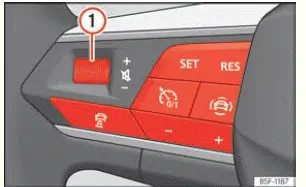
Fig. 66 Controls on the steering wheel.
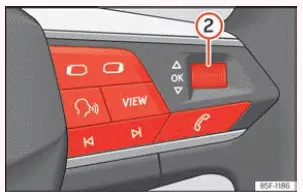
Fig. 67 Controls on the steering wheel.
The Seat Ateca multifunction steering wheel incorporates control modules that allow the driver to operate several vehicle systems without having to reach for the infotainment display or other dashboard controls. Depending on the vehicle's equipment, these steering wheel controls provide access to audio playback, telephone functions, navigation information, voice control and selected driver assistance functions. Their purpose is to make frequently used features easier to operate while helping the driver maintain attention on the road and keep both hands close to the normal steering position.
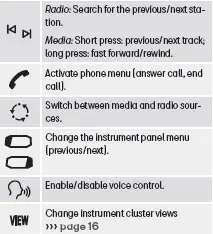
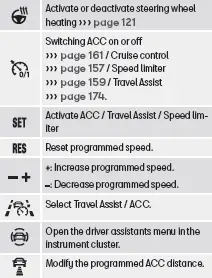
Buttons available depending on the version
- Turn the rotary control to adjust the audio volume. Rotating it in one direction increases the volume, while turning it in the opposite direction reduces the volume. This allows the driver to change the sound level without reaching for the infotainment system.
Press the rotary control to mute the audio output. This provides a quick way to silence the sound when necessary, for example when the driver needs to concentrate on surrounding traffic or hear information from outside the vehicle.
- Turn the rotary control to navigate through the menus displayed in the instrument cluster. Rotating the control moves through the available menu items or displayed information. When the navigation map is shown in the instrument cluster, turning the control changes the map zoom level, allowing the driver to zoom in or out.
Press the rotary control to confirm or select the currently highlighted option on the instrument cluster display. This makes it possible to navigate menus and choose settings directly from the steering wheel without using separate dashboard controls.
Steering wheel position adjustment
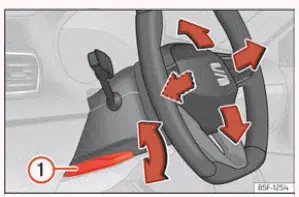
Fig. 68 Lever in the lower left side of the
steering column.
The steering wheel position should be adjusted before starting a journey and only while the Seat Ateca is stationary. Correct adjustment helps the driver maintain a comfortable driving posture, reach the steering wheel controls without stretching and preserve the intended protection provided by the driver's front airbag. Never attempt to change the steering wheel position while the vehicle is moving.
- Pull the steering column adjustment lever downwards, as indicated by position 1 in Fig. 68, to release the steering wheel adjustment mechanism. Move the steering wheel into the desired position, taking care to maintain a comfortable distance and a clear view of the instrument cluster. Once the position has been selected, push the lever firmly upwards until it locks securely. Check that the steering wheel remains fixed in the selected position before driving.
WARNING Incorrect adjustment of the steering wheel or improper use of the steering column adjustment mechanism can result in serious or fatal injuries. A steering wheel that is not securely locked may move unexpectedly while driving, and an unsuitable steering wheel position can reduce the effectiveness of the driver's front airbag in a collision.
- After adjusting the steering column, always push the locking lever shown in Fig. 68, position 1, firmly upwards until it is fully engaged. Make sure the steering wheel is securely locked so that its position cannot change unexpectedly while the Seat Ateca is being driven.
- Never adjust the steering wheel while the vehicle is moving. Attempting to release or reposition the steering column during driving can cause the driver to lose control of the vehicle. If an adjustment is necessary, stop in a safe location before releasing the lever and changing the steering wheel position.
- Position the steering wheel so that its centre faces your chest rather than your face. This helps the driver's front airbag provide its intended protection in the event of a collision. An incorrectly positioned steering wheel may interfere with airbag deployment and increase the risk of injury.
- While driving, always hold the steering wheel with both hands on the outer rim, approximately at the 9 o'clock and 3 o'clock positions. This hand position provides secure control of the steering wheel and helps reduce the likelihood of arm and hand injuries if the driver's front airbag deploys.
- Never hold the steering wheel at the 12 o'clock position or use an unsafe grip, such as placing your hands over the centre of the steering wheel.
If the driver's front airbag deploys while your hands or arms are positioned across the airbag cover, the force of deployment can cause serious injuries to your hands, arms or head. Keep your hands on the outer steering wheel rim in the recommended positions whenever the vehicle is being driven.
 Glass roof sun blind
Fig. 65 On the interior roof lining: function
button to operate the sun blind.
The Seat Ateca panoramic glass roof is equipped with an electrically operated sun blind that allows occupants ...

Other materials:
Head restraints
WARNING: To minimize the risk of neck injury in the event of a
crash, the driver and passenger occupants should not sit in or
operate the vehicle, until the head restraint is placed in its proper
position. The driver should never adjust the head restraint while the
vehicle is in motion.
WARNING ...
Area View system
Fig. 146 Area View system display: top view.
Front camera area. This section represents the view captured by the camera at the front of the Seat Ateca. It helps the driver observe the space ahead of the vehicle when approaching obstacles or manoeuvring into a confined area.
Right c ...
Daytime running lamps
WARNING: Always remember to turn on your headlamps at
dusk or during inclement weather. The Daytime Running Lamp
(DRL) system does not activate the tail lamps and generally may not
provide adequate lighting during these conditions. Failure to activate
your headlamps under these conditions may re ...
