
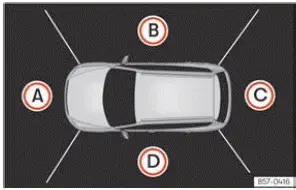
Fig. 146 Area View system display: top view.
- Front camera area. This section represents the view captured by the camera at the front of the Seat Ateca. It helps the driver observe the space ahead of the vehicle when approaching obstacles or manoeuvring into a confined area.
- Right camera area. The right-side camera provides visual information about the area alongside the vehicle. This view is useful for assessing lateral clearance when parking near kerbs, other vehicles or fixed objects.
- Rear camera area. The rear camera shows the space behind the Seat Ateca, assisting the driver when reversing or positioning the vehicle near the rear boundary of a parking space.
- Left camera area. The left-side camera displays the area beside the driver's side of the vehicle on left-hand-drive models, helping the driver assess nearby obstacles and available clearance during parking manoeuvres.
The Area View interface includes function buttons for selecting camera perspectives and adjusting the information displayed on the infotainment screen. The availability of individual controls depends on the equipment installed in the vehicle.
 Exit the current display. Closes the active Area View screen and returns to the previous infotainment display. This control allows the driver to leave the camera interface when the additional view is no longer needed.
 Adjust the display. Opens the settings used to change the brightness, contrast and colour of the camera image. These adjustments can improve the appearance of the displayed view under different lighting conditions, although they cannot eliminate the cameras' detection limitations.
 Three-dimensional views. Provides access to the available three-dimensional representations of the Seat Ateca and its surroundings. These views allow the driver to examine the displayed area from different perspectives when manoeuvring.
 ParkPilot sound control. Depending on the vehicle's equipment, this button switches the ParkPilot audible warnings on or off. The control affects the sound indications associated with the parking assistance system.
The top view is produced by combining the images captured by all four cameras into a single representation of the area around the Seat Ateca. This combined display, identified by the  symbol in Fig. 146, provides an overview of the vehicle's position relative to nearby objects. Because the image is assembled from several camera perspectives, the driver should remain aware that the representation may contain distortions and areas of limited visibility.
To select the top view, press the vehicle representation within the corresponding area of the infotainment display. The system then shows the combined overhead perspective, allowing the driver to assess the space around the Seat Ateca without selecting each camera individually.
Area View automatically changes between the front and rear camera perspectives according to the vehicle's direction of travel. This allows the displayed information to correspond to the area towards which the Seat Ateca is moving, reducing the need to change views manually during forward and reverse manoeuvres.
To select an individual camera perspective, press the corresponding area of the full or reduced top-view representation, marked A to D in Fig. 146. The selected area is highlighted in orange, indicating which camera view is currently active. This allows the driver to concentrate on a particular side of the vehicle while retaining access to the other available perspectives.
Conditions necessary for the use of the Area View system
- All vehicle doors and the rear lid must be closed. Open body panels can interfere with the intended camera views and prevent the system from displaying the surroundings under its normal operating conditions.
- The camera images must be clear and reliable. Keep the lenses clean and free from dirt, snow, ice and other contamination that could obstruct the view or distort the displayed image. A camera with restricted visibility cannot provide dependable visual assistance.
- The area surrounding the vehicle must be sufficiently visible for the driver to assess the manoeuvre safely. Do not rely on Area View when the displayed image or actual surroundings prevent obstacles and other road users from being recognised clearly.
- The parking or manoeuvring area should have a level surface. Uneven ground and steep gradients can affect how the cameras represent nearby objects and may make the displayed distances and reference markings less reliable.
- The Seat Ateca should not be heavily loaded at the rear. Additional weight can change the vehicle's position relative to the road surface, affecting the relationship between the camera images and the actual surroundings.
- The driver should be familiar with the operation and limitations of Area View before using it in demanding parking situations. Understanding the available perspectives, display controls and visual distortions makes it easier to interpret the camera images correctly.
- There must be no damage affecting the vehicle in the areas where the cameras are installed. The cameras must remain correctly positioned and aligned to provide the intended views.
If the position or installation angle of a camera has changed, for example following a rear-end collision or another impact near the camera housing, have the system inspected by a qualified specialist workshop. Even when the camera continues to display an image, incorrect alignment may affect the accuracy of the visual representation.
Special characteristics
The images supplied by the Area View cameras are two-dimensional, even when they are combined to create an overhead representation of the Seat Ateca. As a result, the display cannot accurately reproduce the depth, height or shape of every feature in the surrounding area. Potholes, raised objects and components protruding from other vehicles may be difficult to recognise or completely absent from the displayed image. The driver must therefore check the actual surroundings rather than assuming that every potential obstacle will appear on the infotainment screen.
Under certain conditions, objects and other vehicles may appear closer or farther away than they really are. Changes in road gradient, vehicle loading and the position of obstacles can all affect how the camera image represents the surrounding space. Particular caution is required in the following situations:
- Moving from level ground onto a slope. As the Seat Ateca approaches an incline or decline, the relationship between the camera and the road surface changes. This can make the apparent distance to nearby objects differ from their actual distance.
- Moving from a slope onto level ground. A change from an inclined surface to a horizontal one can also alter the appearance and apparent position of obstacles in the camera image. The driver should reduce speed and check the available clearance directly.
- Heavy loading at the rear. When the rear of the Seat Ateca carries substantial additional weight, the vehicle's position relative to the road changes. This can influence the camera perspective and make the displayed distance to surrounding objects less representative of the actual clearance.
- Approaching protruding objects. Objects extending from walls, other vehicles or structures may not be represented accurately by the camera system. Their shape and position can make them particularly difficult to identify in the combined view.
Some protruding objects may lie outside the cameras' fields of vision altogether. The driver must check for overhanging or projecting obstacles before continuing a manoeuvre, even when the displayed area appears clear.
Trailer mode
When a trailer is electrically connected to the factory-installed towing bracket, the Area View system hides all auxiliary guidance lines in the rear camera area. The camera image may still provide visual information about the space behind the Seat Ateca, but the usual rear parking reference lines are no longer displayed in this configuration. The driver must take the trailer's position and dimensions into account and monitor the surrounding area carefully while manoeuvring.
Note SEAT recommends becoming familiar with the Area View system and its functions in a quiet location with little traffic or in a suitable car park. Practising at low speed allows the driver to understand how the different camera perspectives relate to the actual surroundings, how the display changes with the direction of travel and how the guidance information should be interpreted. This familiarity is particularly useful before using the system in narrow or crowded parking areas.
 Introduction
The Top View Camera system in the Seat Ateca uses four cameras to create a combined representation of the area surrounding the vehicle. The resulting image is displayed on the infotainment screen, hel ...
 Connecting and disconnecting
Fig. 147 Centre console: button for activating/
deactivating the Top View camera system
manually in combination with the Park assist
system (A) or else with the rear ParkPilot
system ...
Other materials:
General Procedures
Cooling System Draining, Filling and Bleeding
Special Tool(s)
Material
Draining
With the vehicle in NEUTRAL, position it on a hoist. Refer to Section
100-02.
WARNING:
Always allow the engine to cool before opening the cooling system. Do not
unscrew the coolant pressure relief ...
Specifications, Description and Operation
SPECIFICATIONS
General Specifications
Torque Specifications
DESCRIPTION AND OPERATION
Roof Opening Panel
The roof opening panel system consists of:
Roof opening panel air deflector
Roof opening panel control switch
Roof opening panel drain hoses
Roof opening panel frame
Roof opening panel gl ...
Wiper functions
Automatic rear window wiper
The rear window wiper of the Seat Ateca can operate automatically when reverse gear is selected. If the windscreen wipers are already switched on, engaging reverse gear activates the rear wiper without requiring the driver to operate its control separately. This functi ...
