
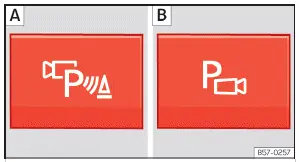
Fig. 147 Centre console: button for activating/
deactivating the Top View camera system
manually in combination with the Park assist
system (A) or else with the rear ParkPilot
system (B).
Manual activation
- Press the
 button once, as illustrated in Fig. 147. This activates the Area View system manually, allowing the driver to examine the surroundings of the Seat Ateca before beginning a parking or manoeuvring operation.
The infotainment screen displays the overhead camera view shown in Fig. 146, combining the available camera images into a representation of the area around the vehicle. Manual activation is subject to a speed restriction: if the button is pressed while the Seat Ateca is travelling faster than 15 km/h (9 mph), the camera image will not appear. The system is intended for parking and low-speed manoeuvring rather than continuous observation during normal driving.
Automatic activation
- Select reverse gear. The Area View system activates automatically and displays the relevant camera image, allowing the driver to observe the space behind the Seat Ateca before beginning to reverse.
- Alternatively, the system may activate when the vehicle begins moving backwards. The displayed camera information corresponds to the reversing manoeuvre and helps the driver assess the surrounding area.
When Area View is activated automatically for reversing, the infotainment screen displays the rear camera image in parallel parking mode together with a reduced overhead view. This combination allows the driver to monitor the area directly behind the Seat Ateca while also seeing a representation of the vehicle's immediate surroundings. The camera display remains an aid to observation and does not replace checking mirrors or looking around the vehicle.
Manual disconnection
- Press the activation button shown in Fig. 147 again. This manually switches off the Area View display when the camera assistance is no longer required.
- Alternatively, press another control on the infotainment system, such as the
 button. Selecting another infotainment function allows the driver to leave the camera interface.
- The system can also be closed by pressing the corresponding function button on the infotainment screen. The available control depends on the current display and the equipment fitted to the vehicle.
Automatic disconnection
- Drive forwards until the vehicle reaches a speed of at least 15 km/h (9 mph). At this speed, the Area View system automatically closes the camera display because the vehicle is no longer operating within the normal low-speed range for this assistance function.
- Alternatively, switch off the ignition. The Area View menu disappears immediately from the infotainment screen, ending the active camera display without requiring any additional action from the driver.
 Area View system
Fig. 146 Area View system display: top view.
Front camera area. This section represents the view captured by the camera at the front of the Seat Ateca. It helps the driver observe the sp ...
 Views of the peripheral vision system
(modes)
Fig. 148 Display on the Area View system
screen: A Front camera: off-road view. B Rear
camera: off-road view.
The red reference lines displayed in the relevant camera views indicate a ...
Other materials:
Legal provisions
When SEAT CONNECT services are used, information is transmitted, received and processed online through the vehicle's communication systems. Some of this information may directly or indirectly reveal details about the person driving the Seat Ateca, including driving behaviour, journeys and geographic ...
Instructions for tow-starting and
towing
When the Seat Ateca is being towed with its hazard warning lights activated, the driver can still indicate an intended change of direction using the turn signals. With the ignition switched on, operate the turn signal lever in the required direction. While the selected turn signal is operating, the ...
Safety advice
WARNING
The driver is responsible for controlling the Seat Ateca and ensuring safe operation at all times. Driver assistance systems are intended to provide support in certain situations, but they cannot replace the driver's attention, judgement or ability to respond to changing conditions. Even ...
