
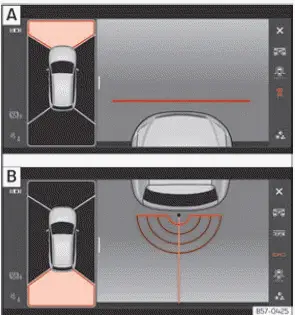
Fig. 148 Display on the Area View system
screen: A Front camera: off-road view. B Rear
camera: off-road view.
The red reference lines displayed in the relevant camera views indicate a distance of approximately 40 cm from the vehicle. These markings help the driver judge the position of nearby obstacles during slow manoeuvres. Because camera images can distort apparent distances, the lines should be treated as visual references rather than exact measurements of the clearance around the Seat Ateca.
Top views (bird's eye view)
Main mode: The standard overhead display combines the camera images to show the Seat Ateca and the area immediately surrounding it. This perspective is particularly useful when assessing the vehicle's position within a parking space or checking the clearance along its sides.
 The vehicle is represented from above together with its immediate surroundings. Depending on the installed equipment, the display may also include the path information provided by ParkPilot. This additional guidance helps the driver understand the vehicle's position and anticipated movement while manoeuvring.
Three-dimensional views: The Area View system also offers alternative perspectives that represent the vehicle and surrounding area from different viewing angles. These views can help the driver examine parts of the surroundings that may be less convenient to assess using the standard overhead representation.
 This mode presents the Seat Ateca and its immediate surroundings from an elevated, overhead perspective. It provides a broad view of the space around the vehicle and helps the driver recognise its position relative to nearby obstacles.
 This view shows the vehicle and its surroundings from above at an angle rather than directly overhead. The oblique perspective provides another way to assess the position of objects alongside the Seat Ateca during parking or low-speed manoeuvring.
 This mode displays the vehicle and the surrounding area from an inclined viewing angle. It allows the driver to examine the camera representation from a different perspective when checking the available space around the vehicle.
To change the viewing angle in the three-dimensional modes, swipe a finger across the infotainment screen in the direction indicated by the arrows. The displayed perspective changes according to the swipe, allowing the driver to examine the Seat Ateca and its surroundings from different angles. These graphical views remain subject to the same camera visibility and distance-perception limitations as the other Area View modes.
Front camera views (front view)
Cross traffic. This front-facing camera mode is intended to help the driver observe traffic approaching from the sides when the forward view is restricted. It can be useful when moving out of a garage, driveway or narrow passage.
 The display provides a view of the areas to the left, directly ahead and to the right of the Seat Ateca. This wider perspective can help the driver recognise approaching traffic when leaving a confined exit where walls, buildings or other obstacles limit direct visibility. The driver must still check the road carefully before moving forwards.
Angle parking. This mode provides a forward-facing camera view with graphical assistance for positioning the vehicle when entering a parking space.
 The area directly in front of the Seat Ateca is displayed on the infotainment screen. This allows the driver to observe the space ahead while approaching or entering a parking bay.
Orientation lines are superimposed on the camera image to provide guidance during the manoeuvre. These lines help the driver judge the vehicle's position and direction relative to the parking space, although the actual clearance must still be checked.
Off-road. The front off-road camera view is designed to show the area immediately ahead of the vehicle from a perspective that may be difficult to see directly from the driver's seat.
 This mode displays the ground directly in front of the Seat Ateca as viewed from above. It can be particularly useful when approaching or travelling over a slope, where the bonnet or road gradient may obstruct the driver's direct view of the surface immediately ahead. The image helps with observation but cannot guarantee that every obstacle or depression will be visible.
Side camera views (side view)
Right and left sides
 This view represents the areas immediately alongside the Seat Ateca from an overhead perspective. It helps the driver assess lateral clearance when manoeuvring close to kerbs, walls, parked vehicles or other obstacles. By showing both sides of the vehicle, the system provides additional visual information for positioning the Seat Ateca accurately within a narrow space.
Driver or passenger side seen from above. This mode concentrates on one side of the vehicle, allowing the driver to examine the selected area more closely when clearance is limited.
 The camera image helps visualise areas alongside the Seat Ateca that may be difficult to observe directly or through the exterior mirrors. This is useful when checking for obstacles close to the bodywork, although some objects may still remain outside the camera's field of view.
Rear camera views (rear view)
Angle parking. The rear angle parking mode provides a camera view and reference markings to assist the driver when reversing into a parking bay.
 The infotainment screen displays the area behind the Seat Ateca, helping the driver observe the selected parking space and nearby obstacles while reversing.
Auxiliary guidance lines appear on the image to assist with positioning the vehicle. These markings provide visual references for the reversing manoeuvre and help the driver assess alignment with the parking space.
Parallel parking. This rear camera mode is intended for manoeuvring into a parking space alongside the road, using graphical references to indicate the available area and the intended vehicle position.
 The display shows the area directly behind the vehicle. Coloured auxiliary boxes and guidance lines provide orientation when positioning the Seat Ateca within a parallel parking space. These markings help the driver judge the relationship between the vehicle and the boundaries of the selected space, but they do not confirm that the area is free of obstacles.
Off-road or hitching a trailer function. This rear camera perspective provides a closer view of the area behind the vehicle and, on appropriately equipped models, additional guidance for positioning the towing connection.
 The rear of the Seat Ateca is shown on the infotainment display. On vehicles equipped with a factory-installed towing bracket, green and red semicircular auxiliary lines indicate distances from the towing connection. The spacing between the green and red reference lines is approximately 30 cm. An orange auxiliary line shows the calculated direction of the towing device according to the current steering wheel angle. These markings help the driver align the vehicle when approaching a trailer, but the actual position of the coupling and surrounding obstacles must be checked carefully.
Cross traffic. The rear cross traffic view is intended to improve the driver's awareness of vehicles or other road users approaching across the area behind the Seat Ateca.
 This mode helps the driver observe traffic to the left, right and across the area behind the vehicle. It can be useful when reversing out of a garage, driveway or narrow exit where the direct view is restricted. The camera image provides additional information about the surroundings, but the driver must still check for approaching traffic before continuing the manoeuvre.
 Connecting and disconnecting
Fig. 147 Centre console: button for activating/
deactivating the Top View camera system
manually in combination with the Park assist
system (A) or else with the rear ParkPilot
system ...
 Trailer Assist
...
Other materials:
Specifications, Description and Operation
SPECIFICATIONS
Material
Torque Specifications
DESCRIPTION AND OPERATION
Handles, Locks, Latches and Entry Systems
Overview
The power lock/unlock feature locks or unlocks the doors upon a customer
request from either door lock control switch in the vehicle, a RKE transmitter,
or the key ...
Park the vehicle
Parking
Whenever you park your Seat Ateca, observe all applicable traffic regulations and local parking restrictions. Choose a suitable location where the vehicle can remain stationary without obstructing other road users or creating a hazard. Before leaving the vehicle, secure it properly to pre ...
Diagnosis and Testing
Information and Entertainment System
Special Tool(s)
DTC Chart(s)
NOTE: For SYNC related concerns, REFER to the SYNC Symptom Chart
before connecting the scan tool and beginning DTC-based diagnostics.
Diagnostics in this manual assume a certain skill level and knowledge of
Ford-specific diagn ...
