
When the Seat Ateca speed warning system determines that the vehicle has exceeded the detected speed limit, it alerts the driver by making the recognised speed limit flash on the instrument cluster display. Depending on the vehicle's equipment, the flashing indication may also appear on the front display. An audible warning can accompany the visual indication according to the selected configuration and the severity of the detected speed limit violation. The system distinguishes between two warning levels, with the second level indicating that the excessive speed is continuing.
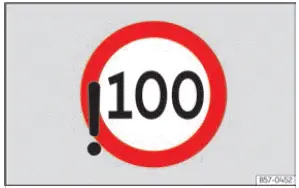
Fig. 9 On the instrument cluster display:
violation of the detected speed limit
(illustration).
Speed warning - Level 1
The system has detected that the vehicle is travelling above the recognised speed limit. As an initial warning, the speed limit symbol begins flashing continuously in the instrument cluster. Depending on the equipment installed, the same flashing indication may also be shown on the front display, as illustrated in Fig. 9. This visual notification draws the driver's attention to the detected speed limit violation and provides an opportunity to reduce speed before the warning progresses to the next level.
Speed warning - Level 2
The system has identified a continuing or progressive violation of the recognised speed limit. This second warning level indicates that the vehicle has remained above the detected limit rather than returning promptly to an appropriate speed.
An audible warning signal sounds to attract the driver's attention. At the same time, the detected speed limit continues flashing on the instrument cluster display and, depending on the vehicle's equipment, on the front display, as shown in Fig. 9. The combined visual and audible warning emphasises that the speed limit violation is continuing and that the driver should adjust the vehicle's speed accordingly.
Note
- The second warning level is activated when the vehicle continues travelling above the recognised speed limit. The system uses this additional warning stage to draw attention to a speed limit violation that has not been corrected after the initial indication.
- The second warning level is cancelled when the driver actively reduces the vehicle's speed. The driver should respond to the warning by adjusting speed in accordance with the applicable traffic restriction and the prevailing road conditions.
Troubleshooting
 Advanced road sign recognition
is
not available
When advanced road sign recognition is unavailable, a yellow control lamp appears in the instrument cluster together with the central yellow warning lamp. An explanatory text message is also displayed in the instrument cluster and in the vehicle status menu. These indications inform the driver that the system cannot currently provide its normal road sign recognition functions or that its operation has been restricted by a fault or unsuitable operating conditions.
The road sign detection system may display one of the following messages, depending on the cause of the problem:
- "Dynamic road sign assist: please clean
the windscreen."
- The windscreen may be dirty in the area used by the camera, or weather conditions may be obstructing the camera's view of the road. Clean the relevant section of the windscreen and remove any dirt, snow, ice or other deposits that could interfere with traffic sign recognition.
- Additional vehicle components, stickers or other objects may be obstructing the camera's field of vision. Check the area around the camera and ensure that nothing covers or restricts the section of the windscreen through which it observes the road.
- The camera may have been displaced or damaged, for example following damage to the windscreen.
Inspect the windscreen and the visible camera area for signs of damage or displacement. If damage is apparent or the warning remains after the view has been cleared, have the system examined by a qualified specialist workshop.
- "Error: dynamic road sign assist"
- A malfunction has been detected in the road sign recognition system. The function may be unable to recognise or display traffic signs correctly. Have the system inspected by a specialised workshop to identify the cause of the fault and carry out any necessary repairs.
- "Speed warning is currently unavailable"
- The speed warning function associated with the road sign detection system is not operating correctly. The vehicle may therefore be unable to provide the normal visual or audible indications when a detected speed limit is exceeded. If the warning continues to appear, arrange for the system to be checked by a specialised workshop.
- "Dynamic road sign assist currently restricted"
- The navigation system may not be supplying the information required by the road sign recognition function. Check whether the navigation system has up-to-date map data, as outdated or unavailable navigation information can affect the system's ability to determine the applicable traffic restrictions.
- Alternatively, the vehicle may be travelling in a region that is not covered by the maps installed in the navigation system. In this situation, the information required to support road sign recognition may be incomplete or unavailable.
If the restriction remains after the navigation information and operating conditions have been checked, have the system inspected by a specialised workshop to determine whether a malfunction is present.
Outside the operating region for advanced road signs recognition
If the Seat Ateca is being driven outside the geographical area supported by the advanced road sign recognition system, the instrument cluster displays the message "Road sign assist: outside the usage area". This notification indicates that the system cannot provide its normal recognition functions in the current region.
- The necessary road sign information is not available for the region in which the vehicle is travelling. Advanced road sign recognition is not supported in the current country, so the driver must rely on the actual roadside signs and applicable local traffic regulations rather than expecting the system to provide recognised speed limits or other restrictions.
 Speed warning
system partially deactivated
A white control lamp appears in the instrument cluster when the speed warning function is no longer operating with its complete default configuration. This indication means that one or more of the standard warning settings have been changed or deactivated. The system may still provide certain speed-related information, but some of its normal warning functions may not be active.
- Check whether the speed warning function itself has been switched off in the assistance system settings. If it is deactivated, the corresponding speed limit violation warnings may no longer be provided.
- Check whether the audible warning is enabled. If the sound notification has been deactivated, the driver may receive visual speed warnings without the corresponding audible signal.
- Check whether the default speed warning threshold has been modified. A manually adjusted threshold changes when the system issues its warning in relation to the detected speed limit, and the white indication may reflect this departure from the standard configuration.
 Driving with the speed warning function
Operating conditions
The speed warning function in the Seat Ateca operates at vehicle speeds above 20 km/h. When the function is active, it monitors the vehicle's speed in relation to the speed limit ...

Other materials:
Changing the wiper rear wiper
blades
Fig. 191 Changing the windscreen wiper
blades
The windscreen wiper blades fitted to the Seat Ateca are supplied with a graphite coating on their wiping surfaces. This coating helps the rubber move smoothly across the glass and reduces the noise produced during operation. When the graph ...
Instrument Cluster and Panel Illumination
DESCRIPTION AND OPERATION
Instrument Cluster and Panel Illumination
Overview
Dimmable Backlighting
Dimmable illumination provides backlighting to certain switches and control
components when the parking lamps are on. The level of backlighting intensity is
adjusted by instrument panel dimmer switch ...
Installation
Engine
Special Tool(s)
Material
Lubricate the torque converter pilot hub with Multi-Purpose Grease.
Remove the Torque Converter Retainer and bolt.
NOTE: Align the torque converter stud marked during removal with
the flexplate.Using the Floor Crane and Spreader Bar, assemble t ...
