
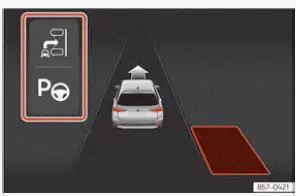
Fig. 139 On the instrument cluster display:
display of the assisted parking system with
decreased visibility.
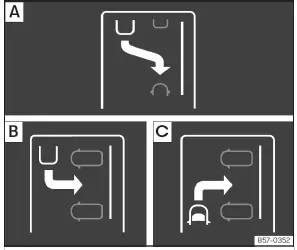
Fig. 140 On the instrument cluster display:
parking modes indication.
The Park Assist system in the Seat Ateca offers three assisted parking modes, allowing the driver to select a manoeuvre appropriate to the position and layout of the available parking space. The supported parking types are:
- Reverse parallel parking. The vehicle is guided backwards into a suitable space positioned parallel to the road, typically between parked vehicles or other objects defining the parking area.
- Reverse angle parking. Park Assist helps steer the Seat Ateca backwards into a suitable perpendicular parking bay, using the available space and detected surroundings to guide the manoeuvre.
- Forward angle parking. The system assists with steering when entering a suitable perpendicular parking space in a forward direction, allowing the driver to approach and occupy the selected bay without reversing into it.
Selecting a parking type after passing in front of the space
Once Park Assist has been activated and the Seat Ateca has passed a parking space that the system recognises as suitable, the instrument cluster displays a proposed parking mode. Park Assist automatically selects the mode it considers appropriate for the detected space and the vehicle's position. The driver should check the proposed manoeuvre before proceeding, particularly where more than one parking arrangement may be possible.
The parking mode currently selected by the system appears prominently in the instrument cluster, as illustrated in Fig. 139. Other available parking modes are shown in a reduced representation, as indicated in Fig. 140. If the automatically selected mode does not match the driver's intended manoeuvre, another available option can be selected by pressing the  button. The display then updates to show the newly selected parking arrangement.
- Before selecting a parking mode, make sure that all operating requirements for Park Assist are satisfied. The vehicle must be positioned and driven within the conditions specified for assisted parking, and the system must be available for use.
- Press the
 button to activate the assisted parking function. The system begins providing the relevant parking mode information through the instrument cluster.
- When Park Assist is switched on, the indicator lamp in the
 button illuminates. The instrument cluster simultaneously shows the selected parking mode, while a smaller representation indicates another available mode to which the driver can switch. This allows the driver to review the proposed manoeuvre before following the parking instructions.
- Activate the turn signal on the side of the road where you intend to park. This informs Park Assist which side of the Seat Ateca should be considered for the parking manoeuvre.
The instrument cluster displays the selected side of the road. If neither turn signal is activated, the system assumes that the driver intends to park on the right-hand side in the direction of travel. Use the appropriate turn signal when parking on the opposite side to ensure that the intended parking area is selected.
- If the displayed parking mode is not the one you want, press the
 button again to switch to the next available parking mode. Check the instrument cluster after each press to confirm which manoeuvre has been selected.
- After the system has cycled through all available parking modes, pressing the
 button once more switches Park Assist off. The current parking mode selection is then cancelled, and the system no longer provides active assistance for that procedure.
- To reactivate Park Assist after switching it off, press the
 button again. The system becomes available for a new parking mode selection when the necessary operating conditions are met.
- Follow the instructions shown in the instrument cluster while driving past the parking space. Maintain a suitable speed, observe other road users and keep the vehicle at the required distance from the parking area. The driver remains responsible for controlling the Seat Ateca while the system assesses the available space and indicates the next step.
Parking in a parking bay without driving past first
Park Assist also provides a special procedure for forward parking into a suitable space without first driving completely past it. This operating situation allows the driver to begin entering the space before activating the assisted steering function. The vehicle must be positioned correctly, and the normal Park Assist requirements must still be satisfied.
- Check that the conditions required for assisted parking are met. Park Assist must be available, and the vehicle must be operating within the system's permitted limits before the manoeuvre is started.
- Drive forwards towards the intended parking space while carefully observing surrounding traffic, pedestrians and nearby obstacles. Stop the Seat Ateca when the front part of the vehicle is already partially inside the parking space. The vehicle should remain stationary while the assisted parking function is activated.
- Press the
 button once to switch on Park Assist from this position. The system then prepares to assist with the parking manoeuvre according to the vehicle's current position.
- When the function is activated, the indicator lamp in the
 button illuminates. The selected parking mode appears in the instrument cluster without the reduced display of alternative modes. This indicates the parking procedure available for the vehicle's current position.
- Release the steering wheel so that Park Assist can perform the necessary steering movements. Keep your hands clear of the rotating wheel while remaining attentive to the surroundings and ready to intervene if the manoeuvre becomes unsafe.
 Description of the Park assist system
Fig. 138 In the centre console, top section:
button to switch on the Park Assist system.
The Park Assist system in the Seat Ateca uses ultrasonic sensors installed in the front and rear ...
 Parking with Park Assist
Fig. 141 On the instrument cluster display: parallel
parking. A: Finding a parking space B: Parking
position. C: Manoeuvring.
Fig. 142 On the instrument cluster display: angle
...
Other materials:
Vehicle power sockets
Fig. 156 Vehicle 12-volt sockets.
12-volt sockets in the centre console. These sockets provide a convenient power connection for compatible electrical accessories used inside the Seat Ateca. They are intended for devices designed to operate from a vehicle's 12-volt electrical supply.
...
Using cruise control
WARNING: Do not use cruise control in heavy traffic, on
winding roads or when the road surface is slippery. This could
result in loss of vehicle control, serious injury or death.
WARNING: When you are going downhill, your vehicle speed
may increase above the set speed. The system will not apply ...
MyFordâ„¢ system
WARNING: Driving while distracted can result in loss of vehicle
control, crash and injury. We strongly recommend that you use
extreme caution when using any device that may take your focus off
the road. Your primary responsibility is the safe operation of your
vehicle. We recommend against the ...
