
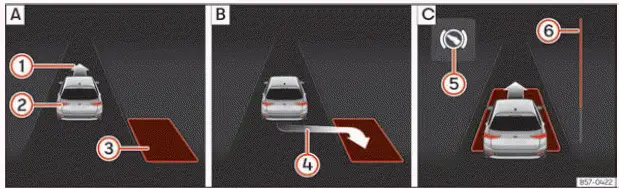
Fig. 141 On the instrument cluster display: parallel
parking. A: Finding a parking space B: Parking
position. C: Manoeuvring.
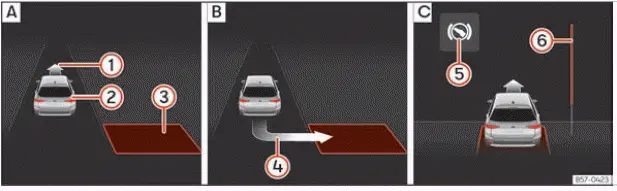
Fig. 142 On the instrument cluster display: angle
parking. A: Finding a parking space B: Parking
position. C: Manoeuvring.
- Message to move forwards. This indication instructs the driver to continue moving forwards while Park Assist searches for a suitable parking space or guides the vehicle towards the correct starting position.
- Your vehicle. The vehicle symbol represents the Seat Ateca in the instrument cluster display, helping the driver understand its position relative to the detected parking space and the indicated manoeuvre.
- Parking space detected. This indication identifies a parking space recognised by Park Assist. The driver should check that the proposed space is the intended destination and that the surrounding conditions allow the manoeuvre to be performed safely.
- Message to park. This instruction indicates that the vehicle has reached a suitable starting position and that the driver can proceed with the assisted parking procedure by following the displayed directions.
- Message to press the brake pedal. This indication instructs the driver to apply the brakes and hold the vehicle stationary. It may appear when Park Assist requires the vehicle to stop before the next stage of the manoeuvre.
- Progress bar. The bar provides a visual indication of the relative distance remaining during the current forward or reverse movement. Its appearance changes as the vehicle progresses through the manoeuvre.
Before beginning an assisted parking manoeuvre, all prerequisites for Park Assist operation must be satisfied and the intended parking mode must already be selected. The Seat Ateca must be positioned according to the instructions shown in the instrument cluster, and the driver must remain prepared to control the vehicle's speed, transmission and brakes throughout the procedure.
Parking
- Check the instrument cluster to confirm that Park Assist has identified the parking space as suitable and that the Seat Ateca has reached the correct starting position. The required position is illustrated in Fig. 141 B for parallel parking and Fig. 142 B for perpendicular parking. The system considers the space suitable for the assisted manoeuvre when parking indication 4 appears in the instrument cluster. Do not begin the manoeuvre until the relevant instruction is displayed.
- Bring the vehicle to a complete stop at the indicated starting position. After a brief pause, engage reverse gear as instructed by Park Assist. Make sure that the area behind the vehicle is clear before beginning to move backwards.
- Release the steering wheel to allow Park Assist to take control of the steering movements. Do not attempt to guide the wheel manually while the system is performing the manoeuvre, unless intervention is necessary to prevent a dangerous situation.
- Observe the message displayed in the instrument cluster before moving the vehicle. The message confirms the operating state of the steering assistance and reminds the driver to monitor the surrounding area throughout the parking procedure.
Steering intervention active. Watch your surroundings!
When this message appears, Park Assist is controlling the steering movements required for the selected parking manoeuvre. Carefully operate the accelerator while observing the area around the Seat Ateca, and keep the vehicle's speed at or below approximately 7 km/h (4 mph). The system controls only the steering; it does not take over the driver's responsibility for accelerating, braking or selecting gears. On vehicles with a manual gearbox, the driver must also operate the clutch as necessary. Remain ready to stop immediately if an obstacle, pedestrian or other hazard enters the vehicle's path.
- Reverse slowly while following the instructions in the instrument cluster. Continue until the continuous ParkPilot warning sounds, indicating that an obstacle is very close; or until the display instructs you to move forwards, as shown in Fig. 141 C or Fig. 142 C; or until a message confirms that the Park Assist manoeuvre has been completed. The progress bar marked 6 shows the relative distance remaining for the current movement. Stop when the system requests a change of direction or when the surrounding conditions make further reversing unsafe.
- Keep the brake pedal depressed while Park Assist completes the required steering wheel movements with the vehicle stationary. Continue holding the brake until the steering adjustment has finished or until the
 symbol disappears from the instrument cluster. This allows the system to position the wheels correctly before the next part of the manoeuvre begins.
- Select first gear when the system instructs you to move forwards. On vehicles with a manual transmission, engage first gear in the normal manner before releasing the brake and beginning the next movement. Follow the appropriate transmission procedure for the vehicle being driven.
- Move forwards slowly until the continuous ParkPilot warning sounds or until the instrument cluster instructs you to engage reverse gear again. Park Assist calculates the necessary steering movements during successive forward and backward manoeuvres, gradually positioning the Seat Ateca within the selected parking space, as illustrated in Fig. 141 C and Fig. 142 C. Continue following the displayed instructions and stop whenever the system requests a change of direction.
- At the end of each forward or reverse movement, allow Park Assist to finish turning the steering wheel before starting the next stage. Waiting for the steering adjustment to be completed helps the system carry out the planned manoeuvre correctly. The assisted parking procedure is finished when the instrument cluster displays the corresponding completion message. In some cases, an audible signal also confirms that the manoeuvre has ended. Check the vehicle's final position before securing it for parking.
Progress bars
The progress bar identified by number 6 in Fig. 141 and Fig. 142 provides a visual representation of the relative distance remaining during each stage of the assisted parking manoeuvre. It appears in the instrument cluster alongside the parking instructions, helping the driver follow the current forward or reverse movement. The bar indicates progress within the manoeuvre rather than providing an exact distance measurement in metres.
The greater the remaining distance for the current movement, the fuller the progress bar appears. As the Seat Ateca moves forwards, the displayed bar decreases from the upper end. When the vehicle reverses, the bar decreases from the lower end. This change in direction corresponds to the movement currently being performed and allows the driver to recognise how much of that stage remains. Continue monitoring the surrounding area and the parking assistance instructions rather than relying exclusively on the progress bar to decide when to stop.
Note If an assisted parking manoeuvre is interrupted before Park Assist confirms that it has finished, the Seat Ateca may not be positioned optimally within the parking space. The vehicle may require further adjustment to achieve a suitable final position. Before leaving the vehicle, check its alignment and the clearance around it, and complete any necessary corrections manually.
 Selecting a parking type
Fig. 139 On the instrument cluster display:
display of the assisted parking system with
decreased visibility.
Fig. 140 On the instrument cluster display:
parking modes indica ...
 Leaving a parking space with the
parking assist system (only for parallel
parking)
Fig. 143 On the instrument panel display:
driving off from perpendicular parking.
Your vehicle in reverse gear. The vehicle symbol on the instrument cluster represents the Seat Ateca ...
Other materials:
Pulling out the key blade
Fig. 45 Vehicle key: extracting the emergency
key.
The Seat Ateca vehicle key contains a removable emergency key blade that can be used to lock or unlock the vehicle manually when the remote control is unavailable or cannot be operated. The mechanical key is stored inside the remote control ...
Memory function
The memory control, located on the side seat panel, allows positioning
recall of the:
• Driver seat.
• Power mirrors.
• Adjustable pedals (if equipped).
• Power tilt/telescopic steering column (if equipped).
A. Type 1
B. Type 2
Programming a memory position
Note: You can pro ...
Engine Ignition - 3.7L Ti-VCT
SPECIFICATIONS
Material
General Specifications
Torque Specifications
DESCRIPTION AND OPERATION
Engine Ignition
Component Location
3.7L Ti-VCT
System Operation
REFER to the PC/ED manual
section 1 Description and Operation.
Component Description
REFER to the PC/ED manua ...
