
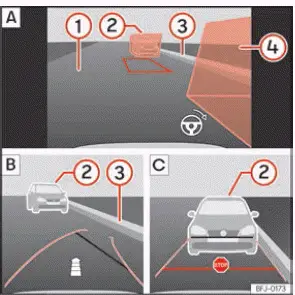
Fig. 145 Display on the Infotainment System
display: reverse assistant, mode 2.
- Find a parking space. Identify a suitable parallel parking space along the road. Check that the space is large enough for the Seat Ateca and that the surrounding vehicles or objects leave sufficient room for the reversing manoeuvre.
- Go to the selected parking space. Position the vehicle alongside the parking area at the required distance. The starting position is important because the camera guidance uses the vehicle's position to display the intended parking path.
- Centre the vehicle inside the parking space. Follow the camera guidance and steering instructions to move the Seat Ateca into the selected space. Adjust the vehicle's position as indicated while monitoring the surrounding obstacles and parking boundaries.
- Road. The roadway alongside the parking space, used as the reference for approaching and positioning the vehicle before reversing.
- Obstacle or auxiliary box. A graphical reference representing an object or boundary at one end of the selected parking space. It helps the driver assess the available room for the manoeuvre.
- Side boundary of the parking space. The lateral limit used to guide the Seat Ateca into the correct position parallel to the road.
- Obstacle or auxiliary box. The reference marking at the opposite end of the parking space, indicating the available clearance for positioning the vehicle.
Parking
- If necessary, press the
 button before driving past the selected parking space. This allows the driver to access the parking assistance display while approaching the intended location.
- With Reverse Assist activated and operating, press the corresponding function button to select parallel parking mode. The infotainment screen displays the camera view and the graphical guidance required for the manoeuvre.
- Activate the turn signal on the side of the road where you intend to park. This identifies the intended parking side and helps ensure that the displayed guidance corresponds to the selected space.
- Position the Seat Ateca parallel to the parking space, maintaining a distance of approximately 1 metre from it. Keep the vehicle aligned with the road and check that there is sufficient room to begin reversing safely.
- Examine the auxiliary boxes displayed on the infotainment screen. If an obstacle extends beyond these reference areas, choose another parking space or reposition the vehicle. Do not continue with a manoeuvre if the available clearance is insufficient.
- Select reverse gear. The camera display shows a red frame representing the intended final position of the Seat Ateca within the parking space. Use this frame as a reference when preparing the steering angle for the first reversing movement.
- Turn the steering wheel until the red frame is positioned between the auxiliary boxes and changes to green. This colour change indicates that the displayed target position has been aligned according to the system's guidance. Hold the steering wheel at the selected angle and begin moving backwards slowly.
- When the directional arrow appears, continue reversing as instructed. A yellow line and a green line are displayed to help guide the manoeuvre. The arrow indicates the remaining distance for the current movement, allowing the driver to monitor progress towards the next steering adjustment.
- While reversing, maintain the steering wheel at the adjusted position until the system instructs you to change it. When the steering wheel symbol
 appears, adjust the steering angle according to the displayed guidance. Continue moving slowly and check the position of the vehicle relative to the parking boundaries.
- Reverse until the STOP indication appears on the infotainment display or until the green guidance line aligns with the side boundary of the parking space. Stop promptly when either of these conditions is reached, and do not continue reversing if an obstacle is too close.
- Bring the Seat Ateca to a complete stop. Turn the steering wheel fully in the opposite direction, as required for the next stage of the parallel parking manoeuvre. Keep the vehicle stationary while making this steering adjustment.
- Continue reversing slowly until the STOP indication appears or until the red guidance line reaches the rear boundary of the parking space. Stop the vehicle at the indicated position and check the surrounding clearance before considering the manoeuvre complete.
Troubleshooting
The system behaves differently than expected
If Reverse Assist does not operate as expected, displays an unusual image or provides guidance that appears inaccurate, several conditions may be responsible. The cause may be related to the camera's visibility, the vehicle's configuration or the operating requirements of the assistance system. Check the following possible causes before attempting to use the function again:
- Dirty camera lens. Dirt, snow and other contamination can obstruct the camera and reduce the clarity of the image. Detergent residue, protective coatings or deposits on the lens may also interfere with visibility, even when the camera does not appear heavily soiled.
- Operating requirements not satisfied. Reverse Assist can function correctly only when the conditions specified for the selected assistance mode are met. Check the vehicle's position, operating speed and other relevant requirements before continuing.
- Water covering the camera. Water on the lens can distort the displayed image or obscure part of the field of view. This may occur after rain, washing the vehicle or driving on wet roads.
- Trailer connected to the towing bracket. The electrical connection of a trailer to the factory-installed towing bracket affects the available Reverse Assist functions and display behaviour. For normal operation of functions that require the trailer to be disconnected, the towing bracket must not be electrically connected to a trailer.
- Damage near the camera. Damage to the rear lid, camera housing or surrounding components, for example following a parking impact, may affect the camera's position or operation. Even relatively minor damage can interfere with the accuracy of the displayed view.
- Camera view obstructed by an accessory. Equipment fitted to the rear of the Seat Ateca, such as a bicycle carrier, may block part of the camera's field of view. Objects concealed by the accessory may not be visible on the infotainment screen.
- Vehicle modifications. Changes to the paintwork around the camera or structural modifications to vehicle components, including the running gear, may affect Reverse Assist operation. Such changes can alter the conditions under which the camera and its guidance functions are intended to operate.
Camera with no visibility, fault message, the system disconnects
- Clean the camera lens carefully and remove any stickers, dirt or accessories that obstruct its field of view. Make sure that no residue remains on the lens and that the camera can provide an unobstructed image of the area behind the Seat Ateca.
- Inspect the camera and the surrounding area for visible damage. Check whether the camera housing, rear lid or nearby components show signs of impact or displacement that could explain the malfunction.
Possible solution
- Temporarily switch off Reverse Assist if the system is not functioning correctly. Avoid relying on an unclear camera image or inaccurate guidance while the cause of the problem remains unresolved.
- Check whether any of the previously described conditions are present. Pay particular attention to camera contamination, water on the lens, obstructing accessories, trailer connections and visible damage around the camera.
- After removing the cause of the problem, reactivate Reverse Assist and check whether the camera image and assistance functions have returned to normal. The system may operate correctly again once the obstruction or operating condition responsible for the problem has been eliminated.
- If Reverse Assist continues to behave unpredictably, displays repeated fault messages or fails to provide a usable image, have the Seat Ateca inspected by a qualified specialist workshop. The camera and associated system components should be checked to identify and correct the malfunction.
 Angle parking
Fig. 144 Display on the infotainment system
display: parking with reverse assist.
Find a parking space. Identify a suitable perpendicular parking bay with sufficient room for the Seat ...

Other materials:
Front radar
Fig. 105 On the front bumper: radar sensor.
Fig. 106 Detection area.
Depending on the vehicle's equipment, the Seat Ateca may be fitted with a radar sensor integrated into the front bumper, as illustrated in Fig. 105. This sensor monitors the area ahead of the vehicle and supplie ...
Load limit
Vehicle Loading – With and Without a Trailer
This section will guide you in the proper loading of your vehicle and/or
trailer, to keep your loaded vehicle weight within its design rating
capability, with or without a trailer. Properly loading your vehicle will
provide maximum return of vehicle ...
Glass roof sun blind
Fig. 65 On the interior roof lining: function
button to operate the sun blind.
The Seat Ateca panoramic glass roof is equipped with an electrically operated sun blind that allows occupants to control the amount of sunlight entering the passenger compartment. The sun blind can be opened or ...
