
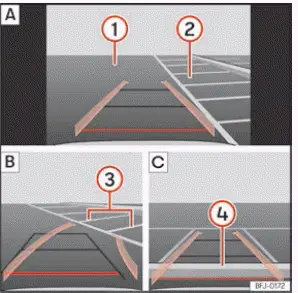
Fig. 144 Display on the infotainment system
display: parking with reverse assist.
- Find a parking space. Identify a suitable perpendicular parking bay with sufficient room for the Seat Ateca. Check the boundaries of the space and make sure that no obstacles or people are present in the intended reversing path.
- Go to the selected parking space. Position the vehicle in front of the chosen bay so that the camera guidance lines can be used to plan the reversing movement. Approach slowly and observe the surrounding traffic.
- Centre the vehicle inside the parking space. Use the displayed orientation lines to guide the Seat Ateca into the bay and align it with the side boundaries. Continue checking the camera image and the surroundings until the vehicle reaches the intended final position.
- Road. The roadway from which the vehicle approaches the selected parking space. This provides the reference area for the initial positioning and reversing manoeuvre.
- Parking space. The selected bay into which the Seat Ateca will be reversed. Its position is shown in relation to the vehicle and the camera guidance lines.
- Side boundary of the parking space. The lateral limit used to align the vehicle within the bay. The driver should compare this boundary with the displayed green and yellow orientation lines.
- Rear boundary of the parking space. The limit at the far end of the bay. This boundary provides the reference for determining when the vehicle should stop reversing.
Parking
- Before driving past the selected parking space, press the
 or
 button to activate the relevant parking assistance function. Make sure the system is available and that the chosen parking bay provides sufficient space for the manoeuvre.
- With Reverse Assist switched on and operating, press the
 function button to select angle parking mode. The infotainment display shows the camera image together with the guidance lines used for perpendicular parking.
- Stop the Seat Ateca in front of the selected parking space, as illustrated in Fig. 144, position 2 A. Check the camera image and the surrounding area to confirm that the vehicle is correctly positioned before beginning to reverse.
- Reverse slowly while turning the steering wheel so that the yellow guidance lines extend into the selected parking space. These lines represent the anticipated path according to the steering angle and help the driver direct the vehicle towards the bay.
Adjust the steering until the green and yellow lines align with the side boundaries of the parking space, marked 3 B in Fig. 144. Continue reversing carefully, checking that the Seat Ateca remains within the indicated boundaries and that the available clearance is sufficient.
- Stop the vehicle when the red guidance line reaches the rear boundary of the parking space, marked 4 C in Fig. 144. This indicates the intended stopping position according to the camera guidance. Before completing the manoeuvre, check the actual distance to any obstacles behind the vehicle, as the camera image does not provide an exact measurement of clearance.
 Connecting and disconnecting
Connect the reverse assist
With the ignition switched on, engage reverse gear. The Rear View Camera system activates and displays the area behind the Seat Ateca on the infotainment screen, allowin ...
 Parallel parking
Fig. 145 Display on the Infotainment System
display: reverse assistant, mode 2.
Find a parking space. Identify a suitable parallel parking space along the road. Check that the space i ...
Other materials:
Dual automatic temperature control
Note: You can switch temperature units between Fahrenheit and Celsius.
See Menu features in the MyFord Touch or MyLincoln Touch chapter.
A. Power/Driver temperature control: Press to turn the climate
control system off and on. When the system is off, outside air cannot
enter the vehicle.
...
Vehicle power sockets
Fig. 156 Vehicle 12-volt sockets.
12-volt sockets in the centre console. These sockets provide a convenient power connection for compatible electrical accessories used inside the Seat Ateca. They are intended for devices designed to operate from a vehicle's 12-volt electrical supply.
...
Remote control
Integrated Keyhead Transmitters (IKTs) (If Equipped)
Use the key blade to start your
vehicle and unlock or lock the
driver door from outside your
vehicle. The transmitter portion
functions as the remote control.
Note: Your vehicle’s keys came
with a security label that provides
importa ...
