
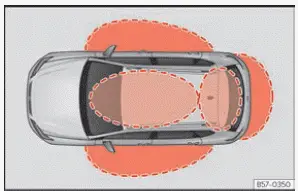
Fig. 48 Keyless Access: proximity zones.
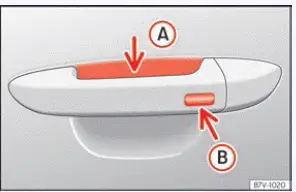
Fig. 49 Door handle: sensor surfaces.
- Unlocking sensor surface on the inner side of the exterior door handle. Touching this area allows the Keyless Access system to recognise an unlocking request when an authorised vehicle key is within the corresponding detection zone.
- Locking sensor surface on the outside of the door handle. This sensor is used to lock the Seat Ateca without pressing a button on the remote control key, provided that the system detects a valid key in the appropriate proximity area.
Depending on its equipment specification, the Seat Ateca may be fitted with Keyless Access, a system that allows the vehicle to be locked, unlocked and started without actively operating the buttons on the vehicle key. Instead, the system recognises an authorised key when it is located within the relevant detection area around the vehicle. To unlock or lock the doors, the driver only needs to operate the appropriate sensor surface on the exterior door handle while carrying a valid key. The detection zones are illustrated in Fig. 48, and the door handle sensors are identified in Fig. 49.
Unlocks the vehicle.
- With an authorised vehicle key within the appropriate proximity zone, touch the unlocking sensor surface A on the inside of the exterior door handle. The Keyless Access system recognises the request and unlocks the vehicle. All direction indicators flash twice to confirm that the unlocking operation has been carried out.
If the Seat Ateca is equipped with selective unlocking, the first operation may unlock only the door or doors specified by the current vehicle settings. Touching the unlocking sensor surface a second time unlocks the entire vehicle, allowing access through the remaining doors. The precise unlocking behaviour depends on the selective opening configuration.
If the Keyless Access unlocking function is not used for an extended period, the system may temporarily deactivate this function. This behaviour is intended to prevent the proximity unlocking feature from remaining continuously active when the vehicle has not been accessed for some time. The function becomes available again the next time the vehicle is unlocked using the remote control key.
Locks the vehicle.
- Park the vehicle safely before attempting to lock it. Make sure the vehicle has been brought to a complete stop and that the normal parking procedure has been completed.
- With a valid key within the appropriate detection zone, touch locking sensor surface B on the outside of the door handle, as shown in Fig. 49. The central locking system locks the vehicle, and all direction indicators flash once to confirm the operation. Check that the vehicle has been secured before leaving it unattended.
After the vehicle has been locked using Keyless Access, the unlocking function is temporarily disabled for a few seconds. This brief interruption allows the driver to check that the vehicle is securely locked without immediately triggering the unlocking function by touching or pulling the door handle. Once this short period has elapsed, the normal Keyless Access unlocking function becomes available again.
Unlocking the rear lid
When the Seat Ateca is locked, the rear lid can be unlocked automatically when its opening mechanism is operated, provided that an authorised vehicle key is detected within the corresponding rear proximity zone. This allows access to the luggage compartment without first unlocking the vehicle doors or pressing a button on the remote control. After the rear lid has been closed, it locks again automatically, maintaining the locked condition of the vehicle.
Temporarily deactivating the Keyless Access system
The Keyless Access unlocking function can be temporarily disabled when the driver wishes to prevent the vehicle from being unlocked simply by touching the exterior door handle. This procedure changes the availability of the proximity unlocking function without requiring permanent changes to the vehicle's equipment or settings. To deactivate the function temporarily, carry out the following steps in the specified order:
- Move the automatic transmission selector lever to position P. The vehicle must be correctly parked before the locking procedure can be completed, and it cannot be locked as described if the required selector position has not been engaged.
- Lock the Seat Ateca using the locking button on the remote control key. This establishes the vehicle's locked condition before the Keyless Access unlocking function is temporarily disabled.
- Within 5 seconds of locking the vehicle, touch sensor surface B on the outside of the exterior door handle once, as illustrated in Fig. 49. The timing is important because the sensor must be operated within the specified period for the temporary deactivation procedure to take effect.
Do not grasp or pull the door handle while touching the outer locking sensor. Operate only the designated sensor surface. This action temporarily disables the Keyless Access unlocking function, preventing the vehicle from being unlocked through the normal proximity sensor operation.
- Wait at least 10 seconds, then pull the exterior door handle to verify that the Keyless Access unlocking function has been deactivated. The door should remain locked and must not open when the handle is pulled. This confirms that touching or operating the handle does not unlock the vehicle through Keyless Access.
After temporary deactivation, the next electronic unlocking operation must be performed using the vehicle key rather than the door handle sensor. Once the Seat Ateca has been unlocked using the remote control key, the Keyless Access system is automatically reactivated. The normal proximity locking and unlocking functions are then available again, provided that an authorised key is detected within the relevant operating zone.
Comfort functions
The Keyless Access system can also be used to operate the comfort closing function for the electric windows and sunroof. To close these openings, place a finger on locking sensor surface B on the exterior door handle, as shown in Fig. 49, and keep it there for several seconds. Maintain contact with the sensor until the electric windows and sunroof have closed. This allows the openings to be closed from outside the Seat Ateca without using the individual window or roof controls inside the passenger compartment. Remain attentive to the closing movement and ensure that no person or object is obstructing the windows or sunroof.
The doors that unlock when the inner sensor surface on the exterior door handle is touched depend on the opening settings selected in the vehicle's Infotainment system. These settings determine how the Keyless Access unlocking function responds, including the behaviour of selective unlocking where fitted. To review or change the configuration, open the vehicle settings using the function button  > Settings > Opening and closing. Select the required opening configuration according to the available options and your preferred unlocking behaviour.
NOTICE Temporarily deactivating the Keyless Access system also disables the sensor-controlled opening and closing functions of the rear lid. This applies even if the corresponding function continues to appear as active in the vehicle's Infotainment menu. While Keyless Access is deactivated, the rear lid's sensor-operated functions will therefore remain unavailable until the system is reactivated. The displayed menu setting does not override the temporary deactivation of Keyless Access.

 Troubleshooting
The Keyless Access system does not work
If the Keyless Access system does not respond when you touch the exterior door handle, the sensor surfaces may be dirty or covered with deposits that interfere ...
Other materials:
Emergency unlocking of the rear lid
Fig. 60 Luggage compartment: access to
manual release.
Fig. 61 Luggage compartment: manual
release.
If the rear lid cannot be unlocked using the normal central locking or electric opening functions, it can be released manually from inside the luggage compartment. This emergency pro ...
Wired and wireless connections
USB connection
Fig. 158 Centre console: USB input.
Fig. 159 Rear centre console: USB connectors
with power socket function.
The Seat Ateca is equipped with a USB connection located in the storage compartment area of the front centre console, as illustrated in Fig. 158. This con ...
Running out of fuel
Avoid running out of fuel because this situation may have an adverse
effect on powertrain components.
If you have run out of fuel:
• You may need to cycle the ignition from off to on several times after
refueling to allow the fuel system to pump the fuel from the tank to
the engine. On rest ...
