
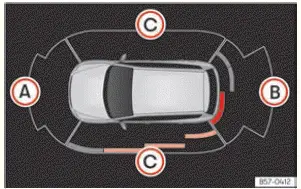
Fig. 133 Park assist view on the Infotainment
system display.
Park Distance Control Plus, also referred to as ParkPilot or Park Assist Plus, helps the driver manoeuvre the Seat Ateca by providing visual and audible warnings about obstacles detected in front of and behind the vehicle. The system is particularly useful when parking in confined spaces or approaching objects that may be difficult to judge from the driver's seat. It supplements direct observation by indicating the approximate location and proximity of detected obstacles, but it does not replace the driver's responsibility for controlling the vehicle.
Ultrasonic sensors are installed in the vehicle's bumpers to monitor the surrounding areas covered by the system. When a sensor detects an obstacle, ParkPilot provides an audible warning and displays the corresponding information on the infotainment screen, as illustrated in Fig. 133. The visual representation helps the driver identify the area in which the obstacle has been detected, while the warning sounds indicate how close the vehicle is to it.
As the Seat Ateca approaches an obstacle, the audible warning characteristics help distinguish whether the detected object is in front of or behind the vehicle. The warning signals for the different monitoring areas allow the driver to recognise the direction of the potential obstruction without relying exclusively on the display. Nevertheless, the surrounding area should always be checked directly, particularly when manoeuvring near pedestrians, other vehicles or fixed structures.
The approximate detection ranges of the parking sensors are listed below. These distances describe the areas monitored by the corresponding sensor groups and should be treated as approximate values rather than guaranteed detection limits:
- 1.20 m. This is the approximate detection range for the sensor area identified as A in the parking assistance illustration. Obstacles within this range may be indicated when the system is active and the sensors can detect them reliably.
- 1.60 m. The sensor area identified as B has an approximate monitoring range of 1.60 metres. The actual ability to recognise an obstacle depends on its position, shape and surface characteristics.
- 0.90 m. The approximate detection range for area C is 0.90 metres. This area is associated with the side monitoring information shown in the parking assistance display and is subject to the system's normal detection limitations.
As the distance between the Seat Ateca and a detected obstacle decreases, the audible warning signals become progressively more frequent. At approximately 0.30 metres, the intermittent warning changes to a continuous tone. This indicates that the vehicle is extremely close to the obstacle and should be stopped immediately. Do not continue moving simply because the obstacle remains visible on the display. If the distance to the obstacle remains unchanged, the volume of the warning is reduced after approximately four seconds to make the continuous signal less intrusive.
To display information about the entire surrounding area of the vehicle, the Seat Ateca must first move a few metres forwards or backwards. This movement allows the parking assistance system to gather information about areas that were not previously covered by its displayed surroundings. As the vehicle moves, the system can incorporate detected obstacles alongside the vehicle into the visual representation. The side areas marked C in Fig. 133 are then shown on the infotainment display. Until the necessary information has been collected, some areas may not be represented, so the driver must check them independently.
Special features of ParkPilot with Area View
When ParkPilot operates together with Area View, the displayed information about the areas alongside the Seat Ateca may be temporarily hidden under certain conditions. This occurs because the system cannot always maintain the information needed to represent the side monitoring areas reliably. The side display is automatically concealed in the following situations:
- When a vehicle door is opened. Opening a door changes the vehicle's immediate surroundings and causes the system to hide the relevant side monitoring information.
- When the Traction Control System (TCS) is switched off. Under this condition, the side area display is automatically hidden rather than continuing to present the previously monitored surroundings.
- When the TCS or Electronic Stability Control (ESC) is actively regulating the vehicle. During these interventions, the side monitoring representation is concealed according to the system's operating logic.
- When the vehicle remains stationary for more than approximately three minutes. After this period without movement, the displayed side area information is automatically hidden and should not be treated as a current representation of nearby obstacles.
Error messages
If an error or malfunction message relating to Park Assist appears in the Seat Ateca instrument cluster, the parking assistance system has detected a fault. The message indicates that one or more functions may not be operating correctly. The driver should take the warning seriously and avoid assuming that all monitored areas remain available.
If the fault has not disappeared before the ignition is switched off, the same warning may not be displayed the next time Park Assist is activated. The absence of a repeated message does not necessarily mean that the underlying problem has been corrected. If the parking assistance system continues to behave abnormally, its operation should be checked.
If a rear parking sensor is defective, the system can continue detecting obstacles in the front monitoring area, but rear obstacle detection is unavailable. Conversely, if a front sensor is faulty, only obstacles in the rear monitoring area are displayed. The relevant fault symbol  appears to identify the restricted parking assistance function. The driver must independently monitor any area for which sensor information is no longer available.
If a sensor fault or another Park Assist malfunction is detected, have the Seat Ateca inspected by a qualified specialist workshop. The affected components should be checked and the cause of the problem corrected before the driver relies on the parking assistance system again.
Trailer mode
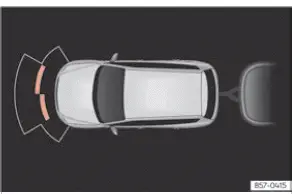
Fig. 134 Park assist display on the screen with
trailer attached.
On Seat Ateca models equipped with a factory-installed trailer hitch, the rear parking sensors are not activated when a trailer is connected to the vehicle. This applies when reverse gear is selected and when the parking assistance button  is pressed. Consequently, obstacles behind or alongside the vehicle are not indicated on the infotainment screen, and the corresponding audible parking warnings are not emitted. The driver must take the trailer's position and the surrounding space into account without relying on rear ParkPilot detection.
The infotainment display continues to show obstacles detected by the front parking sensors, while the vehicle's trajectory representation is hidden. This modified display reflects the restricted operation of the parking assistance system when a trailer is attached. The driver must carefully observe the area behind the trailer and around the vehicle during reversing or other low-speed manoeuvres.
Park assist settings
The audible warnings and other configurable Park Assist indications can be adjusted through the Seat Ateca infotainment system. These settings allow the driver to select how the parking assistance warnings are presented and how they interact with the vehicle's audio system. The available adjustments include:
- Automatic activation: Switches the automatic activation of Park Assist on or off. This setting determines whether the system can activate automatically under the applicable operating conditions.
- Front volume: Adjusts the volume of the parking assistance warnings associated with the front monitoring area and the relevant front and rear warning presentation. Select a level that allows the signals to be heard clearly without becoming unnecessarily distracting.
- Rear volume: Controls the volume of the audible warnings for obstacles detected behind the vehicle. This setting allows the rear warning level to be adjusted independently according to the driver's preference.
- Reduce volume: Determines how much the currently playing audio source is reduced when Park Assist is switched on. Depending on the selected setting, the infotainment system lowers the audio volume so that the parking assistance warnings can be heard more easily.
- Front sound settings/treble: Adjusts the tone of the audible warning signals for the front monitoring area. The selected tone helps distinguish the front parking warnings during manoeuvres.
- Rear sound settings/treble: Adjusts the tone of the warning signals for the rear monitoring area. This allows the driver to select a suitable sound characteristic for obstacles detected behind the Seat Ateca.
WARNING ParkPilot is an assistance system and cannot guarantee that every obstacle or person will be detected. The driver remains responsible for observing the surrounding area and preventing collisions during all parking and manoeuvring operations.
- Always monitor traffic and the area surrounding the Seat Ateca by looking directly in the direction of travel and checking the space around the vehicle. Parking assistance systems provide additional information but cannot replace driver attention or judgement. Responsibility for completing every manoeuvre safely remains with the driver.
- The parking sensors have blind spots in which people and objects may not be detected. Pay particular attention to children and animals, whose position or size may make them difficult for the system to recognise. Never assume that an area is clear simply because ParkPilot has not issued a warning.
- Maintain a clear view of the vehicle's surroundings throughout the manoeuvre. Use the exterior and interior mirrors as additional aids, and check directly whenever visibility is restricted. Stop the vehicle if you cannot determine whether there is sufficient clearance to continue safely.
NOTICE Several environmental conditions, object characteristics and vehicle-related factors can affect the operation of Park Assist Plus. Under certain circumstances, the system may fail to recognise an obstacle or provide an inaccurate indication of its position. Relying exclusively on these warnings can result in damage to the Seat Ateca or nearby objects.
- Under some conditions, Park Assist Plus cannot reliably detect or display particular types of obstacles. Their dimensions, position or surface characteristics may prevent the ultrasonic sensors from receiving a suitable reflected signal. Examples include:
- Chains, trailer drawbars, narrow bars, fences, posts and thin tree trunks. These objects may present only a small surface to the sensors and can therefore be difficult to identify consistently.
- Objects positioned above the sensors' detection area, including projections extending from walls. Such obstacles may not be represented correctly even though they could come into contact with the vehicle during a manoeuvre.
- Objects with particular surface structures or materials, such as wire mesh fences or powder snow. Their characteristics can interfere with the reflection of ultrasonic signals and reduce the reliability of obstacle detection.
- Certain object surfaces and types of clothing do not reflect ultrasonic signals sufficiently for reliable detection. As a result, the parking sensors may fail to recognise these objects or may provide inaccurate information about their position.
People wearing clothing with unsuitable reflective characteristics may also be difficult for the system to detect. Always check for pedestrians directly, regardless of whether the parking assistance display indicates that the surrounding area is clear.
- External sound sources can interfere with the ultrasonic signals used by ParkPilot. This interference may prevent the system from detecting nearby people or objects correctly or may cause unexpected warnings. The driver must continue observing the surroundings whenever such interference is possible.
- If ParkPilot warns about a low obstacle, remember that the obstacle may disappear from the sensors' detection area as the vehicle moves closer. The system may then stop warning about it even though the obstacle remains present and could damage the vehicle. High kerbs and similar objects can also go undetected under certain conditions, particularly when their position creates a risk of contact with components beneath the Seat Ateca. Do not continue moving towards a previously detected obstacle simply because the warning has stopped.
- Ignoring the parking distance warnings can result in considerable vehicle damage. When the audible signals become more frequent or the display indicates that an obstacle is very close, reduce speed and stop before contact occurs. Never use the warnings as permission to continue moving until the vehicle physically reaches an obstacle.
- Damage to the radiator grille, bumpers, wheel arches or underside of the vehicle can alter the alignment of the parking sensors. Even a small change in sensor orientation may affect the accuracy of the distance information or prevent certain obstacles from being detected.
If the Seat Ateca has sustained damage in these areas, have the parking assistance system inspected by a qualified specialist workshop. The sensors should be checked for correct positioning and operation before the system is relied upon again.
- A number plate or number plate holder that extends beyond the designated mounting area can interfere with parking sensor detection. A bent, curved or deformed number plate may have a similar effect. These conditions can cause false obstacle warnings or obstruct part of a sensor's detection area. Ensure that the number plate and its holder are correctly fitted and do not interfere with the sensors.
Note
- The infotainment display responds with a slight delay. Consequently, the visual representation of the surrounding area may not correspond exactly to the vehicle's position at every instant. Manoeuvre slowly and use direct observation rather than relying on the screen alone to judge the remaining distance to an obstacle.
- In certain circumstances, ParkPilot may issue a warning even though no obstacle is present in the monitored area. Such false indications can occur when environmental conditions or external influences interfere with the ultrasonic sensors. Possible causes include:
- Rough or cobblestone road surfaces, or areas covered with long grass. These conditions can affect the signals received by the sensors and may produce unexpected proximity warnings.
- External ultrasonic sources, including parking assistance systems operating on nearby vehicles. Signals from other equipment may interfere with the Seat Ateca's sensors and cause incorrect indications.
- Heavy rain, snowfall, hail or dense exhaust gases. These conditions can interfere with obstacle detection and may cause the system to display warnings that do not correspond to a nearby solid object.
- A number plate that is not securely attached to the bumper. Incorrect mounting or movement of the plate can interfere with the parking sensors and produce false warnings.
- Changes in road gradient, particularly where the surface rises or falls sharply near the vehicle. Such changes can influence how the sensors interpret the surrounding area.
- To maintain reliable ParkPilot operation, keep the parking sensors clean and free from snow, ice and other deposits. Do not cover them with stickers, protective films or accessories that could obstruct their detection areas. Check their condition regularly, particularly after driving in poor weather.
- When cleaning the vehicle with high-pressure water or steam equipment, avoid directing the jet at the parking sensors. If direct application is unavoidable, keep it very brief and maintain a distance of more than 10 cm from the sensor surface. Excessive pressure applied too closely may damage the components or affect their operation.
- Accessories fitted to the front of the Seat Ateca can interfere with Park Assist operation. For example, an advertising number plate holder or another attachment positioned near the sensors may obstruct their detection areas or cause incorrect warnings. Consider the location of the parking sensors before installing additional equipment.
- Practise using ParkPilot in a quiet area away from traffic before relying on its indications in confined parking spaces. Becoming familiar with the warning tones, display graphics and changes in signal frequency will help you understand how the system responds as the vehicle approaches an obstacle.
- The volume and tone of the parking assistance signals can be adjusted through the infotainment system. Select settings that make the warnings clearly distinguishable from other vehicle sounds and allow you to recognise the relevant obstacle information while manoeuvring.
- Observe the instructions relating to towing a trailer. When a trailer is connected, the operation of the rear parking sensors and the information shown on the infotainment display may change. Take these restrictions into account and check the area around the vehicle and trailer directly before reversing or manoeuvring.

 Operating Park Assist Plus
Fig. 135 Centre console: parking aid button
(depending on the version).
Switching on and off manually
Press the button once to switch Park Assist Plus on or off manually. The butt ...
Other materials:
Body System - General Information
SPECIFICATIONS
Material
DESCRIPTION AND OPERATION
Insulation
Insulation is used as a sound-deadener to reduce exterior road and powertrain
noises from the interior of the vehicle. Mastic insulators are also used as
insulation. For information on the location of the mastic insulators, refer
to&nb ...
PreCrash system
How it works
The PreCrash system in the Seat Ateca is a preventive occupant protection function designed to respond when the vehicle encounters certain potentially dangerous driving situations. If the system identifies conditions associated with an increased risk of an accident, it can automaticall ...
Installation
Engine
Special Tool(s)
Material
Lubricate the torque converter pilot hub with Multi-Purpose Grease.
Remove the Torque Converter Retainer and bolt.
NOTE: Align the torque converter stud marked during removal with
the flexplate.Using the Floor Crane and Spreader Bar, assemble t ...
