
Stow items in the cupholder carefully as items may become loose during hard braking, acceleration or collisions, including hot drinks which may spill.
Note: The appearance and features of the center console may be different than shown based on your vehicle’s option level.
Available console features include:
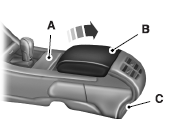
A. Cupholders
B. Utility compartment with audio input jack, USB port, SD card slot and power point
C. Rear power point, rear heated seats control
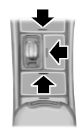
Some consoles have panel doors covering the cupholders and switches. Press the doors to open them.
Some cupholders have a divider.
Pull up on the divider and move it in the slots to best fit the cup you are using.

 Overhead console
The appearance of the overhead console will vary according to your
option package.
Press near the rear edge of the door
to open it. ...
Other materials:
Using sync with your media player
You can access and play music from your digital music player over the
vehicle’s speaker system using the system’s media menu or voice
commands. You can also sort and play your music by specific categories,
such as artists, albums, etc.
SYNC is capable of hosting nearly any digital media pl ...
Auxiliary Power Points
WARNING: Do not plug optional electrical accessories into the
cigarette lighter socket (if equipped). Improper use of the lighter
can cause damage not covered by your warranty, and can result in fire
or serious injury.
Note: If used when the engine is not running, the battery will
discharge.
...
Active park assist
WARNING: This system is designed to be a supplementary park
aid. It may not work in all conditions and is not intended to
replace the driver’s attention and judgment. The driver is responsible
for avoiding hazards and maintaining a safe distance and speed, even
when the system is in use.
Note ...
