
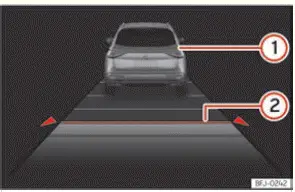
Fig. 114 On the instrument cluster display:
ACC active.
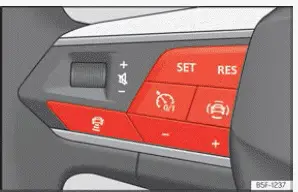
Fig. 115 On the multifunction steering wheel:
buttons for operating the ACC.
- Vehicle detected ahead. The corresponding vehicle symbol illuminates when ACC recognises a vehicle travelling in front and the following distance is being regulated. This indication helps the driver identify whether the system is responding to traffic ahead rather than simply maintaining the programmed cruising speed.
- Selected following distance: level 2. The display indicates the currently programmed distance setting, allowing the driver to check how much separation ACC is configured to maintain from a detected vehicle ahead. The selected level can be changed using the steering wheel controls.
Information about Adaptive Cruise Control can be displayed in the central section of the Assistants view or in the left-hand information profile of the Seat Ateca digital instrument cluster. These layouts provide a more detailed representation of the system's operating status, including detected traffic and the selected following distance. If neither display layout is selected, the essential ACC information appears automatically in a simplified format in the lower central area of the instrument cluster, allowing the driver to monitor the system without changing the current display view.
The programmed cruising speed is displayed alongside the ACC status indicator. This makes it possible to distinguish the speed selected by the driver from the vehicle's actual speed, which may be lower when Adaptive Cruise Control is maintaining a safe distance behind slower traffic. The displayed status also helps identify whether ACC is actively regulating or waiting in standby mode.
Connecting
- Press the
 button on the multifunction steering wheel, as shown in Fig. 115. This switches on Adaptive Cruise Control and prepares the system for speed and distance regulation. Before using ACC, make sure the road and traffic conditions are suitable for assisted driving.
After being switched on, ACC remains in standby mode and does not yet regulate the vehicle's speed or following distance. The driver must continue controlling the accelerator and brake pedals until active regulation is started. Switching on the function alone does not mean that the Seat Ateca will automatically maintain its current speed.
Start regulation
Starting ACC regulation also automatically activates Electronic Stability Control (ESC) and the Traction Control System (TCS). These systems form part of the vehicle's electronic stability and traction assistance and must be available for ACC to operate under its intended conditions. Their activation accompanies the start of Adaptive Cruise Control regulation.
- To begin regulating speed and following distance, press the
 button on the multifunction steering wheel, as illustrated in Fig. 115. Activate regulation only when the vehicle is travelling under suitable conditions and the surrounding traffic can be monitored safely.
ACC stores the current vehicle speed as the programmed cruising speed. If the current speed falls outside the system's permitted operating range, the closest valid speed within that range is selected instead. The system then regulates the Seat Ateca according to the stored speed and the selected following distance, adapting its response when a vehicle ahead is detected within the relevant operating conditions.
On vehicles equipped with an automatic transmission, the selector lever must be in position D, S or M for ACC regulation to operate. These positions allow the system to function while the vehicle is travelling forwards. If the transmission is not in an appropriate driving position, ACC regulation cannot be started or maintained as described.
On Seat Ateca models with a manual transmission, ACC can operate when a forward gear other than first is selected. Reverse gear is also excluded. In addition, the vehicle must be travelling faster than approximately 30 km/h (18 mph). The driver remains responsible for selecting the correct gear and keeping engine speed within an appropriate operating range while ACC is active.
Depending on whether the radar sensor detects another vehicle ahead, the instrument cluster displays one of the following ACC status indicators. These symbols provide a quick visual distinction between active speed regulation with no detected vehicle and active regulation while following traffic.
 Lights up green
Adaptive Cruise Control is switched on and actively regulating, but no vehicle has been detected ahead within the relevant detection area. Under these conditions, ACC operates according to the programmed cruising speed, subject to its normal operating limits. The driver must still watch for traffic and obstacles that may not be recognised by the radar sensor.
 Lights up green
Adaptive Cruise Control is active and has detected a vehicle travelling ahead. The system can adjust the Seat Ateca's speed in response to the detected vehicle while working to maintain the selected following distance. The driver must continue monitoring the traffic situation and intervene if the automatic response is insufficient.
When ACC is switched on but remains in standby mode, the corresponding control lamps illuminate grey rather than green. This indicates that the system is available but is not currently performing active speed or distance regulation. The colour change helps the driver recognise whether ACC is controlling the vehicle or whether manual speed control is required.
Program the speed
To select the desired cruising speed, use the  or
 buttons shown in Fig. 115. These controls adjust the programmed speed in increments of 10 km/h (5 mph), allowing the driver to make relatively large changes without repeatedly entering a new value. Check the speed displayed in the instrument cluster after making an adjustment, and ensure that the selected setting remains appropriate for the applicable speed limit and traffic conditions.
While ACC regulation is active, smaller adjustments can be made using the  button to increase the programmed speed by 1 km/h (1 mph). To reduce the selected speed by the same increment, press the
 button. These smaller adjustments are useful when the driver wants to refine the cruising speed without making a substantial change. The system continues to take account of detected traffic ahead, so the vehicle's actual speed may remain below the programmed value when necessary to maintain the selected distance.
Program the distance setting
ACC allows the driver to choose between five following-distance levels, ranging from very short to very long. The selected level determines the distance that the system attempts to maintain behind a detected vehicle ahead. Choosing a longer setting provides more separation, while a shorter setting reduces the programmed gap. The driver must select a distance suitable for the prevailing speed, visibility, weather and traffic conditions rather than relying solely on the availability of a particular setting.
- Press the
 button and then use the corresponding increase or decrease control shown in Fig. 115 to select the required following-distance level. Observe the instrument cluster display while changing the setting so that the selected distance can be confirmed before continuing.
- Alternatively, press the
 button repeatedly until the desired following-distance level is displayed. Each selection changes the programmed distance according to the available settings, allowing the driver to choose the level most appropriate for the current conditions.
Always observe the regulations governing minimum following distances and safe braking distances in the country where the vehicle is being driven. Legal requirements may differ between countries, and the selected ACC distance must not be treated as a substitute for the driver's responsibility to maintain adequate space. Increase the following distance whenever road conditions or visibility make additional stopping distance necessary.
Suspend regulation (standby)
- Briefly press the
 button shown in Fig. 115, or press the brake pedal. Either action interrupts active ACC regulation and places the system in standby mode. This allows the driver to take direct control when traffic conditions require braking or when automatic speed regulation is no longer appropriate.
The ACC indicator changes to grey, confirming that active regulation has been suspended. The previously programmed cruising speed and following-distance level remain stored, allowing the system to resume using these settings when the driver requests reactivation. While ACC is in standby, the driver must control the vehicle's speed and maintain the required distance from surrounding traffic independently.
If Electronic Stability Control (ESC) or the Traction Control System (TCS) is switched off, ACC regulation is interrupted automatically. The availability of these stability and traction functions is therefore relevant to ACC operation. The driver should check the status of the associated systems if Adaptive Cruise Control unexpectedly enters standby.
Reinstating the cruise control
- Press the
 button to resume ACC regulation using the last stored cruising speed and following-distance setting. Before resuming, check that the programmed speed remains suitable for the current traffic situation, particularly if the vehicle has slowed significantly since regulation was interrupted.
- Alternatively, press the
 button to start regulation using the vehicle's current speed. This allows the driver to establish a cruising speed based on the present driving situation rather than returning to the previously stored value.
Switching off
- Press and hold the ACC control button used to switch off the system. Continue holding it until Adaptive Cruise Control is deactivated. The programmed cruising speed is then cleared, so the previous speed setting is no longer available for automatic resumption. If ACC is required again, it must be switched on and a new speed selected.
Exceeding the speed regulated by the ACC
While driving with Adaptive Cruise Control active, the driver can temporarily increase the vehicle's speed by pressing the accelerator pedal. This allows the Seat Ateca to accelerate beyond the speed currently being regulated by ACC, for example when the driver needs to complete an overtaking manoeuvre. During this accelerator override, ACC regulation is suspended and the driver is responsible for controlling acceleration and maintaining a safe distance from other vehicles. When the accelerator pedal is released, the system resumes regulation according to its stored settings, provided that the necessary operating conditions remain satisfied. The driver should anticipate the return to automatic regulation and avoid releasing the accelerator in a situation where the programmed response would be inappropriate.
Changing the drive profile
On Seat Ateca models equipped with SEAT Drive Profile, the selected driving profile can influence how Adaptive Cruise Control responds when accelerating or braking. This means that ACC may regulate speed and following distance with different acceleration and deceleration characteristics depending on the active profile. The selected driving mode therefore affects not only the vehicle's general driving response but also the behaviour of ACC within its operating limits.
On vehicles without the SEAT Drive Profile function, ACC behaviour can also be adjusted through the driving profiles available in the infotainment system under Drive assist. Selecting one of these profiles changes the relevant ACC settings in the same way as the corresponding profile in SEAT Drive Profile. The driver can therefore influence the system's acceleration and braking characteristics through the available infotainment settings, depending on the vehicle's equipment.
WARNING Before allowing the Seat Ateca to move off under ACC control, always check that the road ahead is clear and that it is safe to proceed. The front radar sensor may fail to recognise certain obstacles, particularly objects that fall outside its detection capabilities or cannot be identified reliably in the current situation. If the vehicle moves forward without the driver checking the surroundings, a collision may occur and serious injuries may result. Do not assume that ACC has detected every obstacle in the vehicle's path. Apply the brakes yourself whenever necessary to prevent the vehicle from moving into danger.
NOTICE When the driver increases speed by pressing the accelerator pedal, ACC regulation is temporarily overridden. Because of the system's technical and detection limitations, ACC may not be able to restore a safe speed or following distance immediately after the accelerator is released. The driver must therefore consider the distance to other vehicles and the prevailing traffic conditions before accelerating beyond the regulated speed.
- Remain prepared to intervene whenever the driving situation requires it. If the Seat Ateca approaches another vehicle too quickly, the available following distance becomes insufficient or ACC does not respond as expected, reduce speed manually and apply the brakes without waiting for an automatic intervention.
 Introduction
Adaptive Cruise Control (ACC) is designed to maintain a cruising speed selected by the driver while also taking account of vehicles travelling ahead. Unlike conventional cruise control, which regulate ...
 Special driving situations
Fig. 116 On the instrument cluster display:
ACC active, vehicle detected on the left.
Adaptive Cruise Control includes functions intended to assist in certain traffic situations, but its ...
Other materials:
Instrument Cluster and Panel Illumination
DESCRIPTION AND OPERATION
Instrument Cluster and Panel Illumination
Overview
Dimmable Backlighting
Dimmable illumination provides backlighting to certain switches and control
components when the parking lamps are on. The level of backlighting intensity is
adjusted by instrument panel dimmer switch ...
Positioning the luggage and cargo
General information
Placing luggage inside the vehicle safely
The Seat Ateca can carry luggage and other items inside the passenger compartment, in the luggage compartment, on a suitable roof carrier or in a trailer. Regardless of where the load is transported, it must be positioned and secured co ...
Operating the glass roof
Fig. 63 On the headliner: glass roof button.
If the sun blind is completely closed or positioned ahead of the moving glass panel, it opens automatically when the sunroof is operated. This allows the glass roof to move without the blind obstructing its travel. However, the sun blind does ...
