
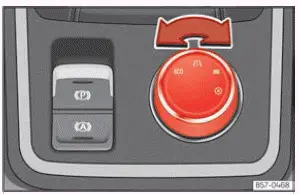
Fig. 102 Centre console: Driving Experience
button.
The Seat Ateca allows the driver to select a driving profile whenever the ignition is switched on, regardless of whether the vehicle is stationary or moving. Each available profile adjusts certain vehicle systems to suit a particular driving style or set of conditions. This makes it possible to change the vehicle's operating characteristics during a journey, although any adjustment should be made without taking attention away from the road.
Selecting a drive profile
- Rotate the Driving Experience button on the centre console until the desired driving profile is selected, as illustrated in Fig. 102. The selector provides a convenient way to change between the available profiles without navigating through several infotainment menus. The selected setting determines how the relevant vehicle systems respond, depending on the equipment fitted to the Seat Ateca.
Displaying the drive profile information
- To view additional details about the currently selected driving profile, press the Information option in the infotainment system. This provides information about the active profile and helps the driver understand which driving characteristics are associated with the selected setting. The information displayed depends on the available vehicle functions and equipment.
WARNING Changing the driving profile while the vehicle is moving can divert the driver's attention from traffic, pedestrians and changing road conditions. Even a brief distraction while operating the Driving Experience button or looking at the infotainment display may increase the risk of an accident. Only adjust the driving profile when it is safe to do so, and avoid prolonged interaction with the controls while driving.
- Always remain attentive to the road and drive responsibly, regardless of the selected profile. Keep your attention on surrounding traffic and make sure that operating the vehicle's controls does not interfere with steering, braking or observing potential hazards. If selecting or reviewing a profile requires more attention than the traffic situation permits, wait until the vehicle is safely stopped.
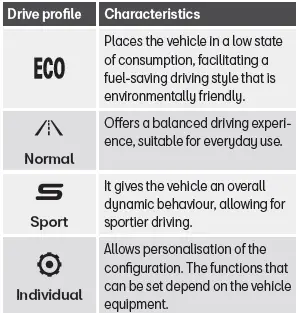
Characteristics of drive profiles
When a driving profile other than Normal is active, the corresponding profile icon appears on the infotainment system display. This provides a visual indication of the selected driving configuration. The rotary Driving Experience selector also uses an LED indicator to identify the active profile. Together, these indications allow the driver to confirm the selected setting and distinguish it from the standard Normal profile. The available profiles and the vehicle systems affected by each selection depend on the equipment installed.
WARNING Always adapt your speed and driving style to the prevailing visibility, weather, road surface and traffic conditions. Selecting a sportier driving profile does not increase the available road grip or remove the physical limitations of the vehicle. Likewise, a profile intended for comfort or efficiency does not reduce the driver's responsibility to maintain a safe speed and sufficient distance from other road users. Choose a driving style appropriate for the actual conditions rather than relying on the selected profile.
Note
- Regardless of which driving profile was active when the ignition was switched off, the vehicle systems start in Normal mode when the ignition is switched on again. The previously selected profile is therefore not automatically restored as the active operating configuration. If you wish to use another profile, select it again using the rotary Driving Experience button on the centre console. This ensures that the desired settings are applied for the current journey.
- The Eco driving profile is not recommended when towing a trailer. The operating characteristics associated with economical driving may be less suitable for the additional demands placed on the vehicle when pulling a trailer. Select an appropriate driving profile and adapt your driving to the trailer load, road gradient and traffic conditions.
 Introduction
SEAT Drive Profiles allow the driver to adjust the operating characteristics of several vehicle systems to suit different driving conditions and personal preferences. Depending on the selected profile ...
 Braking system
Information about the brakes
New brake pads require a running-in period before they can deliver their full braking performance. During approximately the first 200 to 300 km, the friction surfaces o ...
Other materials:
Installation
Engine
Special Tool(s)
Material
Lubricate the torque converter pilot hub with Multi-Purpose Grease.
Remove the Torque Converter Retainer and bolt.
NOTE: Align the torque converter stud marked during removal with
the flexplate.Using the Floor Crane and Spreader Bar, assemble t ...
Removal and Installation
Hood Latch
Removal and Installation
Remove the upper radiator sight shield.
Remove the 8 screws.
Remove the 4 bolts.
Remove the 2 pin-type retainers.
NOTE: Mark the position of the hood latch prior to removing the
hood latch bolts.Remove the 2 bolts and position t ...
Button for the assistant systems
Fig. 103 On the turn light and main
beam lever: key for driver assistance systems
(depending on the version).
Fig. 104 Left side of the multifunction steering
wheel: button for driver assistance systems
(depending on the version).
Depending on the equipment and model ...
