
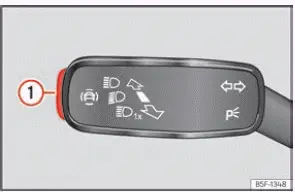
Fig. 103 On the turn light and main
beam lever: key for driver assistance systems
(depending on the version).
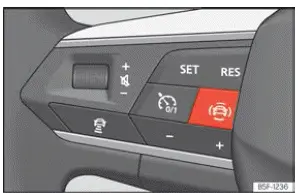
Fig. 104 Left side of the multifunction steering
wheel: button for driver assistance systems
(depending on the version).
Depending on the equipment and model version, the Seat Ateca has a dedicated button for accessing its driver assistance systems. This control is located either on the turn signal and main beam lever, as shown in Fig. 103, or on the left-hand side of the multifunction steering wheel, as illustrated in Fig. 104. The button provides direct access to the Assistants menu, where the driver can review the available assistance functions and switch individual systems on or off. The functions displayed in this menu depend on the assistance equipment installed in the vehicle.
- Press the
 button to open the Assistants menu. The menu provides access to the driver assistance functions that can be controlled through this interface, allowing the driver to check their current settings without searching through the main vehicle configuration menus.
- Navigate to the assistance system you wish to change and select the appropriate option to activate or deactivate it. A check mark next to a function indicates that the corresponding assistance system is switched on. If the mark is absent, the function is not currently activated through this setting. Check the displayed status before confirming any changes.
- Confirm the selected setting by pressing the
 button on the multifunction steering wheel. This confirms the selection made in the Assistants menu and applies the requested setting to the relevant system.
The driver assistance systems can also be activated or deactivated through the vehicle settings menu in the infotainment system. This provides an alternative way to manage the available functions when using the central display. The exact range of settings depends on the equipment fitted to the Seat Ateca, and some assistance systems may have operating conditions that affect their availability.
 Safety advice
WARNING
The driver is responsible for controlling the Seat Ateca and ensuring safe operation at all times. Driver assistance systems are intended to provide support in certain situations, but they ...

Other materials:
Getting assistance outside the u.S. And canada
Before exporting your vehicle to a foreign country, contact the
appropriate foreign embassy or consulate. These officials can inform you
of local vehicle registration regulations and where to find unleaded fuel.
If you cannot find unleaded fuel or can only get fuel with an anti-knock
index low ...
Rear Drive Axle/Differential
SPECIFICATIONS
Material
Torque Specifications
DESCRIPTION AND OPERATION
Rear Drive Axle and Differential
The rear drive axle consists of the following components:
Dished circular flange
Full-time Active Torque Coupling (ATC)
Aluminum housing with steel housing cover
Matched ring and pinion ...
Starting the engine
Vehicles with manual transmission: Move the gear lever into the neutral position, then fully depress the clutch pedal. Keep the clutch pedal pressed until the engine has started. This ensures that the transmission is disengaged during the starting procedure and prevents the vehicle from moving un ...
