
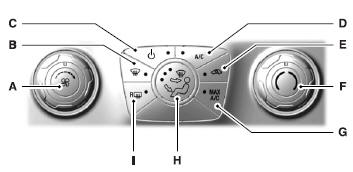
A. Fan speed control:
Controls the volume of air circulated in your vehicle. Turn to select the desired fan speed or switch off. If you switch the fan off, the windshield may fog up.
B. Defrost:
Distributes air through the windshield defroster vents and demister vents. This setting can also be used to defog and clear the windshield of a thin covering of ice.
C. Power:
Press to turn the system off and on. When the system is off, outside air cannot enter the vehicle.
D. A/C:
Press to turn air conditioning off and on. Air conditioning cools the vehicle using outside air. To improve air conditioning when starting your vehicle, drive with the windows slightly open for two to three minutes.
E. Recirculated air:
Press to switch between outside air and recirculated air. When the LED on the button is lit, the air currently in the passenger compartment is being recirculated. Using recirculated air can reduce the time needed to cool the interior and reduce unwanted odors from entering your vehicle.
F. Temperature control: Controls the temperature of the air circulated in your vehicle. Turn to select the desired temperature.
G. MAX A/C: Distributes recirculated air through the instrument panel vents to cool the vehicle. This position is more economical and efficient than normal air conditioning.
H. Air distribution control: Press to set the air distribution to a position listed below:
 Distributes air through the
windshield defroster vents, demister
vents and floor vents.
 Distributes air through the
instrument panel vents.
 Distributes air through the
instrument panel vents, floor vents,
and demister vents.
 Distributes air through the
floor vents.
I. Rear defrost: Turns the heated windows and mirrors off and on.
See Heated windows and mirrors later in this chapter for more information.
 Climate Control
...
 Dual automatic temperature control
Note: You can switch temperature units between Fahrenheit and Celsius.
See Menu features in the MyFord Touch or MyLincoln Touch chapter.
A. Power/Driver temperature control: Press to turn the ...
Other materials:
Specifications, Description and Operation
SPECIFICATIONS
Torque Specifications
a Refer to the procedure in this section.
DESCRIPTION AND OPERATION
Seating
Front Seats
The front seats can be equipped with the following systems:
Manual seat track
Power seat track
Manual recliner
Power recliner
Manual lumbar adjust
Power lumbar ad ...
Driveline System - General Information
SPECIFICATIONS
Material
General Specifications
DESCRIPTION AND OPERATION
Driveline System
The driveline system consists of the following components:
Center support bearing
Driveshaft assembly
Front halfshafts
Rear halfshafts
Active Torque Coupling (ATC)/rear axle
On Front Wheel Drive (FWD ...
General Procedures
Valve Clearance Check
Remove the RH fender splash shield. For additional information, refer
to Section 501-02.
Remove the valve cover. For additional information, refer to Valve
Cover in this section.
NOTE: Turn the engine clockwise only, and only use the crankshaft
...
