
Lighting of the instrument cluster, displays and controls
The brightness of the instrument cluster, displays and illuminated controls in the Seat Ateca can be adjusted through the infotainment system. This allows the driver to select a comfortable level of illumination for the dashboard and other controls, making the information easier to read without creating unnecessary brightness inside the passenger compartment, particularly when driving at night.
- Open the infotainment system and select
 > Settings > Lighting > Vehicle interior lighting. Alternatively, depending on the infotainment system version, select
 > Interior settings > Lighting > Instrument cluster. Use the available adjustment to set the illumination intensity to the desired level.
The selected lighting intensity automatically adapts to changes in the ambient brightness inside the vehicle. As the surrounding light conditions vary, the system adjusts the illumination of the instruments and controls to help maintain their readability and provide a suitable level of brightness for the driver.
When the automatic dipped beam lighting function  is activated, a light sensor monitors the ambient brightness and automatically switches the dipped beam headlights on or off as required. The lighting of the instrument cluster and vehicle controls is also adjusted in accordance with the detected conditions, allowing the exterior and interior illumination to respond together to changes in surrounding light.
In certain situations, such as when driving into a tunnel with the automatic dipped beam function  switched off, the instrument cluster illumination may become significantly dimmer or even switch off. This behaviour is intended to alert the driver that the surrounding conditions have become too dark for driving without the dipped beam headlights. The reduction in dashboard illumination serves as a visual reminder to switch on the appropriate exterior lighting. If the Seat Ateca is equipped with a digital instrument cluster, the message "Turn on the lights" is displayed to indicate that the dipped beam headlights should be activated.
Interior and reading lights
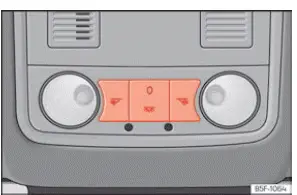
Fig. 82 Detail of headliner: front interior
lighting.
 Switches off the interior lights. Selecting this setting prevents the corresponding interior lighting from remaining illuminated when it is not needed, allowing the occupants to keep the passenger compartment dark.
 Switches on the interior lights. This setting provides illumination inside the passenger compartment when occupants need additional light, for example when entering the vehicle or looking for an item.
Central position Door contact connection. When the interior lighting control is placed in its central position, the lights operate automatically in response to the vehicle's doors, locking system and ignition status. This setting allows the passenger compartment to be illuminated when entering or leaving the vehicle without requiring the occupants to operate the light switch manually.
The interior lights switch on automatically when the Seat Ateca is unlocked, when a door is opened or when the ignition is switched off. This provides temporary illumination for occupants entering or leaving the vehicle. After all the doors have been closed, the lights go out automatically following a short delay. They also switch off when the vehicle is locked or the ignition is switched on, preventing unnecessary interior illumination once the vehicle is secured or ready to be driven.
 Switches the reading light on or off. The reading light provides a more localised source of illumination for an occupant who needs to read or examine something inside the vehicle without necessarily switching on all the interior lights.
The design and arrangement of the interior lighting controls may differ according to the Seat Ateca version and equipment fitted. Although the appearance or position of individual switches may vary, the available controls perform the corresponding interior and reading light functions.
Glove compartment and luggage compartment lighting
The glove compartment and luggage compartment have lighting that operates automatically when the corresponding compartment is opened. Opening the glove compartment on the front passenger side switches on its internal light, making stored items easier to see. The light switches off again when the compartment is closed. Similarly, opening the rear lid activates the luggage compartment lighting, helping occupants locate or arrange items in the load area. Closing the rear lid automatically switches off the luggage compartment light.
Footwell lighting
The footwell lights are located beneath the dashboard on the driver's and front passenger's sides. They illuminate the lower areas of the passenger compartment when the doors are opened, making it easier for occupants to see the floor and position their feet when entering the vehicle. Once the Seat Ateca is being driven, the footwell illumination is reduced to a lower brightness level so that it remains less noticeable and does not unnecessarily distract the driver. The brightness can be adjusted through the infotainment system by selecting  > Settings > Lighting > Interior lighting. This setting allows the driver to choose the preferred illumination intensity for the footwell area.
Background lighting
The background lighting provides additional illumination within the Seat Ateca passenger compartment, highlighting the centre console and the footwell areas. Depending on the vehicle version and equipment, the lighting may also extend to the front door panels. Unlike the main interior lights, background lighting is intended to provide a softer illumination of selected interior areas, making the cabin controls and surrounding surfaces easier to distinguish in low-light conditions.
The brightness and colour of the background lighting can be adjusted through the infotainment system, allowing the interior illumination to be adapted to the driver's preferences. Depending on the infotainment system version, open the menu using  > Settings > Background lighting, or select
 > Background lighting. The available settings provide control over the lighting intensity and colour, according to the equipment installed in the vehicle.
 "Coming home" and "Leaving home"
function (exterior orientation lighting)
The "Coming Home" and "Leaving Home" functions illuminate the area immediately surrounding the Seat Ateca when the driver or passengers enter or leave the vehicle in darkness. These exterior orientati ...
 Visibility
...
Other materials:
Entertainment
A. AM 1 and AM AST
B. FM 1, FM 2 and FM AST
C. SIRIUS
D. CD
E. USB
F. Touch this button to scroll down for more options, such as:
• SD Card
• BT Stereo
• A/V In
G. These buttons change with the media mode you are in.
H. Radio memory presets and CD controls.
Note: Some features ...
Child lock
Fig. 55 Left door child lock.
The child safety lock prevents the rear doors of the Seat Ateca from being opened using their interior door handles. Its primary purpose is to reduce the risk of children accidentally opening a rear door while the vehicle is moving. When the child lock is engaged, ...
Auxiliary Power Points
WARNING: Do not plug optional electrical accessories into the
cigarette lighter socket (if equipped). Improper use of the lighter
can cause damage not covered by your warranty, and can result in fire
or serious injury.
Note: If used when the engine is not running, the battery will
discharge.
...
