
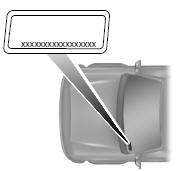
The vehicle identification number is located on the driver’s side instrument panel.
Please note that in the graphic, XXXX is representative of your vehicle identification number.
The Vehicle Identification Number (VIN) contains the following information:
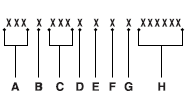
A. World manufacturer identifier
B. Brake system / Gross Vehicle Weight Rating (GVWR) / Restraint Devices and their location
C. Make, vehicle line, series, body type
D. Engine type
E. Check digit
F. Model year
G. Assembly plant
H. Production sequence number.
 Part numbers
1 Refer to scheduled maintenance information for the appropriate
intervals for changing the spark plugs.
Note: Replace the spark plugs with ones that meet Ford material and
design specification ...
 Vehicle certification label
The National Highway Traffic Safety
Administration Regulations require
that a Safety Compliance Certification
Label be affixed to a vehicle and
prescribe where the Safety
Compliance Certificati ...
Other materials:
Settings
A. Clock
B. Display
C. Sound
D. Vehicle
E. Settings
F. Help
Under this menu, you can set your clock, access and adjust the
display, sound and vehicle settings as well as access settings for
specific modes or the help feature.
Clock
Note: You cannot manually set the date. Your vehicle†...
Load limit
Vehicle Loading – With and Without a Trailer
This section will guide you in the proper loading of your vehicle and/or
trailer, to keep your loaded vehicle weight within its design rating
capability, with or without a trailer. Properly loading your vehicle will
provide maximum return of vehicle ...
Disassembly
Engine
Special Tool(s)
Material
NOTICE: During engine repair procedures, cleanliness is extremely
important. Any foreign material, including any material created while cleaning
gasket surfaces that enters the oil passages, coolant passages or the oil pan,
can cause engine failure.
NOTE:& ...
