
 Audible warnings and indicators
Key In Ignition Warning Chime
Sounds when the key is left in the ignition in the off or accessory
position and the driver’s door is opened.
Keyless Warning Alert (If Equipped)
Sounds the horn tw ...
 Trip computer
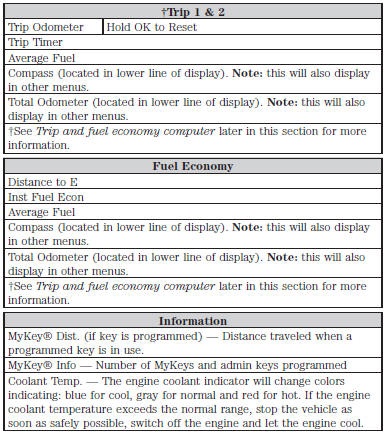
Resetting the Trip Computer
Press and hold OK on the current screen to reset the respective trip,
distance, time and fuel information.
Odometer
Registers the total accumulated distance for the lif ...
Other materials:
Mobile communications equipment
Using mobile communications equipment is becoming increasingly
important in the conduct of business and personal affairs. However, you
must not compromise your own or others’ safety when using such
equipment. Mobile communications can enhance personal safety and
security when appropriately use ...
Using cruise control
WARNING: Do not use cruise control in heavy traffic, on
winding roads or when the road surface is slippery. This could
result in loss of vehicle control, serious injury or death.
WARNING: When you are going downhill, your vehicle speed
may increase above the set speed. The system will not apply ...
Vehicle certification label
The National Highway Traffic Safety
Administration Regulations require
that a Safety Compliance Certification
Label be affixed to a vehicle and
prescribe where the Safety
Compliance Certification Label may
be located. The Safety Compliance
Certification Label shall be affixed to
either the ...
