
WARNING:
In severe weather conditions, it may be necessary to switch your headlamps on manually.
Note:
If the vehicle is equipped with autolamps, it will have the windshield wiper rainlamp feature. When the windshield wipers are turned to low- or high-speed wiping during daylight, and the headlamp control is in the autolamp position, the exterior lamps will turn on after a brief delay and will remain on until the wipers are turned off.
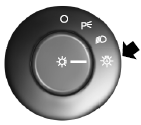
The autolamp system provides light sensitive automatic on-off control of the exterior lights normally controlled by the headlamp control.
The headlamps will remain on for a period of time after you switch the ignition off. You can adjust the time delay using the message center in the instrument cluster.
See Information displays.
 Lighting control
A. Off
B. Parking lamps, instrument panel
lamps, license plate lamps and tail
lamps
C. Headlamps
High Beams
• Push the lever toward the
instrument panel to activate.
• Push the lever ...
 Instrument lighting dimmer
• Tap the top or bottom of the
control to brighten or dim
all interior lit components
incrementally.
• Press and hold the top of the
control to activate the “dome on�
feature. This w ...
Other materials:
Interior luggage compartment release
WARNING: Keep vehicle doors and luggage compartment locked
and keep keys and remote transmitters out of a child’s reach.
Unsupervised children could lock themselves in the trunk and risk
injury. Children should be taught not to play in vehicles.
WARNING: Do not leave children, unreliable adu ...
Interior mirrors
WARNING: Do not adjust the mirror when your vehicle is
moving.
Note: Do not clean the housing or glass of any mirror with harsh
abrasives, fuel or other petroleum or ammonia based cleaning products.
You can adjust the interior mirror to your preference. Some mirrors also
have a second pivot p ...
Diagnostic Methods
Effective Diagnostic Techniques
NOTE: Do not use this document in place of Ford-prescribed Symptom
Based Diagnostics or Workshop Manual diagnostics. Diagnostic Methods is intended
to provide Ford vehicle diagnostic information only for support of
Ford-prescribed diagnostics.
The following di ...
