
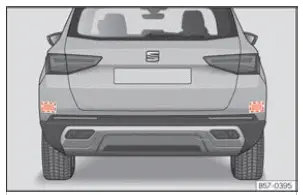
Fig. 108 Rear view of the vehicle: radar sensor
areas.
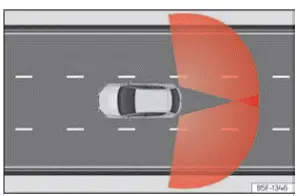
Fig. 109 Sensor detection zones.
The Seat Ateca is equipped with rear radar sensors positioned behind the left and right sections of the rear bumper. These sensors are concealed within the bumper assembly and are therefore not visible from outside the vehicle, as illustrated in Fig. 108. Their purpose is to monitor areas alongside and behind the vehicle that may be difficult for the driver to observe directly. The monitored regions include the blind spots on either side of the vehicle and the area behind it, with the approximate detection zones shown in Fig. 109. The information collected by the sensors helps the relevant driver assistance systems recognise approaching vehicles and other traffic within their operating limits.
The rear radar sensors provide detection information for the following driver assistance functions. Their availability and operation depend on the equipment fitted to the Seat Ateca and whether the sensors can monitor their designated areas without obstruction:
- Side Assist. This function uses information from the rear radar sensors to monitor traffic in the areas alongside and behind the vehicle, including regions that may not be clearly visible in the exterior mirrors. The system can provide assistance when the driver is considering a lane change, subject to its detection capabilities and operating conditions.
- Rear Cross Traffic Alert. This function uses the rear radar sensors to detect traffic approaching from the sides behind the vehicle. It is particularly relevant when reversing out of a parking space where the driver's view of approaching vehicles may be restricted by neighbouring vehicles or other obstacles.
Automatic deactivation of supported functions
The rear radar sensors may deactivate automatically if the vehicle detects that one of them has remained obstructed for an extended period. When a sensor cannot reliably monitor its designated detection area, the assistance functions that depend on its information may be restricted or switched off. This prevents the systems from continuing to operate on the assumption that the surrounding traffic can be detected correctly.
One possible cause of automatic deactivation is a layer of snow or ice covering the bumper area directly in front of a rear radar sensor. Although the sensors themselves are hidden behind the bumper, material accumulating on the outside can interfere with their ability to detect objects. Similar restrictions may arise when other substances or obstructions affect the radar signal.
When the system detects such a restriction, a corresponding text message appears on the instrument cluster display. The message informs the driver that the affected assistance function is unavailable or operating with limitations. Check the relevant bumper areas for obstructions and do not rely on the disabled function until normal sensor operation has been restored.
Control lamps
 Side Assist function not available. This indication means that the system cannot currently provide its normal assistance for monitoring traffic alongside and behind the vehicle. The driver must check the mirrors and surrounding traffic independently before changing lanes or performing other manoeuvres.
 Rear Cross Traffic Alert function not available. When this warning is displayed, the system cannot be relied upon to detect approaching cross traffic while reversing. Carefully observe the area behind and to both sides of the vehicle, particularly when leaving a parking space with restricted visibility.
NOTICE
- The radar sensors installed behind the rear bumper may be damaged or displaced if the bumper is struck, even during a relatively minor collision. Such impacts can occur while entering or leaving a parking space, for example when the bumper comes into contact with another vehicle or an obstacle. A change in sensor position can affect the direction and accuracy of radar detection. As a result, the associated assistance systems may deactivate automatically or continue operating with reduced effectiveness. If the rear bumper has been damaged, have the sensors inspected before relying on their functions.
- Keep the rear bumper free from snow, ice and other material that could obstruct the radar sensors. Pay particular attention to the areas behind which the sensors are installed, even though the components themselves cannot be seen from outside. Do not cover these sections of the bumper with objects or accessories that could interfere with radar detection. Maintaining a clear detection area is necessary for the rear assistance systems to operate correctly.
- Only use paint approved by SEAT when repainting the rear bumper. The properties of the paint and the way it is applied can influence the radar signals passing through the bumper surface. Using unsuitable paint may restrict radar detection or cause the associated lane-change warning functions to operate incorrectly. Any bumper refinishing work should therefore take account of the concealed radar sensors and the manufacturer's requirements.
- The detection capability of the rear radar sensors may be affected by environmental conditions and material accumulating on the bumper. Leaves, snow, dense mist, dirt and similar obstructions can interfere with the sensors' view of surrounding traffic. Clean the bumper surfaces in front of the sensors when contamination is present, and check that no material remains in the areas used for radar detection.
- Never rely on automatic lane-changing assistance or Rear Cross Traffic Alert when the rear radar sensors are dirty or obstructed. Under these conditions, the systems may be unable to identify approaching vehicles correctly or provide the expected assistance. Clean the affected sensor areas before using these functions and remain responsible for checking the surrounding traffic yourself.
- Accessories fitted to the rear of the Seat Ateca, including bicycle carriers, luggage racks and similar equipment, may interfere with the rear radar sensors. Depending on their position and construction, these objects can obstruct or affect radar detection and reduce the effectiveness of the associated assistance systems. Take this possibility into account whenever rear-mounted accessories are installed, particularly when manoeuvring or changing lanes.
Ultrasound sensors
The Seat Ateca may also be equipped with ultrasonic sensors integrated into its bumpers. These sensors are used by the parking assistance systems to detect obstacles in the surrounding area during low-speed manoeuvres. They provide information that helps the relevant functions identify nearby objects when the vehicle is being parked or moved through confined spaces. Depending on the installed equipment, the ultrasonic sensors support the following systems:
- Park Assist. The ultrasonic sensors provide information about nearby obstacles and the surrounding parking area to support the vehicle's parking assistance function. Their correct operation is important when manoeuvring into or out of parking spaces.
- Park assist plus. This function uses information from the parking sensors to assist the driver in recognising obstacles around the vehicle during parking and other low-speed manoeuvres, according to the system's equipment and operating conditions.
- Rear park assist. The rear ultrasonic sensors monitor the area behind the vehicle and help identify nearby obstacles while reversing. This assistance is particularly useful when the driver's direct view of the space behind the Seat Ateca is limited.
NOTICE
- Damage to the radiator grille, bumpers, wheel arches or underside of the vehicle can alter the position or orientation of the sensors used by the parking assistance systems. Even a relatively small change in sensor alignment may affect the accuracy of obstacle detection and cause the parking assistance functions to respond incorrectly. If any of these vehicle components has been damaged, arrange for the affected systems to be checked by a qualified specialist workshop. Correct sensor positioning is essential for reliable operation.
- A number plate or number plate holder that extends beyond the designated mounting area may interfere with the parking sensors. The same applies to a number plate that is bent, curved or otherwise deformed. These conditions can obstruct part of a sensor's detection area or cause the system to interpret the number plate assembly as an obstacle. As a result, false warnings may occur, or the sensors may lose visibility of certain areas around the vehicle. Ensure that the number plate and its holder fit correctly within the intended mounting space.
Note
- For reliable operation of the ultrasonic parking sensors, keep their surfaces clean and free from snow, ice and accumulated dirt. Do not cover the sensors with stickers, decorative items or other objects that could interfere with the transmission and reception of ultrasonic signals. Check the sensor areas regularly, particularly after driving in poor weather or on dirty roads, as even localised contamination may affect obstacle detection.
- When cleaning the vehicle with high-pressure washing equipment or a steam cleaner, avoid directing the jet continuously at the sensors. If direct exposure cannot be avoided, keep it extremely brief and maintain a distance of more than 10 cm between the cleaning equipment and the sensor surface. Excessive pressure or prolonged exposure at close range may damage the sensors or interfere with their correct operation.
- Certain accessories fitted to the front of the vehicle can interfere with the parking assistance system. For example, a number plate holder incorporating an advertising panel may extend into an area monitored by the sensors or obstruct their detection field. Before fitting such accessories, make sure that they do not interfere with the sensors or cause false obstacle warnings during parking manoeuvres.
Area View system
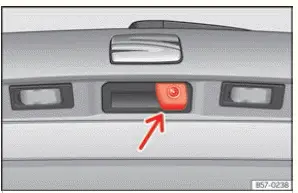
Fig. 110 On the rear lid handle: top view
system.
Depending on the equipment specification, the Seat Ateca may have either one camera or a system incorporating four cameras. These cameras provide visual information about the area around the vehicle and support the relevant parking and manoeuvring functions. The rear camera is located in the tailgate handle area, as shown in Fig. 110. The number of cameras fitted determines which views and assistance functions are available through the vehicle's display.
- Top View Camera. On vehicles equipped with the multi-camera arrangement, the system provides views of the surrounding area to assist the driver when parking or manoeuvring in confined spaces. The images help the driver assess the position of the vehicle relative to nearby obstacles, within the limits of camera visibility.
- Rear View Camera. This function displays a camera image of the area behind the Seat Ateca, providing additional visual assistance when reversing. It can help the driver observe obstacles that may be difficult to see directly, although the displayed image does not replace checking the mirrors and the surrounding area.
WARNING Fitting a number plate frame or holder that extends into the camera's viewing area can obstruct part of the image displayed on the screen. This reduces the camera's effective field of vision and may prevent the driver from seeing obstacles or other objects behind the vehicle. Make sure that the number plate assembly does not interfere with the camera lens or the area it monitors. Never rely exclusively on the camera image when reversing or manoeuvring, particularly if any part of the displayed view is obstructed.
NOTICE
- Keep all camera lenses clean and free from snow, ice, mud and other deposits to maintain a clear image on the infotainment display. Do not cover the cameras with stickers, accessories or objects that could restrict their field of vision. Where the vehicle is equipped with the relevant cleaning arrangement, the camera can be cleaned by operating the wiper. Check the displayed image before relying on it during parking or reversing, especially after driving in adverse weather.
- Never use abrasive cleaning products or materials on the camera lens. Abrasive substances can scratch or damage the lens surface, reducing image clarity and potentially affecting the usefulness of the camera view. Clean the lens carefully using suitable non-abrasive methods so that the optical surface remains undamaged.
- Do not use hot or warm water to remove snow or ice from a camera lens. Sudden temperature changes may damage the camera or its components. Remove snow and ice carefully without applying excessive force or using cleaning methods that could harm the lens or camera housing.
 Front camera
Fig. 107 On the windscreen: field of vision of
the Lane Assist system camera.
Depending on the equipment fitted to the Seat Ateca, a forward-facing camera may be installed on the front w ...

Other materials:
Operating the speed limiter
Fig. 112 On the multifunction steering wheel:
buttons to control the speed limiter.
Connecting
Press the button to switch on the speed limiter. This makes the function available for setting a maximum driving speed through the steering wheel controls.
Switching on the speed li ...
Radio equipment and symbols
The radio functions available in the Seat Ateca depend on the infotainment system installed in the vehicle, its equipment specification and the country in which it is used. These factors determine which frequency bands, reception methods and additional radio features are supported. Depending on the ...
Introduction
The cruise control system (GRA) allows the Seat Ateca to maintain a driving speed selected by the driver without requiring continuous pressure on the accelerator pedal. Once the desired speed has been stored and speed regulation is active, the system controls the vehicle's speed according to the sel ...
