
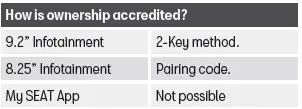
The procedure for confirming vehicle ownership depends on the infotainment system installed in the Seat Ateca. Depending on the equipment configuration, ownership accreditation is carried out either by using both physical vehicle keys or by entering a registration code. This verification is required to establish the primary user and confirm that the person registering the connected services is authorised to manage the vehicle.
9.2" Infotainment system
For vehicles equipped with the 9.2-inch infotainment system, becoming the primary user requires both physical vehicle keys. The two-key verification procedure confirms ownership during the SEAT CONNECT registration process. If you already have a SEAT CONNECT account, first log into that account through the infotainment system and then open the user management section. The ownership check is completed inside the vehicle, using the two keys as part of the verification procedure.
- Switch on the ignition and the infotainment system. Make sure both physical vehicle keys are available before starting the ownership accreditation process.
- Open the SEAT CONNECT registration procedure in the infotainment system and follow the displayed instructions to associate your user account with the Seat Ateca.
- Alternatively, open the menu Manage users > Settings > Become primary user. Follow the instructions shown on the infotainment display to begin the primary-user verification procedure.
- Press the unlock button on the first vehicle key when instructed by the system. This is the first part of the two-key ownership verification.
- Press the unlock button on the second vehicle key when prompted. The system uses the confirmation from both physical keys to complete the required ownership accreditation procedure.
8.25" Infotainment system
For a Seat Ateca equipped with the 8.25-inch infotainment system, primary-user accreditation is performed using a registration code rather than the two-key procedure. The code is available through the SEAT website and the My SEAT App after the vehicle has been linked to your user account. To obtain it, open My Garage > Add Vehicle and complete the vehicle registration steps, including acceptance of the applicable terms and conditions and the SEAT Privacy Policy. Once the registration code is available, complete the ownership verification inside the vehicle by opening Vehicle settings > SEAT CONNECT > Registration in the infotainment system. Enter the pairing code displayed in the My SEAT App and follow the instructions to submit the verification request. After the infotainment system has processed the required commands through its radio communication connection, ownership accreditation is completed. You can then check the current verification status in the My SEAT App to confirm whether the vehicle has been successfully associated with your account as the primary user.
Identity accreditation (SEAT ID)
Identity accreditation is a separate verification requirement for SEAT CONNECT services that involve sensitive vehicle security functions. Before using services such as "Remote Opening", the registered user must complete the necessary identity verification. This procedure helps ensure that security-related remote operations are available only to an appropriately verified account holder. Identity accreditation can be completed in person at a specialised SEAT dealership with assistance from a brand representative, or independently through the online verification procedure provided in the My SEAT App. The method used depends on the available verification options and the instructions associated with the service.
For further information about SEAT ID, the identity verification procedure and the requirements for activating security-related connected services, consult the My SEAT App. The application provides the relevant instructions and information needed to complete the accreditation process for your Seat Ateca.
 Activation of SEAT CONNECT and SPIN
To activate SEAT CONNECT on your Seat Ateca, you must complete the registration and vehicle-linking procedure. This process associates the vehicle with your SEAT ID, establishes the necessary account ...
 Legal provisions
When SEAT CONNECT services are used, information is transmitted, received and processed online through the vehicle's communication systems. Some of this information may directly or indirectly reveal d ...
Other materials:
Disassembly and Assembly
Transaxle - Overhaul
Special Tool(s)
Material
Disassembled Views
All vehicles
Special Tool(s): Holding Fixture 307-580
Special Tool(s): Retainer, Torque Converter 307-346
NOTICE: The torque converter is heavy. Be careful not to drop
it or damage will result.NOT ...
Installing child seats
Child Seats
Use a child safety seat (sometimes
called an infant carrier, convertible
seat, or toddler seat) for infants,
toddlers or children weighing
40 pounds (18 kilograms) or less
(generally age four or younger).
Using Lap and Shoulder Belts
WARNING: Airbags can kill or injure a child ...
Store the rear shelf
Fig. 169 In the boot: covers for storing the rear
shelf.
Fig. 170 In the boot: fitting the rear shelf.
Depending on the equipment fitted to the Seat Ateca, the removable luggage compartment shelf can be stored in a designated space beneath the boot floor when it is not required. ...
