
Connect System
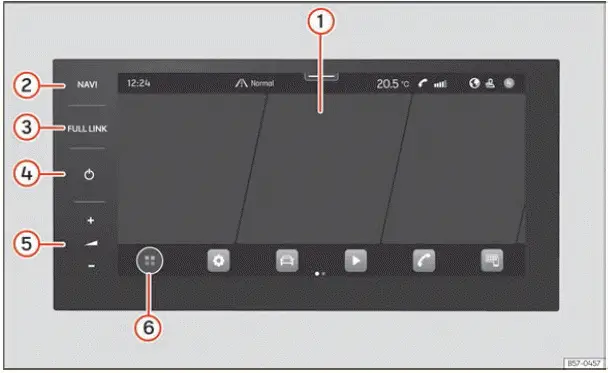
Fig. 160 Overview: control unit
- Touch screen. The touchscreen is the main interface for operating the Seat Ateca infotainment system. Touch the corresponding icons, menus and on-screen controls to select functions, change settings and access the information displayed. The available functions depend on the vehicle's equipment and the currently selected menu.
- Navigation menu access. Opens the navigation menu, providing access to the navigation functions supported by the installed infotainment system. The menu allows you to operate the available navigation features and view the corresponding information on the display.
- Access the Full Link menu. Opens the Full Link interface, which allows compatible mobile phones to connect to the infotainment system using supported smartphone integration technologies. The connection options available depend on the connected device and the vehicle's equipment.
- Turn the infotainment on/off. Use this control to switch the infotainment system on or off manually. The system can also switch on or off automatically under certain conditions associated with the vehicle's ignition and operating state.
- Turn volume up/down. Adjusts the audio output level of the infotainment system. Increase or decrease the volume as required, while ensuring that warning signals and other important sounds outside the vehicle remain clearly audible.
- Main menu in tile mode. Displays the main infotainment functions as tiles, allowing direct access to the available menus and system features. This layout provides an overview of the functions that can be selected from the main screen.
Media System
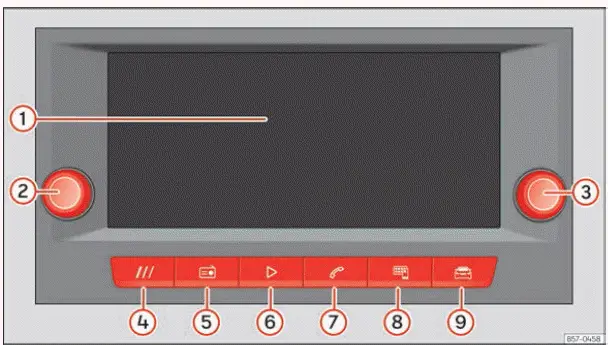
Fig. 161 Overview: control unit and indication in
the 8.25-inch version
- Touch screen. The 8.25-inch touchscreen provides access to the infotainment system's menus, settings and supported functions. Select the required on-screen controls to navigate through the interface and operate the available features.
- Rotary push button for volume and power. Turn the control to adjust the infotainment volume. The same control is also used to switch the infotainment system on or off, providing direct access to these functions without navigating through the touchscreen menus.
- Rotary push button for searching and selecting. Use this control to browse available options and make selections within the infotainment system. It provides an alternative method of navigating supported menus and choosing the required function or item.
- HOME button. Opens the infotainment system's start page. Press this button to return to the main interface, where the available functions and menus can be accessed.
- Radio. Opens the radio interface for selecting and listening to available radio stations. The functions displayed depend on the radio services and reception options supported by the installed system.
- Multimedia. Provides access to the media functions used for playing audio from compatible sources. The available playback options depend on the connected devices, supported media and equipment configuration.
- Telephone. Opens the telephone menu, allowing supported phone functions to be operated through the infotainment system when a compatible mobile device is connected.
- Full Link. Opens the smartphone integration menu for connecting compatible mobile phones and accessing the supported Full Link technologies available in the Seat Ateca.
- Vehicle. Provides access to vehicle-related information and settings available through the infotainment system. The functions shown depend on the equipment and configuration of the vehicle.
 Safety instructions
Some functions of the Seat Ateca infotainment system may provide links to websites operated by independent third parties. These links are offered as a means of accessing external information or servic ...

Other materials:
Net bag
Fig. 175 In the boot: net bag hooked up at floor
level.
Fig. 176 In the luggage compartment: rings 1
and hooks 2 for attaching the net bag.
The luggage compartment net bag helps prevent lightweight luggage and smaller belongings from moving around the boot while the vehicle i ...
Air filter(s)
WARNING: To reduce the risk of vehicle damage and/or personal
burn injuries, do not start your engine with the air cleaner
removed and do not remove it while the engine is running.
When changing the air filter element, use only the air filter element
listed. Refer to Motorcraft® Part Numbers in ...
Specifications, Description and Operation
SPECIFICATIONS
Material
General Specifications
Torque Specifications
a Refer to the procedure in this section.
DESCRIPTION AND OPERATION
Wheels And Tires
Safety Precautions
WARNING:
Vehicle may have multiple drive wheels. Do not use engine to power the driveline
unless all drive wheels are ...
