
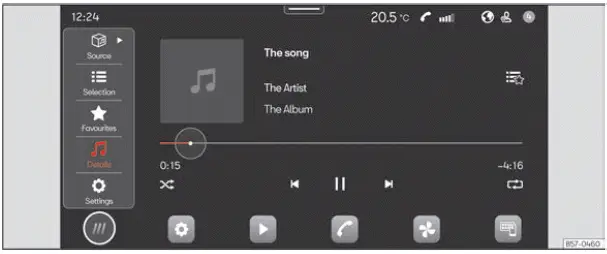
Fig. 163 Schematic representation: Media view
Media mode allows you to play compatible multimedia files through the Seat Ateca infotainment system using supported external data media and connected devices. Depending on the equipment installed in the vehicle, the system can access audio and other supported media content stored on connected devices and reproduce it through the available infotainment functions. The media interface provides access to the corresponding playback controls and the content available from the selected source.
The types of data media that can be connected depend on the infotainment system's equipment and supported interfaces. Not every Seat Ateca configuration offers the same connection options, and successful playback also depends on the compatibility of the connected device and its stored files. The following types of media sources may be supported:
- USB storage devices. Compatible USB storage media can be used as a source of multimedia files. Examples include a USB memory stick or a mobile phone connected through a USB interface. The infotainment system accesses supported files stored on the connected device, provided that the device and its data configuration are compatible with the system.
- Bluetooth devices. Compatible devices, such as mobile phones and tablets, can be connected through Bluetooth for supported media playback. This allows audio content to be transmitted wirelessly from the connected device to the infotainment system, subject to the Bluetooth functions and profiles supported by both devices.
Depending on the installed infotainment equipment, Media mode can reproduce different categories of multimedia files. The formats and playback functions available are determined by the system's capabilities and the compatibility of the selected media source. The supported types of content may include:
- Audio files. Compatible digital audio files can be played through the infotainment system from supported data media. The availability of individual files depends on their format, storage location and the ability of the system to read the connected device.
- Video files. Certain infotainment configurations also support video file playback. This function depends on the installed system, and video content can be reproduced only when the corresponding equipment and file compatibility requirements are satisfied.
Access the MEDIA menu
- Press HOME
 > to open the Media menu, as illustrated in Fig. 163. The infotainment system displays the available media interface, allowing you to access supported playback sources and select compatible multimedia content. The appearance and available options depend on the installed infotainment version.
Access the settings
- Press HOME >
 >
 to access the Media mode settings. This menu contains the configuration options supported by the installed infotainment equipment and the selected media functions.
Data media limitations and indications
External data media may fail to operate correctly if they have been exposed to excessive temperatures or have suffered physical damage. High temperatures can affect electronic storage devices and their components, while damaged connectors or storage media may prevent the infotainment system from accessing the stored files. If a device is not recognised or playback becomes unreliable, its physical condition and compatibility should be considered before attempting to use it again.
Always observe the instructions and operating limitations provided by the manufacturer of the data storage device. These may include requirements relating to handling, storage conditions, supported connections and the correct use of the equipment. Following the manufacturer's recommendations helps reduce the risk of device damage and problems when connecting external media to the Seat Ateca infotainment system.
Differences in manufacturing quality and technical characteristics between data media from different manufacturers can affect their operation with the infotainment system. Even devices of the same general type may behave differently during file access and playback. As a result, some storage devices may experience interruptions, recognition problems or other multimedia playback malfunctions despite appearing to be compatible.
An incorrectly configured data storage device may not be readable by the infotainment system. The way the device is prepared and the arrangement of its stored data can affect whether the system is able to recognise it and access the available multimedia files. If the device cannot be read, the problem may be related to its configuration rather than to the individual audio or video files stored on it.
Playlists do not contain the multimedia files themselves. Instead, a playlist defines the intended playback sequence and contains references to the locations of the corresponding files within the storage device's folder structure. When a playlist is selected, the infotainment system uses these references to locate and play the individual media files in the specified order. For playback to work correctly, the referenced files must still be present in the locations indicated by the playlist. If files have been moved, renamed or deleted, the playlist may no longer be able to access them, even though the playlist itself remains available on the data medium.
Note SEAT accepts no liability for damage to, deterioration of or loss of files stored on external data storage devices. Multimedia files and other information held on connected media remain the responsibility of the device owner. Before using a storage device with the Seat Ateca infotainment system, make sure that any important files are preserved separately, as the vehicle manufacturer does not assume responsibility for their integrity or continued availability.
 Media Mode
...
 Equipment features and media symbols
Audio, multimedia and connectivity:
Media playback and control via Bluetooth. The Seat Ateca infotainment system supports wireless media playback from compatible Bluetooth devices, including mobil ...
Other materials:
Introduction
The Seat Ateca infotainment system combines a range of important vehicle functions within a central control interface. Depending on the equipment installed, it provides access to air conditioning controls, vehicle configuration menus, radio and audio functions, navigation and other supported systems ...
Window anti-trap function
The electric windows in the Seat Ateca are equipped with an anti-trap, or roll-back, function designed to reduce the risk of injury when the windows are closing. This protective feature monitors the closing movement and helps prevent the glass from continuing to rise when unusual resistance is encou ...
Removal and Installation
Clockspring
Removal and Installation
WARNING: If
the clockspring is not correctly centralized, it may fail prematurely. If in
doubt, repeat the centralizing procedure. Failure to follow these instructions
may increase the risk of serious personal injury or death in a crash.
NOTE: Remov ...
