
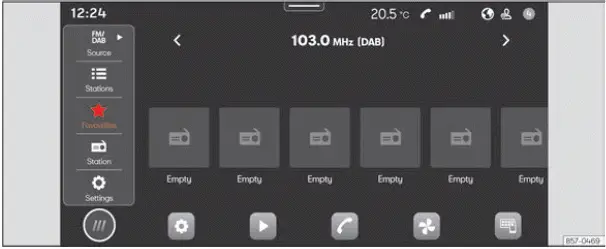
Fig. 162 Schematic representation: Radio view.
Radio mode allows you to listen to available radio stations through the Seat Ateca infotainment system. Depending on the installed radio equipment, stations can be received using different frequency bands and reception methods. Frequently used stations can be stored as favourites on the preset buttons, making it possible to select them quickly without searching through the available broadcasts each time. The radio interface provides access to station selection and the other functions supported by the installed system.
The available frequency bands and types of radio reception depend on the vehicle's equipment and the country in which it is being used. Broadcasting services and the frequencies assigned to them can vary between regions. In some countries, particular frequency bands may no longer be used for radio broadcasting or may become unavailable because the corresponding services have been discontinued. Consequently, the radio functions and stations accessible in one country may differ from those available in another.
Access the RADIO menu
- To open Radio mode, select HOME >
 ››› Fig. 162. The infotainment system displays the radio interface, where you can access the available stations, supported reception options and stored favourites. The appearance of the screen may vary according to the installed infotainment version.
Access the settings
- To open the radio configuration options, select HOME >
 >
 . The settings menu contains the available controls for configuring radio operation. The options displayed depend on the radio equipment, reception capabilities and country-specific configuration of the vehicle.
Online functions in Radio mode
Some radio functions use online services and therefore require more than ordinary radio reception. These features depend on the vehicle's connectivity equipment, the status of the associated SEAT CONNECT services and the availability of a suitable data connection. Online functions in the Seat Ateca Radio mode can be used only when the following requirements are satisfied:
- SEAT CONNECT equipment. The vehicle must be equipped with the SEAT CONNECT functionality required to support the corresponding online radio services. Vehicles without the necessary connectivity equipment cannot access functions that depend on these services.
- Active SEAT CONNECT user account. You must have a valid, active SEAT CONNECT user account. The account provides access to the connected services associated with the vehicle, subject to the applicable service conditions and availability.
- Vehicle assigned to the user account. The Seat Ateca must be correctly associated with your SEAT CONNECT account. This connection allows the relevant online services to identify the vehicle and provide the functions available under the registered account.
- Available mobile data. A suitable data allowance is required for online radio functions. This may be provided through a corresponding data plan purchased from the webshop of SEAT's official data supplier. Alternatively, the necessary data connection may be supplied through the Wi-Fi hotspot using the data allowance of your own mobile device. The connection must have sufficient available data for the requested online functions to operate.
Note
- Radio broadcasters are responsible for the information and programme content they transmit. SEAT does not control the material provided by individual radio stations. In addition, electrical equipment connected to the vehicle may interfere with radio reception or produce unwanted noise through the loudspeakers. If reception quality deteriorates or unusual audio interference occurs, consider whether a connected electrical device could be contributing to the disturbance.
- Metallic films, foil coverings and stickers containing metal coatings can affect radio reception when they are applied to vehicle windows incorporating an aerial. Such materials may weaken or obstruct the signals received by the window aerial and reduce reception quality. When fitting window films or decorative stickers to the Seat Ateca, take care not to interfere with the areas used for radio reception.
 Radio mode
...
 Radio equipment and symbols
The radio functions available in the Seat Ateca depend on the infotainment system installed in the vehicle, its equipment specification and the country in which it is used. These factors determine whi ...
Other materials:
Disassembly
Engine
Special Tool(s)
Material
WARNING: Do not smoke, carry lighted tobacco or have an open flame of any
type when working on or near any fuel-related component. Highly flammable
mixtures are always present and may be ignited. Failure to follow these
instructions may result in serious person ...
In california (U.S. ONLY)
California Civil Code Section 1793.2(d) requires that, if a manufacturer
or its representative is unable to repair a motor vehicle to conform to
the vehicle’s applicable express warranty after a reasonable number of
attempts, the manufacturer shall be required to either replace the
vehicle wit ...
General Procedures
Audio Control Module (ACM) Self-Diagnostic Mode
NOTE: If the Audio Front Control Module (ACM) is completely
inoperative (does not power up), the part number decal on the Audio Front
Control Module (ACM) chassis can be used to attain the ACM part number.
Turn the ACM on.
...
