
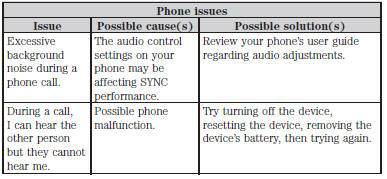
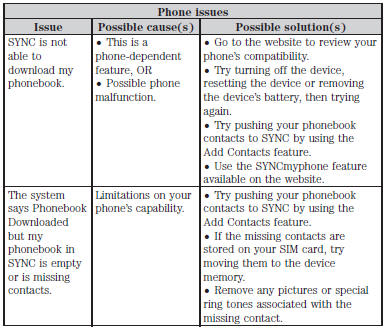
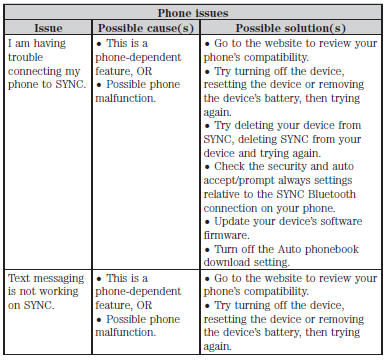
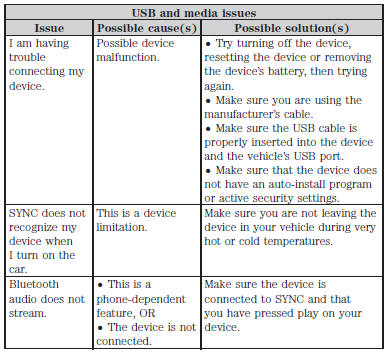
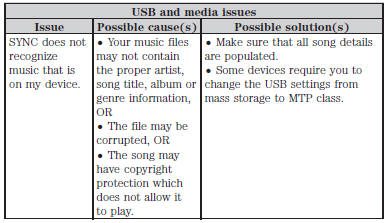
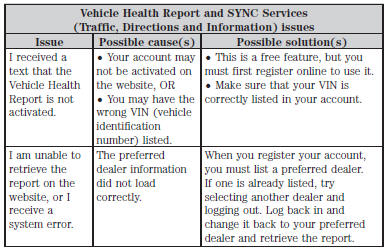
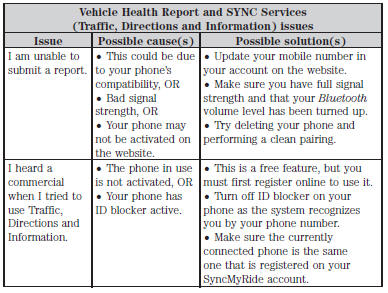
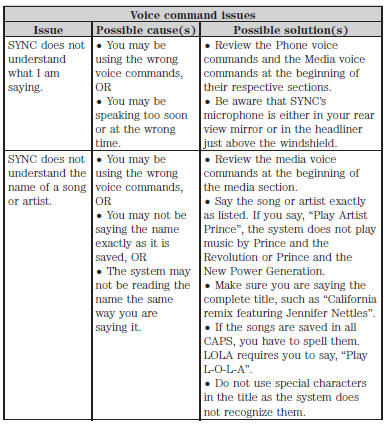
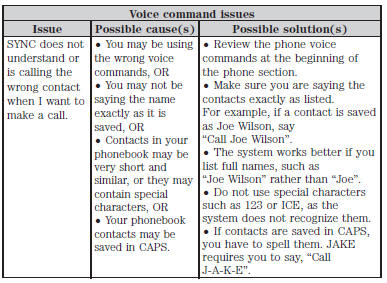
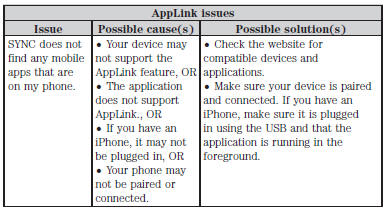
Your SYNC system is easy to use. However, should questions arise, see the tables below.
Use the website at any time to check your phone’s compatibility, register your account and set preferences as well as access a customer representative via an online chat (during certain hours).
Visit www.SYNCMyRide.com, www.SYNCMyRide.ca or www.syncmaroute.ca for more information.
 Using sync with your media player
You can access and play music from your digital music player over the
vehicle’s speaker system using the system’s media menu or voice
commands. You can also sort and play your music by specific ...
 MyFord Touch® (If Equipped)
INTRODUCTION
WARNING: Driving while distracted can result in loss of vehicle
control, crash and injury. We strongly recommend that you use
extreme caution when using any device that may take your f ...
Other materials:
General Procedures
Brake Shift Interlock Override - Floor Shift
NOTE: If it is necessary to use the override procedure to move
the selector lever out of the PARK position, it is possible that a fuse has
blown. GO to Pinpoint Test A.
This vehicle is equipped with a brake shift interlock feature that prevent ...
Vehicle identification number
The vehicle identification number
is located on the driver’s side
instrument panel.
Please note that in the graphic,
XXXX is representative of your
vehicle identification number.
The Vehicle Identification Number (VIN) contains the following
information:
A. World manufacturer identif ...
Acceleration Control
SPECIFICATIONS
Torque Specifications
DESCRIPTION AND OPERATION
Acceleration Control
The acceleration controls consist of the accelerator pedal and sensor
assembly.
The engine management system electronically operates the throttle of the
engine in response to throttle pedal movements initiated by ...
