
AUDIO CONTROL
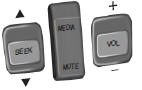
SEEK:
Press to select the next or previous stored preset or track.
Press and hold to select the next or previous frequency or seek through a track.
MEDIA
: Press repeatedly to scroll through available audio modes.
MUTE:
Press to silence the radio.
VOL (Volume):
Press to increase or decrease the volume.
VOICE CONTROL (IF EQUIPPED)
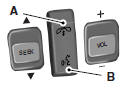
A. Phone mode
B. Voice recognition
See the SYNC or MyFord Touch chapter.
CRUISE CONTROL
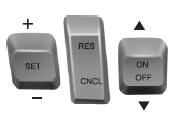
Type 1
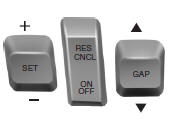
Type 2
See the Cruise Control chapter for information on this feature.
INFORMATION DISPLAY CONTROL
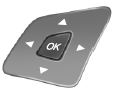
See the Information Displays chapter for more information.
Cluster Display Control Features

If equipped with: MyFord system: This control functions the same as the center control on the faceplate. See MyFord system in the Audio Systems chapter.
MyFord Touch: Use this control to adjust the right side of the cluster display. Navigate through the screen and press OK to select. See the MyFord Touch chapter.
HEATED STEERING WHEEL (IF EQUIPPED)
See the MyFord Touch chapter.
 Adjusting the steering wheel
WARNING: Do not adjust the steering wheel when your vehicle
is moving.
Note: Make sure that you are sitting in the correct position. See
Sitting
in the Correct Position in the Seats chapter.
1 ...
 Pedals
Adjustable pedals
WARNING: Never adjust the accelerator and brake pedal with
feet on the pedals while the vehicle is moving.
The control is located on the left side of the steering column. Press an ...
Other materials:
Specifications, Description and Operation
SPECIFICATIONS
Material
Torque Specifications
DESCRIPTION AND OPERATION
Handles, Locks, Latches and Entry Systems
Overview
The power lock/unlock feature locks or unlocks the doors upon a customer
request from either door lock control switch in the vehicle, a RKE transmitter,
or t ...
Recommended towing weights
Note: Do not exceed the trailer weight for your vehicle configuration
listed in the chart below.
Note: Make sure to take into consideration trailer frontal area. Do not
exceed 12 feet2 (1.11 meters2) trailer frontal area.
Note: For high altitude operation, reduce the gross combined weight by ...
In-Vehicle Repair
Upper Intake Manifold
Removal
NOTICE: If the engine is repaired or replaced because of upper
engine failure, typically including valve or piston damage, check the intake
manifold for metal debris. If metal debris is found, install a new intake
manifold. Failure to follow these instructions c ...
