
Adjustable pedals
WARNING
: Never adjust the accelerator and brake pedal with feet on the pedals while the vehicle is moving.
The control is located on the left side of the steering column. Press and hold the appropriate control to move the pedals.
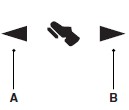
A. Farther
B. Closer
The pedal positions are saved and recalled with the memory feature (if equipped). Refer to the Seats chapter.
The pedals should only be adjusted when the vehicle is parked.
 Steering wheel controls
AUDIO CONTROL
SEEK: Press to select the next or
previous stored preset or track.
Press and hold to select the next or
previous frequency or seek through
a track.
MEDIA: Press repeatedly to ...

Other materials:
Fuel Tank and Lines
SPECIFICATIONS
General Specifications
Torque Specifications
DESCRIPTION AND OPERATION
Fuel Tank and Lines
2.0L Gasoline Turbocharged Direct Injection (GTDI)
Fuel Tank and Lines
The fuel tank and lines consists of:
a single container (L-shaped) fuel tank.
a fuel level sensor assembly.
a Fuel ...
Capacities and Specifications
Engine Drivebelt Routing
3.5L V6 engine
3.5L V6 SHO engine
2.0L EcoBoost engine
...
Special operating conditions
If you operate your vehicle primarily in any of the following conditions,
you need to perform additional maintenance as indicated. If you
occasionally operate your vehicle under any of these conditions, it is
not necessary to perform the additional maintenance. For specific
recommendations, see ...
