
PRINCIPLES OF OPERATION
WARNING:
Vehicle modifications involving braking system, aftermarket roof racks, suspension, steering system, tire construction and wheel or tire size may change the handling characteristics of your vehicle and may adversely affect the performance of the AdvanceTrac® system. In addition, installing any stereo loudspeakers may interfere with and adversely affect the AdvanceTrac® system. Install any aftermarket stereo loudspeaker as far as possible from the front center console, the tunnel, and the front seats in order to minimize the risk of interfering with the AdvanceTrac® sensors. Reducing the effectiveness of the AdvanceTrac® system could lead to an increased risk of loss of vehicle control, vehicle rollover, personal injury and death.
WARNING:
Remember that even advanced technology cannot defy the laws of physics. It is always possible to lose control of a vehicle due to inappropriate driver input for the conditions. Aggressive driving on any road condition can cause you to lose control of your vehicle increasing the risk of personal injury or property damage.
Activation of the AdvanceTrac® system is an indication that at least some of the tires have exceeded their ability to grip the road; this could reduce the operator’s ability to control the vehicle potentially resulting in a loss of vehicle control, vehicle rollover, personal injury and death.
If your AdvanceTrac® system activates, SLOW DOWN.
The AdvanceTrac® system helps you keep control of your vehicle when on a slippery surface. The electronic stability control portion of the system helps avoid skids and lateral slides and the traction control system helps avoid drive wheel spin and loss of traction. See the Traction Control chapter for details on traction control system operation.
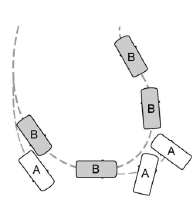
A Vehicle without AdvanceTrac® skidding off its intended route.
B Vehicle with AdvanceTrac® maintaining control on a slippery surface.
AdvanceTrac®
The system automatically activates when you start your engine. The electronic stability control portion of the system is disabled when the transmission is in reverse (R) or, on SHO models, if you press the ESC OFF switch and hold it for more than five seconds when the brakes are applied and the vehicle is at a stop. You can turn off the traction control portion of the system independently. See the Traction Control chapter.
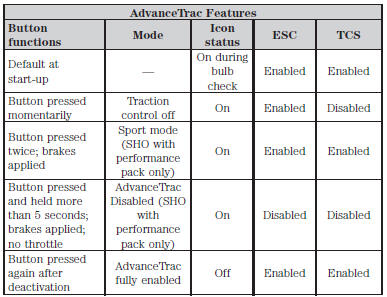
The SHO model is equipped with a sport mode which allows the driver to reduce normal AdvanceTrac system intervention and provide a more spirited driving experience. To enter sport mode, press the stability control button twice rapidly with the brakes applied. The message appears in the information display that the system is now in sport mode.
Note: Sport mode is not intended to be used on public roadways.
 Traction Control
PRINCIPLES OF OPERATION
The traction control system helps avoid drive wheel spin and loss of
traction.
If your vehicle begins to slide, the system applies the brakes to individual
wheels and, wh ...
 Parking Aids
...
Other materials:
Front End Body Panels
SPECIFICATIONS
Torque Specifications
DESCRIPTION AND OPERATION
Active Grille Shutter System
Overview
The grille shutter system (when equipped) is comprised of the grille shutter
assembly and the grille shutter actuator. The grille shutter system is primarily
used to maximize fuel economy by reduc ...
Instrument Panel and Console
SPECIFICATIONS
Torque Specifications
REMOVAL AND INSTALLATION
Instrument Panel - Exploded View
Instrument Panel Trim Panel and Fasteners
Instrument Panel Finish and Trim Panels
Instrument Panel Upper Section
Glove Compartment
For additional information, refer to the procedures in this sec ...
Removal and Installation
Headlamp Assembly
Removal
Remove the front bumper cover. Refer to Section 501-19.
Remove the headlamp assembly upper bolt.
To install, tighten to 3.2 Nm (28 lb-in).
Remove the headlamp assembly front bolt.
To install, tighten to 3.2 Nm (28 lb-in).
Remove the headlamp ...
