
Note:
Wet road conditions may result in inconsistent or unexpected wiping or smearing. Lower the sensitivity, switch to normal or high-speed wiping or turn the wipers off to reduce smearing.
Note:
Turn off the wipers before entering a car wash.
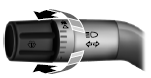
Use the rotary control to adjust the sensitivity to one of the interval moisture settings. The wipers will not cycle until moisture is detected on the windshield. The wiper speed will vary based on the amount of moisture detected on the windshield and the sensitivity setting. The wipers will continue to wipe as long as moisture is detected.
Keep the outside of the windshield clean, especially the area around the interior mirror where the sensor is located, or sensor performance may be affected.
 Windshield wipers
Note: Fully defrost the windshield before switching on the windshield
wipers.
Note: Make sure you switch off the windshield wipers before entering a
car wash.
Note: Clean the windshield and wi ...
 Windshield washers
Note: Do not operate the wipers on a dry windshield. This may scratch
the glass, damage the wiper blades or cause the wiper motor to burn out.
Always use the windshield washer before wiping a dry ...
Other materials:
Crash sensors and airbag indicator
WARNING: Modifying or adding equipment to the front end of
your vehicle (including frame, bumper, front end body structure
and tow hooks) may affect the performance of the airbag system,
increasing the risk of injury. Do not modify the front end of your
vehicle.
Your vehicle has a collection of ...
Waxing
Regular waxing is necessary to protect the paint on your car from the
elements. We recommend that you wash and wax the painted surface
once or twice a year.
When washing and waxing, park your vehicle in a shaded area out of
direct sunlight. Always wash your vehicle before applying wax.
• ...
Driveline System - General Information
SPECIFICATIONS
Material
General Specifications
DESCRIPTION AND OPERATION
Driveline System
The driveline system consists of the following components:
Center support bearing
Driveshaft assembly
Front halfshafts
Rear halfshafts
Active Torque Coupling (ATC)/rear axle
On Front Wheel Drive (FWD ...
