
Note:
Wet road conditions may result in inconsistent or unexpected wiping or smearing. Lower the sensitivity, switch to normal or high-speed wiping or turn the wipers off to reduce smearing.
Note:
Turn off the wipers before entering a car wash.
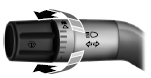
Use the rotary control to adjust the sensitivity to one of the interval moisture settings. The wipers will not cycle until moisture is detected on the windshield. The wiper speed will vary based on the amount of moisture detected on the windshield and the sensitivity setting. The wipers will continue to wipe as long as moisture is detected.
Keep the outside of the windshield clean, especially the area around the interior mirror where the sensor is located, or sensor performance may be affected.
 Windshield wipers
Note: Fully defrost the windshield before switching on the windshield
wipers.
Note: Make sure you switch off the windshield wipers before entering a
car wash.
Note: Clean the windshield and wi ...
 Windshield washers
Note: Do not operate the wipers on a dry windshield. This may scratch
the glass, damage the wiper blades or cause the wiper motor to burn out.
Always use the windshield washer before wiping a dry ...
Other materials:
Diagnosis and Testing
Engine Cooling
Special Tool(s)
Material
Principles of Operation
Engine coolant flows primarily from the engine to the radiator circuit and
back to the coolant pump. Coolant is sent from the coolant pump through the
engine block and cylinder heads. Separate circuits from the engine also feed the ...
Reporting safety defects (U.S. only)
Your satisfaction is important to Ford Motor Company and to your dealer.
If a warranty concern has not been resolved using the three-step
procedure outlined earlier in this chapter in the Getting the Services
You Need section, you may be eligible to participate in the BBB AUTO
LINE program.
...
Fuel Tank and Lines
SPECIFICATIONS
General Specifications
Torque Specifications
DESCRIPTION AND OPERATION
Fuel Tank and Lines
2.0L Gasoline Turbocharged Direct Injection (GTDI)
Fuel Tank and Lines
The fuel tank and lines consists of:
a single container (L-shaped) fuel tank.
a fuel level sensor assembly.
a Fuel ...
