
The power rear sunshade covers the rear window of the vehicle.
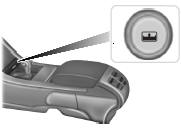
The control is located in the center console access bin.
Press the control to move the sunshade up or down.
Note: Do not try to manually move the sunshade.
The sunshade has a one-touch down feature. Press and release the control to move the sunshade down. To stop motion during one-touch operation, press the control a second time.
The sunshade automatically retracts when you move the gearshift lever to position R.
 Sun visors
Slide-On-Rod
Rotate the visor toward the side
window and extend it rearward for
extra sunlight coverage.
Retract the visor before moving it
back toward the windshield and
storing it.
Illumi ...
 Moonroof
WARNING: Do not let children play with the moonroof or leave
children unattended in the vehicle. They may seriously hurt
themselves.
WARNING: When closing the moonroof, you should verify that it
i ...
Other materials:
Special operating conditions
If you operate your vehicle primarily in any of the following conditions,
you need to perform additional maintenance as indicated. If you
occasionally operate your vehicle under any of these conditions, it is
not necessary to perform the additional maintenance. For specific
recommendations, see ...
Universal Garage Door Opener (If Equipped)
HomeLink® wireless control system
WARNING: Make sure that the garage door and security device
are free from obstruction when you are programming. Do not
program the system with the vehicle in the garage.
WARNING: Do not use the system with any garage door opener
that does not have the safety s ...
Safety canopy curtain airbags
WARNING: Do not place objects or mount equipment on or near
the headliner at the siderail that may come into contact with a
deploying curtain airbag. Failure to follow these instructions may
increase the risk of personal injury in the event of a crash.
WARNING: Do not lean your head on the door. ...
