
WARNING:
The cargo net is not designed to restrain objects during a collision or heavy braking.
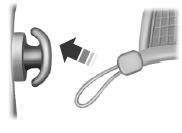
The cargo net secures lightweight objects in the cargo area. Attach the net to the anchors provided.
Do not put more than 50 pounds (22 kilograms) in the net.
 Load Carrying
...
 Load limit
Vehicle Loading – With and Without a Trailer
This section will guide you in the proper loading of your vehicle and/or
trailer, to keep your loaded vehicle weight within its design rating
capabili ...
Other materials:
Diagnosis and Testing
Seating
Special Tool(s)
Medium Speed Controller Area Network (MS-CAN)
This vehicle utilizes a communication system called a Medium Speed Controller
Area Network (MS-CAN). When diagnosing the memory seat, heated seats or climate
controlled seats, use a Vehicle Communication Module (VCM) and Integr ...
Windshield wipers
Note: Fully defrost the windshield before switching on the windshield
wipers.
Note: Make sure you switch off the windshield wipers before entering a
car wash.
Note: Clean the windshield and wiper blades if they begin to leave
streaks
or smears. If that does not resolve the issue, install ...
Specifications, Description and Operation
SPECIFICATIONS
Torque Specifications
DESCRIPTION AND OPERATION
Information and Entertainment System
Component Location
Speaker - A-pillar
Global Positioning System Module (GPSM)
Speaker - instrument panel
Microphone
Front Display Interface Module (FDIM)
Front Controls Interface Module (FCIM) ...
